Which versions of Tally are supported?
TallyPrime (current version, recommended) and Tally ERP 9 are both supported via XML import. TallyPrime Server enables real-time webhook push.
Link to this answerA Tally payroll integration carries the accounting side of each salary run into Tally, keeping the ledgers in step with payroll every month. Push monthly payroll journals, salary disbursal entries, statutory liabilities (PF, ESI, PT, TDS) and approved expense claims from WappBlaster directly into TallyPrime or Tally ERP 9, eliminating month-end re-entry into finance ledgers. Available via XML import file (universal) or REST API webhook (TallyPrime Server).
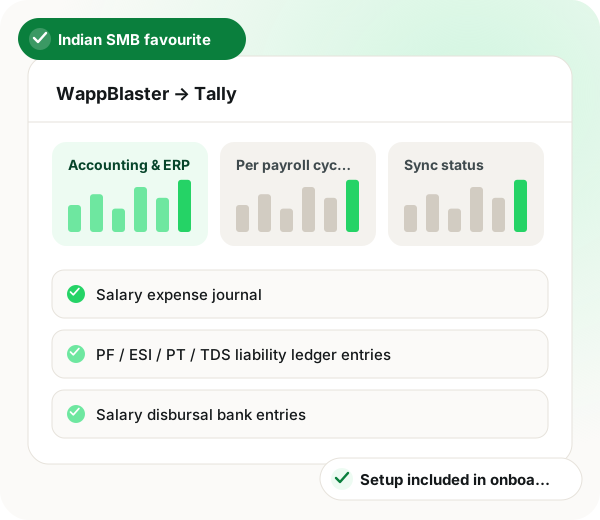
Tally payroll integration in brief
Tally payroll integration from WappBlaster offers two delivery modes, so any Indian SMB can connect regardless of its Tally setup. The universal option produces a Tally XML file at payroll close that imports into TallyPrime or Tally ERP 9; the second pushes entries by REST webhook to TallyPrime Server with no manual import at all. Either way the books receive gross salary journals by department, PF, ESI, PT and TDS liability ledgers, bank disbursal entries, advance and loan postings, plus approved expense claims with OCR-read GSTINs and pre-tagged input credit. Ledger mapping happens once, for example Basic to Salaries (Indirect) and PF to PF Payable, and a parallel cycle confirms the match before go-live. UAE payroll can post in AED with WPS and gratuity provision heads. The connection carries no integration fee on the Attendance Suite, which the pricing page lists from ₹2100 a year for 7 staff, and routine imports take about 5 minutes per cycle.
A Tally payroll integration is a connection that moves each month’s salary journals, statutory deductions and approved expense claims into Tally, so nobody re-enters them at month end.
WappBlaster generates a Tally XML file at payroll close for any Tally version, or pushes by webhook to TallyPrime Server, with no integration fee on the Attendance Suite.
Finance teams review and post journals that arrive ready, with no transcription or rounding slips.
Receipts carry an OCR-read GSTIN into Tally with input credit pre-tagged for GSTR-2 matching.
Per-state PT and disbursal batches post with state tags into a single Tally company.
Standard Tally vouchers and ledgers mean your accountant has nothing new to learn.
Gratuity accrual, leave encashment and bonus provisions can post as month-end journals.
Data flow
WappBlaster Payroll → Tally
Frequency: Per payroll cycle (monthly)
WappBlaster Expense → Tally
Frequency: Daily batch or per cycle
Setup
In WappBlaster, map salary components and statutory accounts to your Tally ledger heads (e.g., Basic → 'Salaries (Indirect)', PF → 'PF Payable'). One-time setup.
~20 minutes
Option A: Tally XML file (works with any Tally version, manual import). Option B: REST API webhook (TallyPrime Server, auto-push). Most SMBs start with XML and upgrade to API later.
~5 minutes
Run one payroll cycle in WappBlaster, export the Tally XML, import to Tally and reconcile against your existing chart of accounts. Resolve any ledger-mapping mismatches.
~30 minutes
From the next cycle, WappBlaster auto-generates the Tally XML at payroll close. Your CA imports in one click or it auto-flows via webhook.
~5 minutes per cycle
Use cases
Payroll closes in WappBlaster, journals flow to Tally automatically, finance reviews and posts. No transcription, no rounding errors, full audit trail with employee-level drill-down.
SMB finance teams (10-200 staff)
Expense receipts with OCR-extracted GSTIN flow into Tally with the input tax credit pre-tagged, ready for GSTR-2 reconciliation.
Finance + tax teams
Per-state PT slabs and per-state salary disbursal batches all post correctly into a single Tally company with state-tagged journals.
Multi-state SMBs and chains
Accountants and dealers also read GST billing tools with WhatsApp built in, an attendance software line for Tally dealers and how to start a software reseller business.
| Feature | Trigger | Entry posted |
|---|---|---|
| Monthly payroll close | The cycle is finalised | Gross salary expense journal by department |
| Statutory deductions | PF, ESI, PT and TDS are computed | Liability ledger entries for each head |
| Salaries paid | Bank disbursal is released | Bank entries for the salary payout |
| Expense approved | A claim is approved, in a daily batch or per cycle | Category journal with GSTIN-tagged input credit |
| Advance or loan given | An employee advance is recorded | Posting to the advance or loan ledger |
TallyPrime (current version, recommended) and Tally ERP 9 are both supported via XML import. TallyPrime Server enables real-time webhook push.
Link to this answerNo. The XML mode works with any Tally desktop installation. TallyPrime Server is required only for auto-push real-time integration.
Link to this answerYes. Per-state PT, per-state holidays and per-state ledger tagging all post correctly into a single Tally company.
Link to this answerUAE payroll journals can be posted to Tally in AED with separate ledger heads for WPS disbursal and end-of-service gratuity provisions.
Link to this answerYes, gratuity accrual, leave encashment provision and bonus provision entries can flow as month-end journals into your provision ledgers.
Link to this answerNo. The output is standard Tally XML, same ledgers, same vouchers, same drill-down. Most CAs adapt within one cycle.
Link to this answerYes. Native integrations are included with your WappBlaster Attendance Suite subscription at no extra integration fee, you pay the attendance bundle (from ₹2100/year for 7 staff) plus any field users you add, as listed on the pricing page.
Link to this answerMap salary components and statutory accounts to your Tally ledger heads once, then import the XML file WappBlaster generates at payroll close. After setup, each cycle takes about 5 minutes.
Link to this answerYes. Receipts carry an OCR-read GSTIN, and the claim journal reaches Tally with input tax credit pre-tagged for GSTR-2 reconciliation.
Link to this answerThe right one delivers journals ready to post, so month-end close shrinks. Finance teams of that size can close in about 90 minutes once WappBlaster payroll journals flow into Tally.
Link to this answerStill not answered?
Ask a real person. We reply on WhatsApp, usually within the hour.
Integration setup is part of onboarding, not a paid add-on. Bring your Tally account to the call and we will connect it together.