Auto dialer app with CRM: RMDialer, the telecalling CRM that forgets nothing.
An auto dialer app with CRM is a calling tool that moves through a lead list and keeps each conversation's details beside the number. RMDialer is the auto dialer app, telecalling CRM and call management software in one app, with an iPhone companion. On Android it puts the customer’s name, status, notes and full history on screen before you answer, updates the lead in two taps when you hang up, and sends the WhatsApp follow-up by itself.
An auto dialer app with CRM dials a lead list automatically and keeps each caller's name, status, notes and call history in the same app as the dialer.
RMDialer combines that with call management, employee call tracking and self-sending WhatsApp follow-ups for ₹1908 ($29) per user per year, mobile app and Web CRM included.
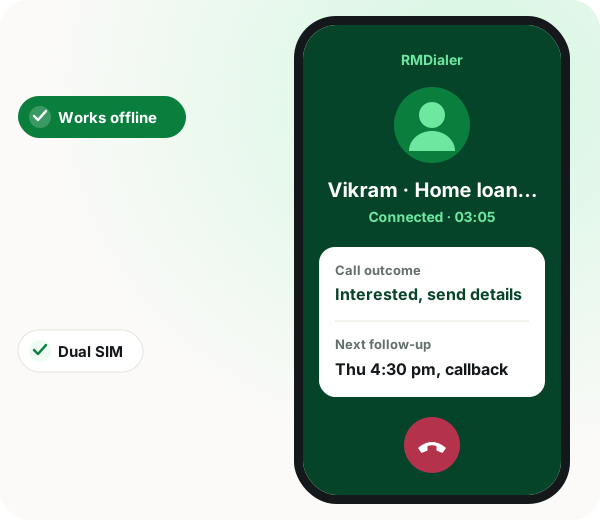
Works offline, supports dual SIM, and syncs to encrypted cloud backup.
Available in 40 languages on Android 8+, with an iPhone companion.
Free 3-day trial with unlimited use and no card.
Auto dialer app with CRM benefits
Known callers
Name, status and your last note appear before you say hello.
Two-tap wrap-up
Outcome and next follow-up are set as you hang up.
Typing-free dialling
The next number dials itself, saving about 18 seconds a call.
Follow-ups that keep promises
The reminder rings on time with the WhatsApp message already written.
What is RMDialer?
RMDialer is a business dialer and telecalling CRM for Android that combines an auto dialer, call management, employee call tracking, lead management and automatic WhatsApp follow-up in one app. It replaces the phone’s own dialer, so incoming and outgoing calls both arrive with the caller’s name, lead status, notes, products and previous calls on screen before anyone answers, the outcome is set in two taps when the call ends, and a WhatsApp message can send itself at that moment on the official Meta Business API. Calls place through the SIM already in the handset rather than over VoIP, which means no virtual number to rent, no IVR to configure and no telecom onboarding. It works offline, supports dual SIM, and syncs to encrypted cloud backup. An iPhone companion app covers assigned leads, calling on your own SIM, outcome logging and team reports, because iOS does not let any app replace the system dialer.
Trusted by 3,500+ businesses
4.8 / 5
Meta Tech Provider
D-U-N-S Registered
Some of the businesses using WappBlaster products every day
The problem
What a normal dialer without CRM costs you every day
Half the day goes into typing numbers
Find it, type it, wait, hang up, repeat.
About 18 seconds lost on every manually dialled call
4 callers × 80 calls a day = 1h 36m gone
Nothing to show for it at the end of the week
Fix: Load the list once. The next number dials itself the moment you hang up.
The phone rings and nobody knows who it is
You answer a bare number and start guessing.
First 30 seconds spent working out who is calling
Last call’s promise forgotten or half-remembered
Customer hears every second of it
Fix: Name, lead status and your last note are on screen before you say hello.
“Call him Tuesday” never happens on Tuesday
The follow-up depends on somebody remembering.
Intention formed on the call, gone by the third one after
Deals die of silence, not of objection
No reminder that carries the context with it
Fix: The reminder rings on time with the WhatsApp message already written.
The same WhatsApp, retyped forty times a day
Catalogue, price list, location, payment link.
Copy the number, open WhatsApp, paste, retype
Name changed by hand, and sometimes not changed at all
Two apps open for what should be one action
Fix: The message sends itself when the call ends, personalised per customer.
The customer list lives on one phone
Numbers, notes and history sit in a personal handset.
Phone lost means customer history lost
Salesperson leaves and the relationship leaves with them
No business copy of who was promised what
Fix: Encrypted cloud backup with selective restore. The list belongs to the business.
Nobody knows what the team actually did
Call counts come from asking people at 7pm.
No record of who called whom, or for how long
Outcomes self-reported, so coaching is guesswork
Problems surface a week late
Fix: Calls, durations and outcomes recorded per agent, live, without a report.
Capabilities
What an auto dialer with CRM does instead
Everything below is in the box. Nothing here is a paid add-on to RMDialer.
Caller ID from your own records
Every call opens with context, not a number.
Name, lead status, notes and products on the call screen
Full call history before you answer
Works on incoming and outgoing calls
Two taps to update the lead
Logging that takes ten seconds actually gets done.
Set outcome and move the lead stage
Add a note and schedule the next follow-up
Never leaves the call screen
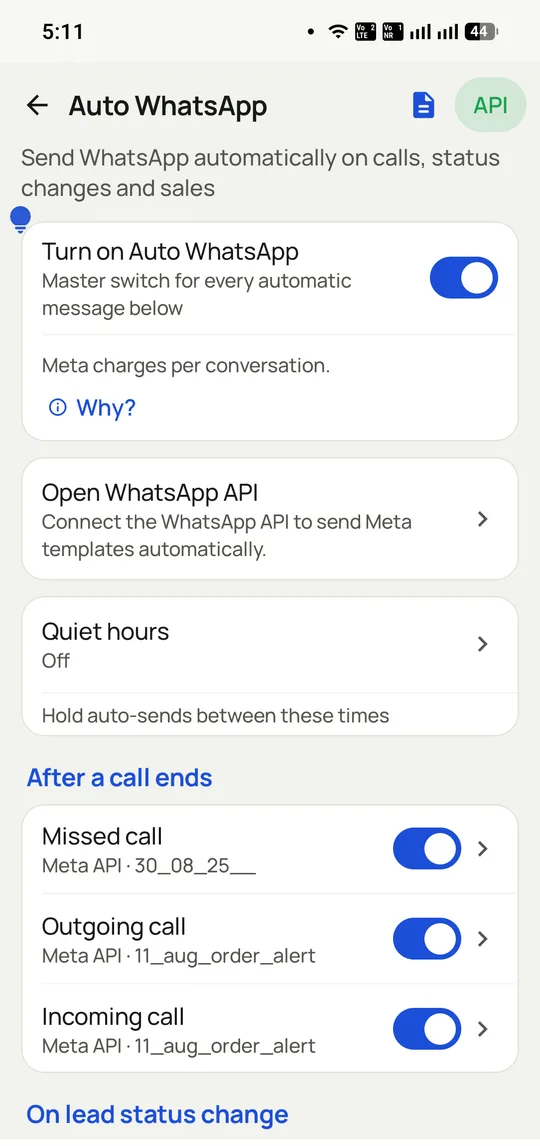
Auto WhatsApp when the call ends
The follow-up sends itself, personalised.
Different message per call outcome
Customer details filled in automatically
Sent on the official WhatsApp Business API
No IVR, no VoIP, no virtual number
It dials through the SIM already in the phone.
No telecom setup and nothing to port
No per-minute VoIP bill
Call cost stays whatever your plan gives you
Auto-dial through a list
Tap once and it works the whole list.
Lists from saved leads, CSV, Excel or Google Sheets
Next number placed the moment the last call ends
Guided calling sessions for a team
A CRM that fits in the app
Leads, clients and money in one place.
Custom fields, lead statuses and sources
Lost-leads list kept with its reason
Payment tracking, product catalogues and renewal reminders
Bulk WhatsApp on the official API
One campaign, thousands of contacts, each personalised.
Approved templates with per-person details
Delivery reported back per contact
Replies land in an inbox beside the customer record
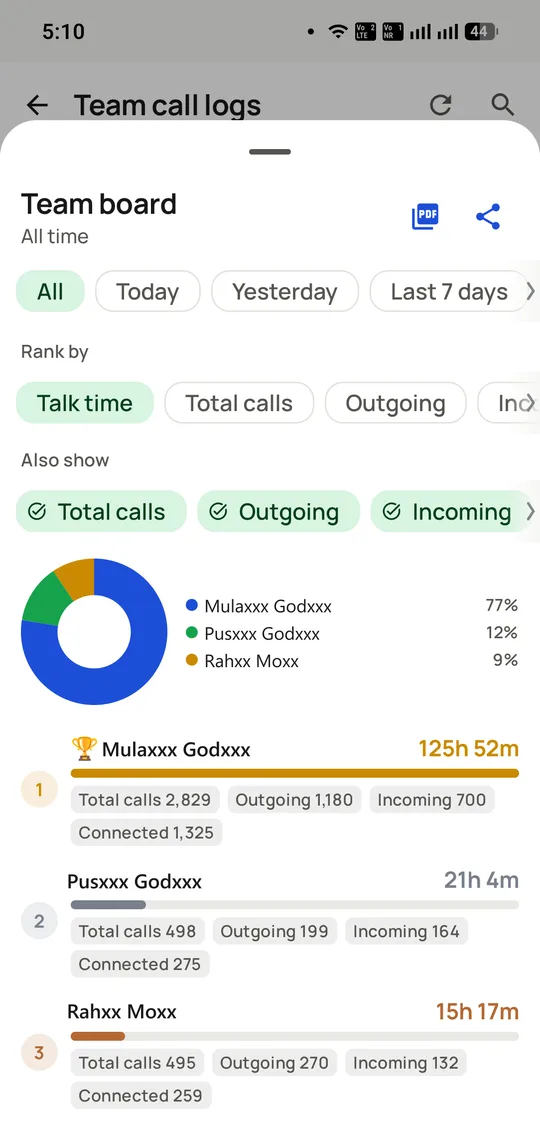
Team reporting without a report
See the day while it is still happening.
Who called whom, for how long, and the outcome
Assign and transfer leads with history attached
Same reports per employee in the app or in a browser, Web CRM included
Works when the network does not
Offline-first, syncs when it reconnects.
Calls, notes and statuses queue locally
Dual SIM and a searchable keypad
40 languages built in
In the app
Auto dialer app with CRM on a real account: RMDialer
Screenshots from a working account, with customer and staff names masked.
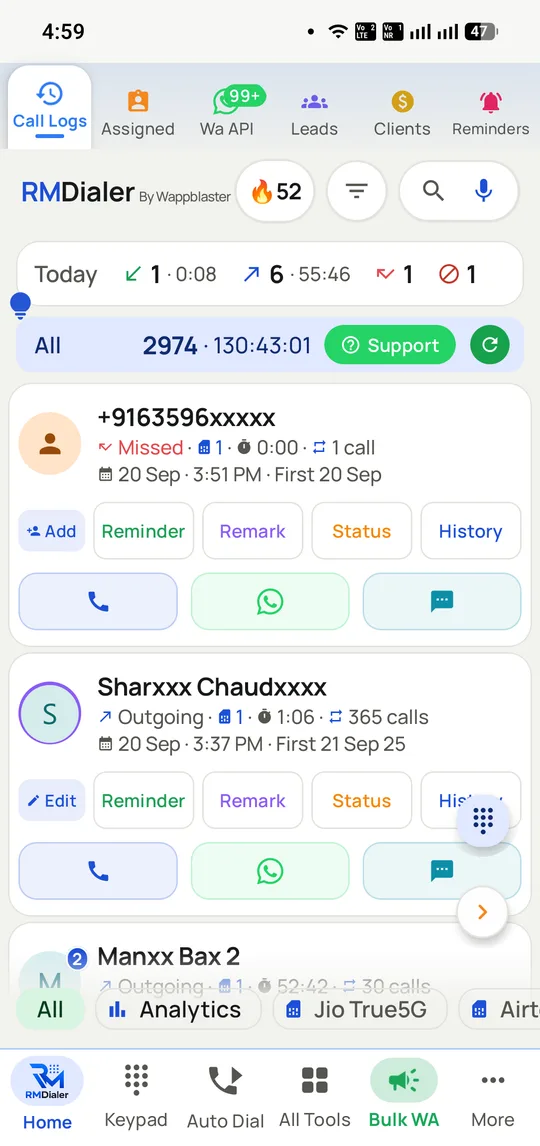
The home screen replaces the phone dialer. Every call carries the customer and the five things you might do next.
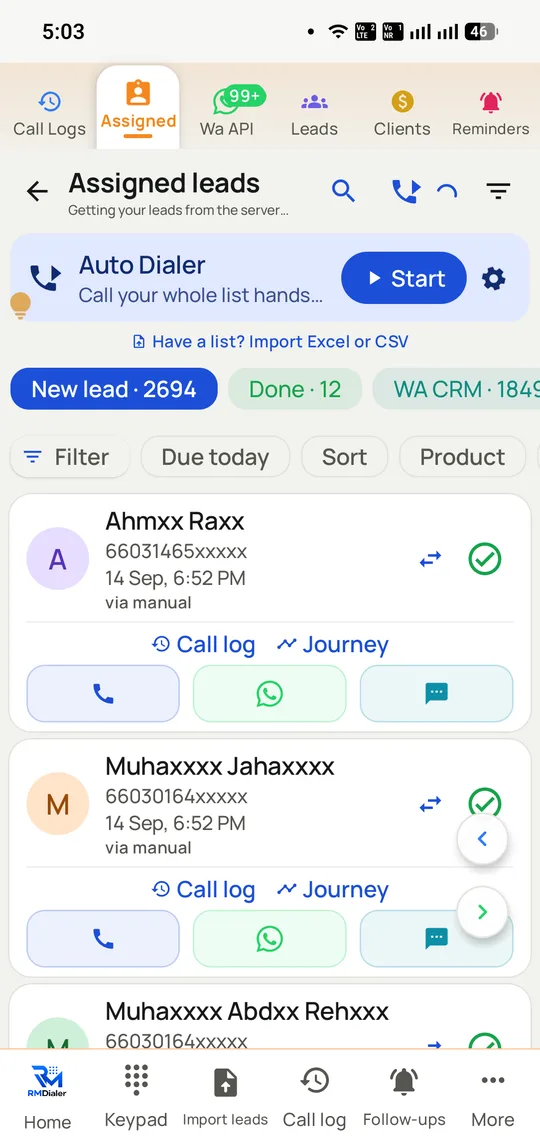
One button runs the assigned list end to end, with the counters showing what is left.
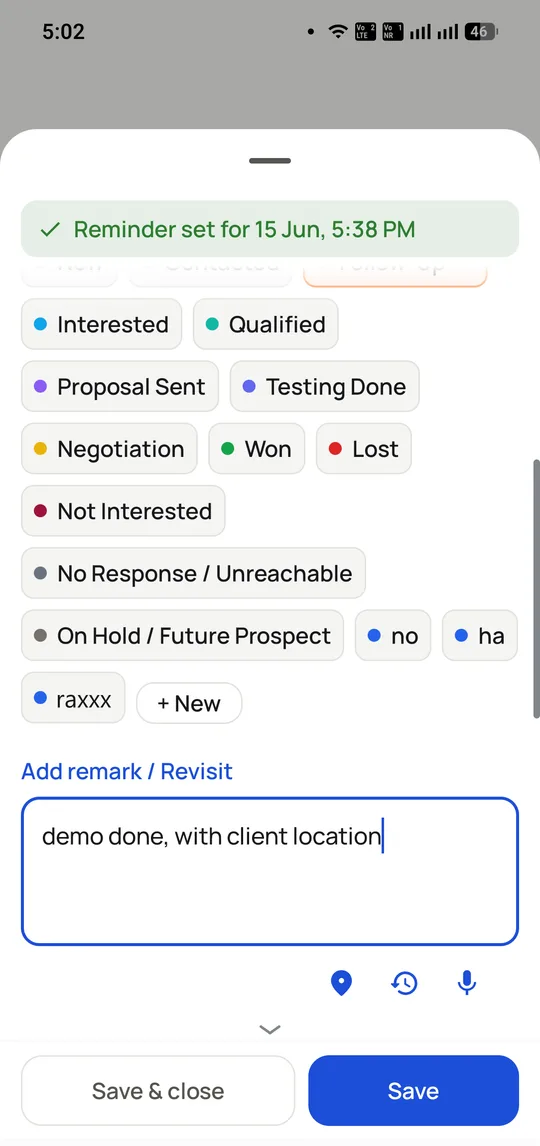
Two taps close the call: a status, a remark, a callback date. Then the next number dials itself.
The follow-up sends itself on the official Meta API, with a different message per call type.
The manager’s view of the same data, with no report for anyone to compile.
How it works
Auto dialer app with CRM setup with RMDialer
Four steps, and we stay on the call for all of them.
1
Install and import
Set RMDialer as the phone dialer, then bring leads in from CSV, Excel, Google Sheets or your existing CRM.
2
Set your statuses
Define the lead stages your team actually uses, plus the custom fields you want on the call screen.
3
Write the follow-up templates
One per outcome: interested, call back later, not interested. These are what send automatically when a call ends.
4
Start calling
Auto-dial a list or take calls as they come. Context appears on screen, the outcome takes two taps, the WhatsApp sends itself.
Who uses it
Auto dialer app with CRM by industry: where RMDialer fits
The same setup, tuned to how each of these actually sells.
Real estate and property brokers
Insurance agents and advisors
Coaching institutes and admissions teams
Car and two-wheeler dealerships
Loan and finance agents
Travel agents and tour operators
Clinics, diagnostics and dental
Telecalling and inside sales teams
Distributors and dealer networks
Comparison
RMDialer auto dialer vs the phone dialer and a spreadsheet
RMDialer auto dialer vs the phone dialer and a spreadsheet — Default dialer + spreadsheet vs RMDialer
Feature
Default dialer + spreadsheet
RMDialer
Who is calling
A number, unless it is saved
Name, status, notes and history before you answer
Updating the lead
Open a sheet, find the row, type
Two taps on the call screen
Follow-up message
Retyped or pasted, when remembered
Sends itself when the call ends
Dialling a list
Copy, paste, dial, repeat
Auto-dial from a list, CSV or Google Sheet
Bulk WhatsApp
Unofficial tools that get numbers banned
Official WhatsApp Business API
Team reporting
Ask people what they did
Calls, durations and outcomes recorded per agent
Reports on a desktop
Whatever someone pasted into the sheet
Per-employee reports in a browser, Web CRM included in the plan
If the phone is lost
The customer list goes with it
Encrypted cloud backup with selective restore
Offline
Spreadsheet will not load
Keeps working, syncs later
In their words
Auto dialer app with CRM reviews: RMDialer
“I stopped answering calls blind. With RMDialer the name and the last note are on screen before I pick up, so I am not asking people to remind me who they are.”
“Renewal reminders and the after-call message used to be my evening job. The RMDialer telecalling CRM has them done by the time I have finished the call.”
“Four telecallers on the RMDialer auto dialer, and I can finally see who called how many people and what came of it without asking anyone for a number.”
In depth
Auto dialer app with CRM: the full RMDialer guide
Why the follow-up is where deals are lost
Most calling teams do not lose deals on the call. They lose them in the hours afterwards, when the catalogue was going to be sent, the quote was going to be shared, and the callback was going to be scheduled. Every one of those depends on someone remembering.
Automating the message at the moment the call ends removes the memory step entirely. The customer receives what was promised while the conversation is still fresh, and the salesperson moves to the next number instead of stopping to type.
Key takeaway: A follow-up that depends on remembering is a follow-up that happens sometimes. One that fires on call-end happens every time.
What the time saving actually adds up to
RMDialer’s own figure is roughly eighteen seconds saved per call: the time spent working out who is calling, then opening another app to record what happened. On a four-person team making eighty calls each, that is about an hour and thirty-six minutes a day returned to calling.
Treat that as the vendor’s number rather than an independent study, but the mechanism is easy to check against your own team: time one salesperson doing the lookup-and-log cycle twenty times and multiply.
RMDialer and Auto WhatsApp After Call are two products
These are two separate products, sold separately. Auto WhatsApp After Call is a dedicated Android app that does one job: send a WhatsApp message automatically when a call ends. It leaves your dialer alone and is the right choice when that single behaviour is what you are buying.
RMDialer is a different product with its own after-call WhatsApp feature built in, alongside the dialer, the lead CRM, auto-dialling and team reporting. Automatic follow-up is one capability inside it rather than the whole product.
Definition: Two products. Auto WhatsApp After Call is a dedicated after-call messaging app. RMDialer is a dialer and CRM that has after-call messaging as one of its features.
Also searched as
Auto dialer app with CRM: other names people search for
People come to RMDialer looking for several different things, and usually find they wanted the same one.
Dialer terms
auto dialer app
business dialer app
sales dialer app
telecaller app
telecalling app
call management app
CRM terms
telecalling CRM
CRM dialer
call management CRM
lead management app
mobile CRM for calling
employee call tracking
WhatsApp terms
WhatsApp after call
auto WhatsApp follow up
bulk WhatsApp from dialer
One Android app covers all three, which is the point: the dialer, the lead record and the follow-up stop being separate jobs.
When an auto dialer app with CRM is the wrong choice
On iPhone the companion app cannot replace the system dialer, so incoming-call context is strongest on Android.
Teams that need VoIP, an IVR or virtual numbers should look at cloud telephony, because RMDialer calls only through the handset's SIM.
Auto dialer app with CRM FAQ
The questions we get asked most about RMDialer.
What is RMDialer?
RMDialer is a business dialer and telecalling CRM for Android that combines an auto dialer, call management, employee call tracking, lead management and automatic WhatsApp follow-ups in one app. Callers arrive with their name, status, notes and history on screen, leads update in two taps, and the follow-up message sends itself when the call ends.
Yes. RMDialer is an auto dialer for Android: load a list from saved leads, CSV, Excel or Google Sheets and it places the next call the moment the last one ends, through the SIM already in the phone rather than VoIP or a virtual number.
Yes. RMDialer is a telecalling CRM: every number is a lead with a status, source, notes and follow-up date, worked from the call screen itself, with per-caller reports for the manager and the desktop Web CRM included in the plan.
Does RMDialer do call management and employee call tracking?
Yes. RMDialer is call management software for teams: every call an employee makes or receives on the app is logged with duration and outcome, attributed to the customer, and reported per employee live, with no register or spreadsheet anywhere in the process.
Which is the best auto dialer app for a sales team on Android?
For teams dialling from real SIMs, the auto dialer app to shortlist is RMDialer: continuous dialling, telecalling CRM, call tracking and automatic WhatsApp follow-up in one plan at ₹1908 ($29) per user per year. Compare it against Runo, TeleCRM, GoDial and Calley on this site; the differences are laid out honestly per competitor.
From Google Play (search RMDialer) or via rmdialer.com. The free 3-day trial includes every feature with no card, and the desktop Web CRM runs in any browser once the app is set up.
₹1908 ($29) per user per year, about ₹159 a month, plus taxes. There is also a 3-month plan at ₹747 ($12) per user, about ₹249 a month, for teams that would rather not commit to a year. Teams pay the same rate per seat, whether it is one person or a thousand. Every feature is included in the one plan, so nothing is withheld for a higher tier. A free 3-day trial with unlimited use and no card required lets you try it before paying anything.
No. Desktop browser access is included in the standard plan, not sold as an add-on. It gives managers leads, clients and reports per employee on a full screen: who called whom, for how long, and with what outcome, on the same data the app is writing, kept in sync both ways. The Android app is where the calling happens; the Web CRM is the same account viewed from a desk.
Yes, that is the design. It becomes the default dialer on the device, handles incoming and outgoing calls, supports dual SIM, and keeps a searchable keypad and filterable call logs.
Bulk campaigns run through the official WhatsApp Business API. That matters because unofficial bulk tools that automate the consumer app breach WhatsApp policy and are the usual reason numbers get banned.
Yes. Calls, notes and status changes carry on offline and sync when the connection returns, which is the normal case for field sales and for anyone calling from a basement.
What happens if the phone is lost or the salesperson leaves?
The data is backed up to encrypted cloud storage over HTTPS with selective restore, so the customer list, notes and history belong to the business rather than to a handset.
They are two separate products. Auto WhatsApp After Call is a dedicated Android app for one job, sending a WhatsApp message when a call ends, and it does not change how you dial. RMDialer is a business dialer and CRM that has after-call WhatsApp as one feature among several, alongside auto-dialling, caller ID, lead management and team reporting.
Yes. The same app is available whitelabelled so partners can sell it under their own brand and set their own price. Message us and we will walk through the reseller terms.
Product facts, pricing and usage figures on this page are taken from rmdialer.com/pricing, the official RMDialer site, checked 2 August 2026. dialer.whatapi.in is the same product in whitelabel form for resellers, where pricing is set by the partner rather than published.