Instant lead response · India B2B · Official Meta API
IndiaMART WhatsApp integration: WappBlaster replies to every enquiry within seconds
An IndiaMART WhatsApp integration answers marketplace buyer enquiries on WhatsApp automatically, so a supplier responds while the buyer is still comparing quotes. Every IndiaMART enquiry creates a contact and triggers a WhatsApp message within seconds. On IndiaMART the same buyer enquiry usually goes to several suppliers at once, so responding first is most of the advantage.
IndiaMART WhatsApp integration by WappBlaster exists because one buyer enquiry on that marketplace typically lands with several suppliers at the same moment, and whoever answers first tends to win the conversation. Once the seller account authorises lead pull, each new enquiry arrives in real time, becomes a CRM contact holding the buyer's name, number, product interest and message, and triggers a Meta-approved acknowledgement carrying one qualifying question. A bot then gathers quantity, delivery location and timeline before a salesperson takes over in the shared inbox, and buyers who stay silent drop into a scheduled drip. Setup runs in four steps that take about an hour in total, including roughly 20 minutes for template approval, and the team completes it with you during onboarding at no extra charge. Pipeline boards later show management which marketplace leads became orders, and TradeIndia can feed the same inbox as a second source.
What is an IndiaMART WhatsApp integration?
An IndiaMART WhatsApp integration is a link that pulls each buyer enquiry from a seller account into a CRM and sends the buyer a WhatsApp reply within seconds.
WappBlaster creates the contact with the product the buyer asked about, then fires an approved template on the official Meta API before routing the lead to a bot or salesperson.
IndiaMART buyers often message several suppliers, so the first reply carries weight.
The buyer’s message text and product interest are saved in CRM super fields.
TradeIndia can be connected as a second lead source in the same inbox.
IndiaMART WhatsApp integration benefits
Seconds-fast acknowledgement
Suppliers reply before competitors who are still copying numbers out of the seller panel.
Night enquiry cover
A buyer who writes at 11pm gets a real answer instead of silence until the office opens.
Bot qualification
Quantity, location and timeline are collected before a salesperson spends time on the lead.
Product-based tagging
Leads are grouped by the item enquired about for later targeted campaigns.
Drip for silent buyers
Enquiries that never answer the first message get scheduled follow-ups.
Data flow
What moves between IndiaMART and WappBlaster
IndiaMART → WappBlaster
IndiaMART seller account → WappBlaster CRM and WhatsApp
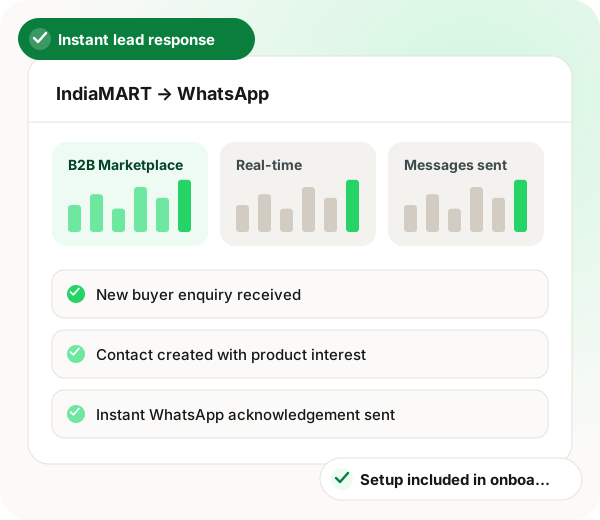
New buyer enquiry received
Contact created with product interest
Instant WhatsApp acknowledgement sent
Lead routed to a salesperson or bot
Frequency: Real-time, on enquiry
Setup
IndiaMART WhatsApp integration setup
1
Connect your IndiaMART account
Authorise lead pull from your seller account.
~10 minutes
2
Map enquiry fields
Buyer name, number, product interest and message mapped onto CRM super fields.
~10 minutes
3
Write the instant reply
An approved template that acknowledges the enquiry and asks one qualifying question.
~20 minutes including approval
4
Route to a bot or a person
Bot qualifies quantity and location, a salesperson closes.
~20 minutes
Use cases
IndiaMART WhatsApp integration use cases
First-responder advantage
Reply in seconds on enquiries that reach several suppliers simultaneously.
B2B sales
After-hours enquiry capture
Enquiries at 11pm get a real acknowledgement instead of waiting for morning.
Sales
Automatic qualification
A bot asks quantity, location and timeline before a salesperson invests time.
Inside sales
Product-interest tagging
Tag by the product enquired about and target later campaigns accordingly.
Marketing
Follow-up sequences
Quiet enquiries get a drip rather than being forgotten.
Sales
Enquiry-to-order tracking
Pipeline boards showing which marketplace leads actually convert.
IndiaMART WhatsApp integration events and messages
Feature
Trigger
Message sent
New buyer enquiry
An enquiry arrives in the IndiaMART seller account
Approved acknowledgement template with one qualifying question
Buyer replies
The buyer answers the first message
Bot asks quantity, delivery location and timeline
Lead qualified
The bot has the key details
Handover to the assigned salesperson in the shared inbox
No reply
The buyer goes quiet after the first message
Follow-up drip messages on a set schedule
When an IndiaMART WhatsApp integration is not a fit
If your IndiaMART leads are few and you already call each one within minutes, an automated reply adds little.
Starting the conversation needs an approved Meta template, so a fully free-form opening message is not possible.
IndiaMART WhatsApp integration FAQ
How quickly does an IndiaMART buyer hear back on WhatsApp?
A few seconds after the enquiry comes in. As soon as the contact is created, an automation fires the first approved template, which matters on a marketplace where each buyer writes to several suppliers at the same time.
Does it capture the buyer's requirement, not just the number?
Yes. The product the buyer asked about and the text of their message are stored in CRM super fields, so your opening reply can mention exactly what they need.
How much does an IndiaMART WhatsApp integration cost with WappBlaster?
There is no separate integration charge. Setup is part of onboarding rather than a paid add-on, and the team connects your IndiaMART account with you on a call.
Is WappBlaster an IndiaMART WhatsApp integration on the official API?
Yes. Every reply goes out as an approved template on Meta's official WhatsApp Business API, which is also why the opening message cannot be fully free-form.
What is the best IndiaMART WhatsApp integration for a supplier who gets enquiries at night?
The best fit answers automatically the moment a lead lands. WappBlaster sends its acknowledgement within seconds at any hour, so a buyer writing at 11pm is not left waiting for the office to open.
Authorise lead pull from your seller account, map the enquiry fields, approve a reply template and choose whether a bot or a person takes over. The four steps take roughly an hour, template approval included.
Can a bot qualify IndiaMART buyers before my sales team calls?
Yes. Once the buyer replies, the bot collects quantity, location and timeline, then passes the qualified lead to the assigned salesperson in the shared inbox.
Can I see which IndiaMART enquiries turn into orders?
Yes. Pipeline boards follow marketplace leads through to the order, showing management which enquiries actually convert. Each lead is also tagged by the product asked about, for later campaigns.