Auto Reply WhatsApp App for Android in India, Triggered by Phone Calls
An Android auto reply app for WhatsApp is a tool that answers people on your behalf when something specific happens, like a finished call. Generic auto-responders fail because they look like robots. Utilize WappBlaster's intelligent Android application to send highly contextual, beautiful auto-replies.
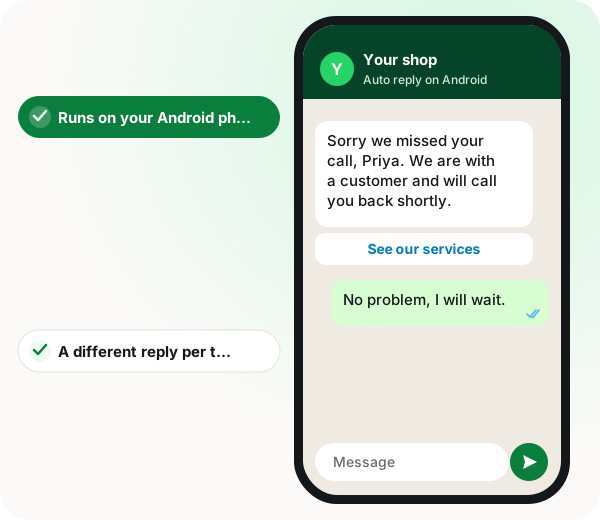
An auto reply WhatsApp app for Android usually reads notifications and answers every incoming text with the same busy message, which can loop endlessly when the other side runs a bot too. WappBlaster takes a different trigger: the phone call. When a customer's call ends, the app sends a WhatsApp template chosen by call type, so an answered incoming call can get a thanks-for-calling note, a missed call an apology with the menu, and an outgoing call a summary of what was discussed. Those 3 separate templates make the reply match what actually happened, which a single generic responder cannot do. Because WappBlaster is an independent Android APK driving the WhatsApp app itself, the page says replies carry no cloud API fee, unlike enterprise tools built on Meta's official API and webhooks. To stop Android's battery optimisation from killing it, the app holds a persistent foreground notification, so replies keep firing while the phone is locked in a pocket. An in-app switch pauses replies after closing.
What is an auto reply WhatsApp app for Android?
An auto reply WhatsApp app for Android sends a prepared WhatsApp message without your input, triggered by an event such as an incoming text or a finished phone call.
WappBlaster triggers its WhatsApp replies from phone calls rather than chat notifications, with separate templates for incoming, missed and outgoing calls.
Call-based triggers avoid the endless bot-to-bot loop of text auto-replies.
Three call states can each carry their own message.
A single power button pauses replies after business hours.
Auto reply WhatsApp app for Android benefits
Call-state triggers
Replies go out after real customer calls, so they arrive with context.
Separate templates
A thank-you for incoming, an apology for missed and a recap for outgoing calls.
No per-reply API fee
The page states replies run through the phone's own WhatsApp, not a paid cloud API.
Stays awake in the background
A persistent foreground notification keeps Android from killing the app.
Dual WhatsApp support
Route automation through regular WhatsApp or WhatsApp Business on the same phone.
Pause switch
Tap once at closing time to stop replies overnight.
Why generic auto reply apps for WhatsApp on Android fail
If you download a free 'Auto Reply' app from the Play Store, it usually functions by reading your notifications and sending a robotic 'I am busy' message to every single incoming text. This frustrates clients, creating an infinite loop of bot replies if the other person also has an auto-responder installed. It is deeply unprofessional.
Call-triggered auto reply on WhatsApp for Android
WappBlaster is significantly smarter. Instead of triggering based on incoming WhatsApp text notifications (which is messy), it triggers based on the physical *Phone Call*. When a client calls your mobile phone, immediately upon hanging up, they receive your professional B2B template. This establishes a vastly superior, contextually relevant communication bridge.
Separate WhatsApp auto reply templates for each call type
A standard app sends one message to everyone. WappBlaster allows multi-variable logic. You can set up Template A perfectly for 'Incoming Calls' (e.g., 'Thanks for calling our business'). You set Template B for 'Missed Calls' ('Sorry we missed you, here is our menu'). You set Template C for 'Outgoing Calls' ('Great speaking with you').
Android auto reply on WhatsApp with zero cloud API fees
Enterprise apps charge you ₹0.80 per auto-reply because they utilize complex Webhooks and Meta's official API. Because WappBlaster is an independent Android APK, it leverages the mobile app natively. Every single auto-reply it generates is completely, unrestrictedly free.
Keeping the Android auto reply running when the phone sleeps
Modern Android operating systems vigorously kill background apps to save battery. WappBlaster is engineered with absolute resilience. It utilizes persistent foreground-notification binding, ensuring it never goes to sleep. Even if your phone is locked in your pocket, the auto-reply engine will continue firing flawlessly.
Auto reply WhatsApp app for Android, trigger by trigger
Feature
What the team does
What WappBlaster does
Customer calls and you answer
Talks, then hangs up
Sends Template A, the thanks-for-calling note
Call goes unanswered
Busy with a customer
Sends Template B with an apology and the menu
You call a client
Finishes the conversation
Sends Template C summing up the chat
Shop closes
Taps the power button
Stops all replies until switched back on
When an auto reply WhatsApp app for Android is the wrong choice
If customers mostly reach you by chat rather than calls, a text-triggered responder or chatbot fits that inbox better.
iPhone users cannot run it, because it relies on Android call detection.
Auto reply WhatsApp app for Android FAQ
Can I use this on two separate WhatsApp accounts on the same Android phone?
Yes. WappBlaster fundamentally supports 'Dual App' environments. You can easily configure the settings to exclusively route the automation through either regular WhatsApp or WhatsApp Business.
Does the app consume massive amounts of battery over a 12-hour operational day?
No. Our C++ and Kotlin unified codebase ensures the background listener consumes practically near-zero CPU cycles, affecting baseline Android battery life by less than 2% daily.
Can I pause the auto-reply when I go home for the night?
Absolutely. The dashboard features a massive, single-click 'Power Button'. When you finish your business hours, simply tap it to pause all backend automation until the next morning.
Can I write my auto-reply heavily using regional language fonts (Hindi/Marathi)?
Yes! WappBlaster supports full native UTF-8 encoding. You can type your template entirely in Hindi, Marathi, Gujarati, or any regional script, and it will deliver beautifully on the client's screen.
Yes, our engineering team continuously actively pushes over-the-air (OTA) patches to guarantee parity and strict compatibility with the latest major Google Android kernel releases.
Is WappBlaster an auto reply WhatsApp app for Android?
Yes, but it replies after phone calls rather than after incoming chats. It keeps separate templates for incoming, missed and outgoing calls on your Android phone.
How much does each WhatsApp auto reply cost on Android?
Nothing per message, according to this page. Enterprise tools charge about ₹0.80 per reply through Meta's official API, while WappBlaster sends through the WhatsApp app already on your phone.
Why do auto reply apps get stuck replying to each other?
Notification-based responders answer every incoming text, so two of them keep messaging back and forth without end. Triggering on a finished phone call instead avoids that loop.
Will the auto reply still work with my phone locked?
Yes. WappBlaster holds a persistent foreground notification so Android does not put it to sleep, and the page says replies keep firing with the phone locked in a pocket.