Do we need a cloud dialer or IVR?
No. WappBlaster Calls Management works on Android phones with regular SIM cards, ideal for SMB inside sales teams of 2–50 reps.
Link to this answerInside sales call management is the discipline of logging, annotating and scheduling every phone conversation a rep has, so no lead slips. Your reps dial from their SIM. WappBlaster captures every call, stores remarks, schedules reminders, and optional Auto WhatsApp After Call, without a cloud dialer or IVR project.
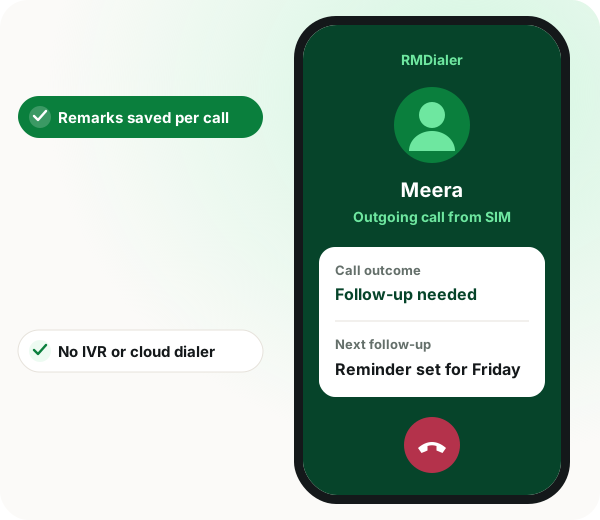
Calls management software for inside sales in brief
Calls management software for inside sales gives managers the visibility they lose when call history lives on individual phones, and WappBlaster Calls Management provides it while reps keep dialling from their own SIM cards. Every call is captured in a shared log without a cloud dialer or IVR project. After a qualified conversation, the rep records budget, timeline and objection notes against the lead, and reminders fire before each callback is due, closing the forgot-to-call-back leak common on high-volume desks. Managers review dashboards by rep and date range and can export activity for reporting, which also means leads can be reassigned cleanly when a rep leaves. An optional layer, Auto WhatsApp After Call, sends the pitch or catalogue link automatically whenever a conversation completes, so the team combines CRM discipline with speed to lead. The setup suits small and mid-sized inside sales teams, which the page sizes at 2 to 50 reps working on Android phones.
Calls management software for inside sales gathers every rep's call log, notes and callback reminders in one place, so managers can coach and reassign leads.
WappBlaster Calls Management works on Android phones with ordinary SIM cards for teams of 2 to 50 reps, no cloud dialer or IVR needed.
Logs survive when a rep leaves, so their leads can be reassigned.
Reps record budget, timeline and objections right after qualifying.
Alerts fire before follow-ups are due, closing the forgot-to-call leak.
Filter activity by rep and date range, then export for reports.
No IVR project; reps use the SIM already in their phone.
When call history lives on individual phones, managers cannot coach effectively or reassign leads when reps leave. Calls Management centralizes logs and notes while reps keep using their normal dialer.
After each qualified call, reps add budget, timeline, and objection notes. Reminders fire before callbacks are due, reducing the “forgot to call back” revenue leak common in high-volume desks.
Enable Auto WhatsApp After Call so every completed conversation also sends your pitch or catalogue link automatically, combining CRM discipline with speed-to-lead.
Explore the platform
Sales managers organising a calling desk also read a shared WhatsApp inbox compared with the Business app, success stories from businesses on WappBlaster and WhatsApp CRM picks for small firms.
| Feature | What the team does | What WappBlaster does |
|---|---|---|
| Rep dials from own SIM | Uses the usual dialer | Captures the call in the shared log |
| Qualified conversation ends | Adds budget and timeline notes | Optionally sends the catalogue on WhatsApp |
| Callback due | Gets the reminder | Fires it before the scheduled time |
| Weekly review | Manager coaches reps | Shows dashboards and exports by date |
No. WappBlaster Calls Management works on Android phones with regular SIM cards, ideal for SMB inside sales teams of 2–50 reps.
Link to this answerYes. Review dashboards by rep and date range, with export for reporting.
Link to this answerYes. WappBlaster Calls Management centralises call logs, remarks and callback reminders from reps' Android phones, while they keep dialing from their own SIM.
Link to this answerFor teams of 2 to 50 reps who call from Android phones, a SIM-based tool avoids an IVR or cloud dialer project. WappBlaster Calls Management is built for exactly that size of desk.
Link to this answerWith central logs, the leads stay with the team. Call history no longer lives only on the departing rep's phone, so managers can reassign those leads.
Link to this answerBudget, timeline and objections, recorded right after each qualified call. Those remarks stay attached to the lead for whoever calls next.
Link to this answerA reminder fires before each scheduled callback is due. That closes the 'forgot to call back' leak the page describes on high-volume desks.
Link to this answerYes, if you switch on Auto WhatsApp After Call. Every completed conversation then also sends your pitch or catalogue link automatically.
Link to this answerNot as the page describes it. Teams that need call recording, IVR routing or a predictive cloud dialer are pointed to a telephony platform instead.
Link to this answerYes. Reps carry on with their normal dialer and SIM, and each call is captured in the shared log.
Link to this answerStill not answered?
Ask a real person. We reply on WhatsApp, usually within the hour.
A short call, your real use case, no card required. We set it up with you rather than sending you a documentation link.