How does StaffPeek remind me to follow up?
You schedule a follow-up on any contact and StaffPeek shows a desktop notification when it is due. You can snooze or mark it complete, and the history is kept.
Link to this answerWhatsApp lead tracking is keeping a record of every sales enquiry that arrives by chat, with its stage, owner and next follow-up date. Leads go cold because nobody followed up. StaffPeek captures every WhatsApp lead into a pipeline and fires follow-up reminders so no conversation slips through.
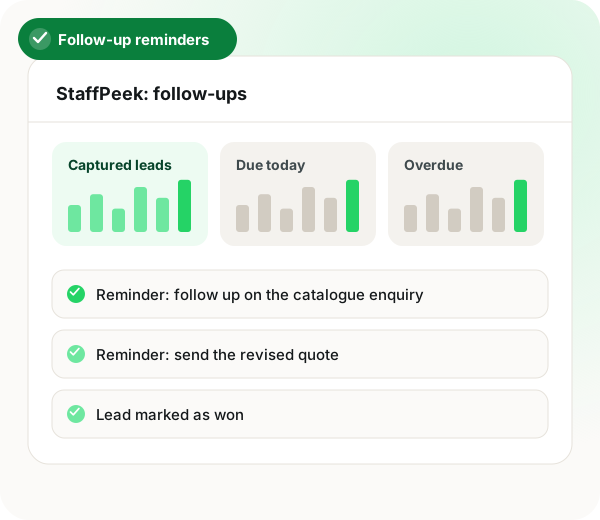
Track WhatsApp leads and follow-ups in brief
Tracking WhatsApp leads and follow-ups fails when the next step lives in someone's memory, and StaffPeek fixes it by turning every chat into a contact with a status and an owner as conversations happen. Each lead can carry status, priority, tags and deal value, edited inline or in a detail drawer, and because chats are captured live with recent conversations reconciled in the background, the pipeline reflects what the team said to customers today rather than a week-old export. Follow-ups are scheduled on any contact and arrive as desktop notifications when due; they can be snoozed or completed, and the history is kept. From a contact, a rep can jump into the chat, quick-send a WhatsApp message, send an SMS or start a phone call. Managers see who followed up and who did not, which turns WhatsApp into a measurable sales channel. Past conversations are covered too, since a 1-click deep scan imports the full history.
You track WhatsApp leads and follow-ups by turning each chat into a contact with a status and owner, then scheduling reminders that alert you when follow-up is due.
StaffPeek captures every WhatsApp chat into a pipeline with status, priority, tags and deal value, and shows desktop notifications when a follow-up falls due.
Chats sync continuously, so status reflects today's conversations.
Desktop notifications fire on the scheduled date.
Set status, priority, tags and deal value without leaving the list.
Jump into the chat, send WhatsApp or SMS, or start a call.
A one-click deep scan brings in the complete history.
StaffPeek tracks WhatsApp leads by turning every chat into a contact with a status and an owner, then scheduling follow-ups with desktop notifications when they are due. You can snooze, complete, and keep a full follow-up history, so every lead has a clear next step instead of living in someone’s memory.
Set lead status, priority, tags and deal value inline or in a detail drawer. Because StaffPeek captures chats live and reconciles recent conversations continuously, the pipeline always reflects what your team actually said to customers today, not a stale export from last week.
From any contact you can jump into the chat, quick-send a WhatsApp message, send an SMS or start a phone call. Managers see who followed up and who did not, which makes WhatsApp a measurable sales channel rather than a blind spot.
Explore the platform
Teams turning chats into a pipeline also read a shared inbox set against the WhatsApp Business app, bulk WhatsApp tools with a built-in CRM and generating leads with a WhatsApp chatbot.
| Feature | What the team does | What StaffPeek does |
|---|---|---|
| New chat arrives | Replies as usual | Logs it as a lead with an owner |
| Lead needs a callback | Schedules a follow-up | Alerts on the due date |
| Not ready yet | Snoozes the reminder | Keeps the history |
| Weekly review | Manager checks the pipeline | Shows who followed up |
You schedule a follow-up on any contact and StaffPeek shows a desktop notification when it is due. You can snooze or mark it complete, and the history is kept.
Link to this answerBoth. Incoming messages are logged as they arrive, recent conversations are reconciled quietly in the background, and a single-click deep scan brings in the complete history.
Link to this answerThe full StaffPeek product page is at /products/staffpeek.
Link to this answerYes. StaffPeek captures every WhatsApp chat into a pipeline with status, priority, tags and deal value, and shows a desktop notification when a follow-up falls due.
Link to this answerGive each chat a status and an owner, then schedule a follow-up date for it. A pipeline that syncs chats live, as StaffPeek does, keeps that view current instead of relying on a weekly export.
Link to this answerYes. Managers see who followed up and who did not, which turns WhatsApp into a measurable sales channel.
Link to this answerYes. From any contact you can open the chat, quick-send a WhatsApp, send an SMS or start a phone call.
Link to this answerStatus, priority, tags and deal value, set inline in the list or in a detail drawer.
Link to this answerNot well. If most leads arrive by phone or email rather than WhatsApp, a calling or email CRM will track them better.
Link to this answerNot for every team. Those with complex quoting and contract stages may still need a full sales CRM alongside it.
Link to this answerStill not answered?
Ask a real person. We reply on WhatsApp, usually within the hour.
A short call, your real use case, no card required. We set it up with you rather than sending you a documentation link.