Send Without Saving Contact

WhatsApp Auto Sender Without Saving Contacts, So Your Phonebook Stays Clean

Sending WhatsApp without saving a contact means messaging a phone number straight from its digits, skipping the step of adding it to your phonebook. Your business phonebook should be for clients, not temporary leads. Automate your data flow while keeping your core Google Contacts immaculately clean.

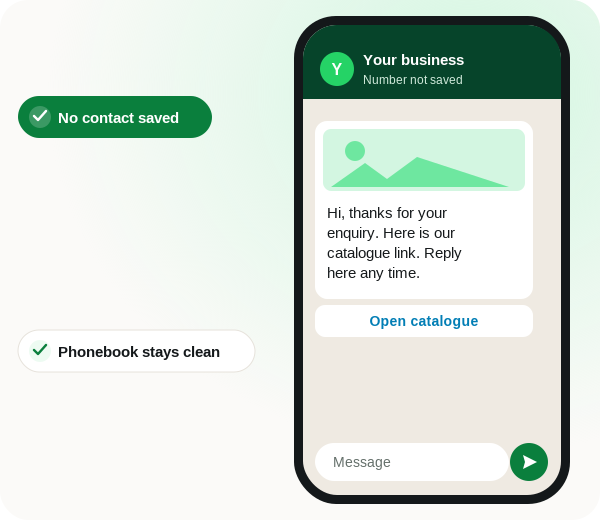
WhatsApp auto sender without saving contact: enquiry reply with a catalogue card and an Open catalogue button

WhatsApp auto sender without saving contact in brief

A WhatsApp auto sender without saving contacts stops a busy sales phone from filling up with entries like Mumbai inquiry 4, and the page estimates a high-volume B2B team can accumulate 4,000 such names within 3 months. WappBlaster reads the raw number from the dialer log after each call and uses Android deep-linking to open a WhatsApp or WhatsApp Business chat with it directly, so the follow-up goes out with the address book untouched. That changes how the phonebook is used: reps save a number only after the lead replies with interest, turning contacts into a list of qualified buyers rather than a dumping ground. It also removes friction, since saving a contact and opening WhatsApp takes about 25 seconds across several screens, which over a 300-day working year the page converts into roughly three weeks of reclaimed time. On corporate phones whose MDM policy locks the contacts app, the zero-save approach lets automation run without breaking those restrictions.

What is a WhatsApp auto sender without saving contacts?

A WhatsApp auto sender without saving contacts opens a chat with a raw phone number from the call log and sends a message, leaving the address book untouched.

WappBlaster takes the unsaved number from your dialer log after each call and opens WhatsApp or WhatsApp Business directly with it, at no extra cost.

  • Thousands of one-time leads no longer clutter your phonebook.
  • Save a number only after the lead replies with interest.
  • Blocked or unknown caller IDs stop the automation safely.

WhatsApp auto sender without saving contact benefits

  • Clean contact book

    No more entries like Mumbai inquiry 4 filling the phone.

  • Qualified saves only

    Numbers get stored once a buyer shows real interest.

  • No save-and-refresh steps

    Skip the screens between dialer, contacts and WhatsApp.

  • Works under MDM rules

    Locked-down corporate contacts apps do not block the send.

  • Both WhatsApp apps

    Unsaved-number sending works in consumer and Business versions.

Phonebook pollution, and why WhatsApp should work without saving contacts

To manually send a 1st-time WhatsApp message to a raw lead, you must explicitly save their number. If you run a high-volume B2B operation, within 3 months, your primary phonebook is fundamentally polluted with 4,000 generic names ('Raju Dialed', 'Mumbai inquiry 4'). This severely degrades your phone's performance and corrupts your corporate identity.

How the WhatsApp auto sender opens a chat without saving the contact

WappBlaster completely obliterates this archaic requirement. It leverages advanced Android deep-linking logic securely natively injected into the WhatsApp package. It automatically extracts the 'raw' unsaved numerical string directly from your dialer log, and forces WhatsApp to open an active session with it instantly.

WhatsApp without saving contacts: save only the leads who reply

By exclusively operating on unsaved numbers during the initial automation phase, your sales team only permanently saves a number *after* the lead replies with 'Yes, I am interested'. This fundamentally transforms your contact book from a 'dumping ground' into a pristine database of highly qualified, interactive B2B buyers.

Auto sender speed: 25 seconds of saving a contact cut to zero

Saving a contact requires 4 screens (Dialer -> Add Contact -> Type Name -> Save -> Open WhatsApp -> Refresh). WappBlaster reduces this 25-second heavy mechanical friction into exactly 0 seconds of friction. The raw automation speed gain across a 300-day fiscal year equates heavily to roughly three weeks of reclaimed labor time.

WhatsApp auto sender without saving contacts on locked-down MDM phones

Many corporate environments lock down the device's main 'Contacts App' severely to prevent employee data scraping. WappBlaster's zero-save architecture brilliantly maneuvers around these corporate MDM restrictions, allowing the automation to execute perfectly without violating internal security read-write policies.
Readers cutting manual steps also read sending an automatic WhatsApp after each phone call, manual follow-up compared with automation and a guide to post-call WhatsApp messages.

WhatsApp auto sender without saving contact, call to qualified lead
Feature What the team does What WappBlaster does
Call with a new lead ends Leaves the number unsaved Reads it from the dialer log and opens WhatsApp
Message sent Moves to the next call Chat thread now exists for that number
Lead replies interested Saves the contact Thread continues as a normal chat
Caller ID hidden Nothing Skips automation for that call

When a WhatsApp auto sender without saving contact is the wrong choice

  • If you want to message a list of numbers that never called you, a call-triggered sender is the wrong tool; it works after real calls.
  • Businesses that must keep every lead in a central CRM should still log contacts somewhere, since this keeps them out of the phonebook only.

WhatsApp auto sender without saving contact FAQ

Is there any risk that Meta will block me for messaging unsaved numbers?

Because you strictly execute these unsaved messages exactly post-call, the recipient possesses high contextual awareness of your brand, heavily discouraging them from tapping the 'Report Spam' button.

Link to this answer

Can I later extract these unsaved numbers if I want to run a broadcast?

Yes. Once an active chat thread is physically established within the WhatsApp interface by WappBlaster, it behaves functionally like any standard chat history available for CRM extraction.

Link to this answer

If a user calls from a blocked ID, will the app crash?

No. The application contains rigorous null-checking logic. If the hardware registers an 'Unknown' or blocked caller ID string, WappBlaster safely terminates the specific automation loop.

Link to this answer

Why do some web platforms charge extra to message unsaved contacts?

Web platforms manipulate Meta's strict Cloud API, charging massive premiums to bypass rigid official restrictions. WappBlaster solves this fundamentally through local hardware-level deep-linking, costing zero extra.

Link to this answer

Can I manually input an unsaved number directly into WappBlaster?

WappBlaster prioritizes fully automated, inbound/outbound dialer reactions. For manual single-texting, utilizing WhatsApp's native direct links is optimal.

Link to this answer

Is WappBlaster a WhatsApp auto sender that works without saving contacts?

Yes. After each call it reads the unsaved number from your dialer log and opens WhatsApp or WhatsApp Business directly with it, at no extra cost.

Link to this answer

When should a salesperson save a lead's number?

After the lead replies with interest. Messaging unsaved numbers first keeps the phonebook for qualified buyers rather than every one-time caller.

Link to this answer

How much time does skipping the save-contact step save?

The page puts manual saving at about 25 seconds per lead across several screens. Over a 300-day year, it estimates roughly three weeks of reclaimed work time.

Link to this answer

What is the best WhatsApp auto sender without saving contacts for corporate phones with MDM?

One that never writes to the contacts app. WappBlaster's zero-save approach works around locked-down corporate contacts apps without breaking internal read-write policies.

Link to this answer

Still not answered?

Ask a real person. We reply on WhatsApp, usually within the hour.

Ask on WhatsApp

WhatsApp auto sender without saving contact: a free demo on your own numbers

A short call, your real use case, no card required. We set it up with you rather than sending you a documentation link.