Make.com WhatsApp integration: two-way WappBlaster scenarios for branching, multi-step workflows
A Make.com WhatsApp integration lets visual automation scenarios react to CRM changes and reply to customers on WhatsApp without custom code. Two-way: WappBlaster pushes data to Make when a contact is created or a custom field changes, and Make scenarios send WhatsApp messages back. Better suited than Zapier to branching, multi-step scenarios.
Make.com WhatsApp integration with WappBlaster suits workflows that branch, because data travels in both directions rather than only outward. A new contact or a changed custom field in WappBlaster posts to a custom webhook in Make, where routers and filters decide what happens next; the scenario then closes with an HTTP module that calls the WappBlaster send endpoint, and the message goes out on Meta's official API. Typical builds split leads by deal value, region or product, enrich a contact from a third-party API before writing to them, keep records aligned with an ERP, or send owners a daily recap of conversations. Error handlers in Make retry a failed send instead of losing it. Connecting takes under an hour: around 3 minutes for the webhook, 5 to point WappBlaster at it, 20 for the scenario and 10 for the return call. Straight one-step flows such as order alerts belong in the native builder.
What is a Make.com WhatsApp integration?
A Make.com WhatsApp integration is a two-way link where CRM events start Make scenarios, and those scenarios send WhatsApp messages or update contacts in return.
WappBlaster posts contact-created and custom-field events to a Make webhook, and a Make HTTP module calls the WappBlaster send endpoint on the official Meta API.
Make suits branching, multi-step logic better than a single-trigger tool.
Data flows both ways, not only outbound.
Simple one-step flows are better kept in the built-in automations builder.
Make.com WhatsApp integration benefits
Branching lead routes
Sales ops can send high-value, regional or product-specific leads down separate WhatsApp sequences.
Enrichment before sending
A third-party lookup can fill in contact details so the message reads personal.
ERP contact sync
Operations teams keep CRM contacts aligned with an ERP or in-house database.
Daily owner digests
A scheduled scenario gathers the day’s chats and sends owners a summary on WhatsApp.
Retry on failure
Make error handlers resend failed messages instead of dropping them quietly.
Data flow
What moves between Make and WappBlaster
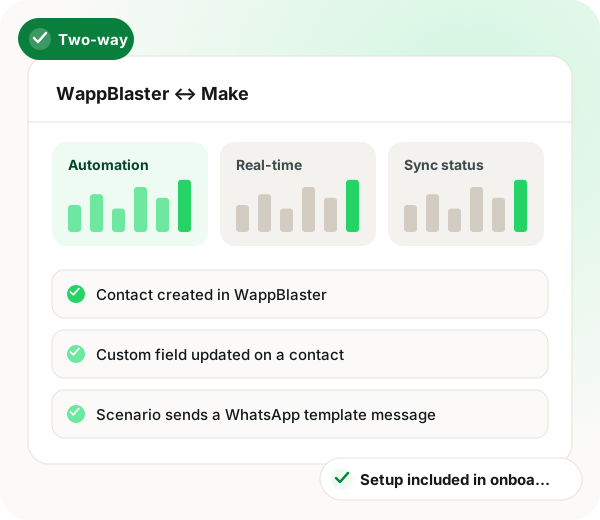
Two-way
WappBlaster CRM → Make.com scenarios
Contact created in WappBlaster
Custom field updated on a contact
Scenario sends a WhatsApp template message
Scenario updates a contact or tag
Frequency: Real-time, on event
Setup
Make WhatsApp integration setup
1
Create the Make webhook
Add a custom webhook module in Make and copy its URL.
~3 minutes
2
Point WappBlaster at it
Configure the contact-created or field-updated event to post to that webhook.
~5 minutes
3
Build the scenario
Add routers, filters and modules for whatever the data should do next.
~20 minutes
4
Send back to WhatsApp
Finish the scenario with an HTTP module calling the WappBlaster send endpoint.
~10 minutes
Use cases
Make WhatsApp integration use cases
Multi-branch lead routing
Route leads to different WhatsApp sequences by value, region or product, using Make routers.
Sales ops
Data enrichment before messaging
Enrich a new contact from a third-party API, then send a personalised WhatsApp message.
Marketing
Cross-system sync
Keep WappBlaster contacts in step with an ERP or a proprietary database.
Operations
Scheduled digests
Aggregate the day's conversations and send a WhatsApp summary to owners.
Scenario-chosen welcome template, routed by value or region
Custom field updated
A field such as stage or product changes
The WhatsApp sequence mapped to the new value
Scheduled run
A daily Make schedule fires
Summary of the day’s conversations to the owner
Send fails
The send endpoint returns an error
Retried message through Make’s error handler
When a Make.com WhatsApp integration is not a fit
If the flow is just “order placed, send a WhatsApp”, the native automation is quicker to set up and needs no Make account.
Make is more technical than the built-in builder, so a team with no one comfortable with webhooks may struggle to maintain scenarios.
Make WhatsApp integration FAQ
Is Make better than Zapier for WhatsApp automation?
For branching, multi-step logic, yes: Make's visual router and error handling are stronger and its operation pricing is usually cheaper at volume. Zapier has the larger app catalogue and is simpler for a straight one-trigger-one-action job.
No, but Make is more technical than the built-in automations builder. If your scenario is 'order placed, send WhatsApp', use the native automation. Reach for Make when the logic genuinely branches.
What is the best Make.com WhatsApp integration for routing leads by region?
Choose one that pushes CRM events into Make so its routers can split them. With WappBlaster, a new contact fires a webhook, Make sorts it by value, region or product, and each branch starts its own WhatsApp sequence.
Under an hour in most cases. Creating the webhook takes about 3 minutes, pointing WappBlaster at it about 5, building the scenario about 20 and adding the return HTTP call about 10.