





Commerce

WhatsApp commerce: a shop your customer browses without leaving the chat

WhatsApp commerce is the sale of goods inside the messaging app, with the product range attached to the business number itself. Every link out to a website is a place people drop off. A catalogue attached to your WhatsApp number keeps browsing, choosing and ordering inside the thread they are already in.

Included in the platform licence. Not a paid add-on.

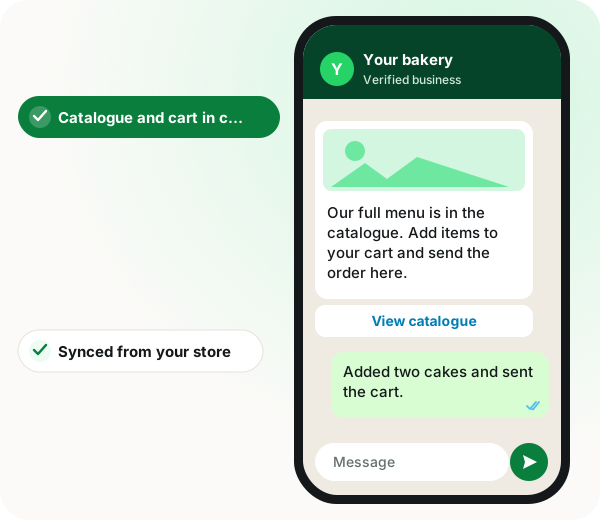
WhatsApp commerce: bakery catalogue message with a View catalogue button and a customer sending a cart of two cakes

The short version

  • Catalogue icon and cart enabled directly on your WhatsApp number.
  • Products pushed to the Meta catalogue from your store or added by hand.
  • Catalogue and multi-product templates send at campaign scale.
  • Indian sellers: business compliance details handled for WhatsApp commerce.
Read the product documentation

WhatsApp commerce in brief

WhatsApp commerce with WappBlaster turns a WhatsApp API number into a storefront: the platform creates a Meta catalogue, links it to the number and switches on the catalogue icon and cart, so buyers add items and order without opening a browser. As a WhatsApp selling and marketing platform, WappBlaster keeps products and orders in sync with your ecommerce system and can push products to the catalogue in bulk. The differentiator for Indian sellers is that the compliance details Meta asks them to supply are handled during setup. The cart is optional per number, so a brand that wants payment through its own website checkout can keep the catalogue for browsing only. Getting started takes 4 steps: create and link the catalogue, load products with categories, decide on the cart, then sell through campaigns and bot flows that place products inside the conversation. Wholesale buyers can reorder from a familiar list, and traders with changing rates update them centrally.

What is WhatsApp commerce?

WhatsApp commerce lets customers browse a product catalogue, add items to a cart and place orders inside a WhatsApp chat without visiting a website.

WappBlaster creates the Meta catalogue, links it to your API number, syncs products and orders with your store, and covers the compliance details Indian sellers must supply.

  • The cart can be switched on or off per number.
  • Products can be pushed to the catalogue in bulk.
  • Catalogue and multi-product messages send from campaigns and bots.

WhatsApp commerce benefits

  • Shop without a website

    Local retailers use the catalogue as their storefront.

  • Fewer drop-offs

    Browsing and ordering stay in the thread instead of a link out.

  • Repeat B2B ordering

    Wholesale buyers reorder from a known list in chat.

  • Store sync

    Product and order fields map to your ecommerce platform.

WhatsApp commerce in detail

WhatsApp commerce lets customers browse products and place orders inside a WhatsApp chat. WappBlaster creates a Meta catalogue and links it to your WhatsApp API number, enables the catalogue icon and cart on the number, syncs products and orders with your ecommerce platform, pushes products to the Meta catalogue, and sends catalogue and multi-product messages so customers can browse and add to cart in the conversation.

Trusted by 3,500+ businesses

  • 4.8 / 5
  • G2
  • Capterra
  • SoftwareSuggest
  • Techjockey
  • Meta Tech Provider
  • D-U-N-S Registered
  • Aayu ENT Clinic
  • Raj
  • Queens
  • Ganesh
  • Om
  • Chanakya

Some of the businesses using WappBlaster products every day

Capabilities

WhatsApp commerce: what you get

Everything here is documented and shipping today, not on a roadmap.

Meta catalogue creation and linking

Create the catalogue and attach it to the WhatsApp API number so the catalogue icon appears in your profile.

Cart on or off, per number

Enable the in-chat cart where you want customers to check out in WhatsApp, disable it where orders should go elsewhere.

Product and order sync

Sync product and order system fields with your ecommerce platform and edit the mapping when your catalogue does not match theirs.

Categories and product management

Create categories, add products, and push them to the Meta catalogue in bulk.

Send products into conversations

Share single products, multi-product messages or the whole catalogue from a campaign or a bot.

India compliance handling

Indian sellers must supply business compliance information before selling through WhatsApp commerce; that step is part of setup.

How it works

WhatsApp commerce: how it is set up

  1. 1

    Create and link the catalogue

    A Meta catalogue attached to your WhatsApp API number.

  2. 2

    Load products

    Push from a connected store or add them directly, with categories.

  3. 3

    Decide on the cart

    Enable it for in-chat checkout, or keep orders flowing to your site.

  4. 4

    Sell from campaigns and bots

    Catalogue and multi-product messages in broadcasts, product sends inside bot flows.

Where it earns its keep

WhatsApp commerce: common uses

  • Local retail without a website

    A catalogue is the shopfront; no site to build or host.

  • Wholesale and B2B ordering

    Repeat buyers ordering from a known list.

  • Restaurants and cloud kitchens

    A menu customers browse and order from in the chat.

  • Boutiques and fashion

    New arrivals pushed as multi-product messages.

  • Electronics dealers

    Model comparisons in a single message.

  • Agri and commodity traders

    Rate lists that change often, updated in one place.

Sellers just starting out can try the free digital catalogue, read about running a whole store inside WhatsApp and see how chatbots help online stores.

WhatsApp commerce features compared
Feature What it does Best for
Catalogue creation and linking Attaches a Meta catalogue to the number Sellers starting from scratch
In-chat cart Lets customers check out inside WhatsApp Simple orders
Product and order sync Maps fields to your store platform Brands with an existing store
Product sends Shares one product, a set or the whole catalogue Campaigns and bot flows

When WhatsApp commerce is the wrong choice

  • If orders must go through your own site's checkout, disable the cart and use the catalogue only for browsing.
  • Indian sellers who cannot provide the required business compliance details cannot sell through WhatsApp commerce yet.

WhatsApp commerce FAQ

Straight answers about WhatsApp commerce.

Can customers actually buy inside WhatsApp?

They can browse a catalogue, add to a cart and submit an order inside the chat. Payment then happens either through WhatsApp native payments where available, through a payment link you send, or on delivery. The catalogue itself is the browsing and ordering layer, not a full checkout system.

Link to this answer

Do I need an existing online store?

No. Products can be added directly and pushed to the Meta catalogue. If you do run Shopify or WooCommerce, syncing keeps the catalogue current automatically.

Link to this answer

Is there anything extra for Indian sellers?

Yes. Meta requires business compliance information from Indian sellers before commerce features can be used on WhatsApp. It is a one-time setup step.

Link to this answer

What is the difference between this and the free digital catalogue?

The free digital catalogue is a hosted link that previews in a chat and works for anyone. WhatsApp commerce is the native Meta catalogue attached to your number, with the catalogue icon and cart inside WhatsApp itself. Many businesses use both.

Link to this answer

How much does WhatsApp commerce cost with WappBlaster?

Catalogue setup, the in-chat cart and store sync are all covered by the one licence you pay for each year. Messages that carry products, such as catalogue or multi-product sends, have Meta's normal charge passed through at cost.

Link to this answer

Is WappBlaster a WhatsApp commerce platform?

Yes. It creates the Meta catalogue, links it to your API number, syncs products and orders with your store, and sends catalogue and product messages from campaigns and bots.

Link to this answer

Can I switch off the WhatsApp cart and keep the catalogue?

Yes. The cart is enabled or disabled per number, so customers can still browse the catalogue while orders go through your own site's checkout.

Link to this answer

Can I upload many products to the WhatsApp catalogue at once?

Yes. You create categories, add products and push them to the Meta catalogue in bulk, or load them from a connected store.

Link to this answer

What is the best WhatsApp commerce setup for a restaurant?

Use the catalogue as the menu so customers browse and order inside the chat, and keep the cart switched on for in-chat ordering. Cloud kitchens follow the same pattern.

Link to this answer

Can wholesale buyers reorder through WhatsApp?

Yes. Repeat B2B buyers can order from a known product list in the chat, and traders whose rate lists change often can update them in one place.

Link to this answer

Still not answered?

Ask a real person. We reply on WhatsApp, usually within the hour.

Ask on WhatsApp

Commerce and payments

Related features

Same licence, same login. These work together out of the box.

WhatsApp commerce: a free demo on your own account

A short call on your real list and your real templates. No card, no sandbox.

  • Set up with you on a call, not a help article
  • Official Meta WhatsApp Business Platform
  • Flat annual fee, Meta charges passed through at cost