





Spreadsheets

Send WhatsApp from Google Sheets, with your spreadsheet wired both ways

Sending WhatsApp from Google Sheets means a spreadsheet drives your messages, with rows supplying the recipients and cell values filling each template. Plenty of businesses run on a Google Sheet and are not about to stop. Rather than fight that, connect it: a status change in a cell sends the message, and what the customer replies comes back into a row.

Included in the platform licence. Not a paid add-on.

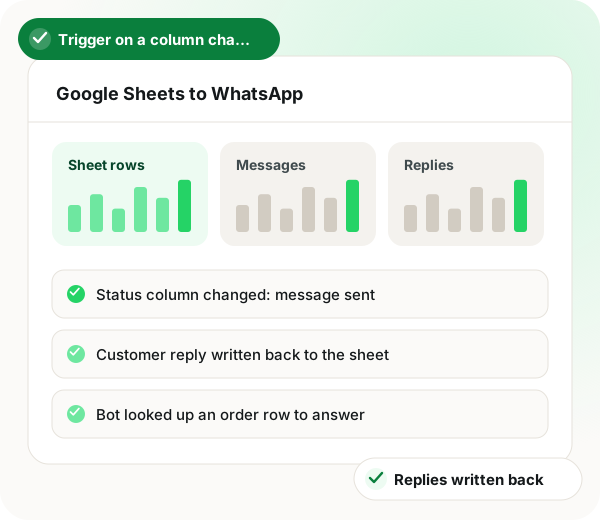
Send WhatsApp from Google Sheets: dashboard with sheet rows, messages and replies tiles and a column-change row

The short version

  • Trigger a message when a specific column changes.
  • Message every row in the sheet, or only the rows you pick.
  • Bots look up sheet rows to answer questions live.
  • Chat responses written straight back into the sheet.
Read the product documentation

Send WhatsApp from Google Sheets in brief

Send WhatsApp from Google Sheets with WappBlaster and the spreadsheet becomes a control panel for a WhatsApp messaging platform, with no Zapier or other paid middleman between them. Updating a watched column, for example setting an order to shipped, fires an approved template to that row's customer, and you can also send to every row or only to a filtered set. The differentiator is that the link runs in both directions: chatbots search the sheet to answer questions live, buttons and lists are built from its rows, and answers collected in chat are written back immediately. Workflow steps can add, update, search, clear or delete rows. Setup follows 4 steps: authorise the sheet, choose the trigger column, map cell values into template variables, and add write-back where the loop should close. Because WappBlaster talks to Google directly, there are no task quotas to count. Once many people edit the same sheet, a CRM with roles becomes the safer home for contacts.

How do you send WhatsApp messages from Google Sheets?

Connect the sheet to a WhatsApp automation, pick a trigger column such as order status, and map row values into an approved template so each change sends a message.

WappBlaster wires the sheet both ways: column changes send messages, bots look up rows to answer live, and captured chat data writes back in real time.

  • Send to every row or to a filtered selection.
  • Dynamic buttons and lists can be built from sheet rows.
  • Add, update, search, clear and delete rows as workflow steps.

Send WhatsApp from Google Sheets benefits

  • No second system

    Teams keep working in the sheet they already update every day.

  • Self-serve order lookups

    Customers ask the bot and get their real row back.

  • Field dispatch

    Assign a job in a row and the technician receives it on WhatsApp.

  • Form to chat

    A Google Form submission starts a conversation straight away.

Send WhatsApp from Google Sheets in detail

Google Sheets automation connects a spreadsheet to WhatsApp in both directions. WappBlaster can trigger a workflow or a message when a specific column changes, run across all or selected rows, look up and search sheet data inside a chatbot flow to answer questions live, build dynamic buttons and lists from sheet rows, and write captured chat data back into the sheet in real time.

Trusted by 3,500+ businesses

  • 4.8 / 5
  • G2
  • Capterra
  • SoftwareSuggest
  • Techjockey
  • Meta Tech Provider
  • D-U-N-S Registered
  • Aayu ENT Clinic
  • Raj
  • Queens
  • Ganesh
  • Om
  • Chanakya

Some of the businesses using WappBlaster products every day

Capabilities

Send WhatsApp from Google Sheets: what you get

Everything here is documented and shipping today, not on a roadmap.

Column-change triggers

Mark an order "shipped" in a sheet and the customer gets the WhatsApp update without a second system.

Row-based sending

Send to every row, or to a filtered selection, which turns a sheet into a lightweight campaign tool.

Lookup inside a bot

The bot searches the sheet for the customer’s order and answers with the real row, not a canned line.

Dynamic buttons and lists

Build the options a user sees from sheet rows, so a menu updates when the sheet does.

Real-time write-back

Everything captured in a bot lands in the sheet as it happens.

Full row and cell operations

Add, update, get, search, clear and delete rows and cells as workflow steps.

How it works

Send WhatsApp from Google Sheets: how it is set up

  1. 1

    Connect the sheet

    Authorise the spreadsheet you want to read and write.

  2. 2

    Pick the trigger column

    Usually a status column that a human already updates.

  3. 3

    Map the message

    Use row values as template variables.

  4. 4

    Add write-back if needed

    Send bot answers into a results sheet so the loop closes.

Where it earns its keep

Send WhatsApp from Google Sheets: common uses

  • Small-team order tracking

    Orders are still managed in the sheet, and WhatsApp simply tells customers when something changes.

  • Google Form to WhatsApp

    A submission starts the conversation instantly.

  • Field team dispatch

    Assign a job in the sheet, the technician gets it on WhatsApp.

  • Inventory alerts

    A stock cell crossing a threshold pings the buyer.

  • Order status lookups

    Customers self-serve against the sheet through the bot.

  • Event registrations

    Register in a form, confirm on WhatsApp, track in the sheet.

Sheet-first teams also use a dialer that calls straight from a Google Sheet, read about shop inventory managed over WhatsApp and set up WooCommerce order notifications.

Send WhatsApp from Google Sheets: events and messages
Feature Trigger Message sent
Order marked shipped Status column changes Shipping update to the customer
Stock falls below threshold Inventory cell crosses a set value Alert to the buyer
Job assigned in a row Assignee column filled in Job details to the technician
Form submitted New row from Google Forms Opening message to the lead

When sending WhatsApp from Google Sheets is the wrong choice

  • Once several people edit the same sheet at once, accidental changes can fire messages; a CRM with roles is safer at that size.
  • Large contact lists with real segmentation needs outgrow a spreadsheet, and the WhatsApp CRM handles them better.

Send WhatsApp from Google Sheets FAQ

Straight answers about Send WhatsApp from Google Sheets.

Is it possible to send bulk WhatsApp from a Google Sheet?

Yes. Point a send at the whole sheet or at chosen rows, and each message is delivered on the official API as an approved template whose placeholders are filled from that row’s cells. Teams that already run their operations out of a spreadsheet get the most from it.

Link to this answer

Does the sheet update when a customer replies?

It can. Whatever a bot flow collects is written into the sheet the moment it is captured, so the answers sit in your rows and not just in the chat inbox.

Link to this answer

Is this different from Zapier?

Yes. WappBlaster talks to Google Sheets itself, with no middleman tool, so you are not paying for a separate subscription or counting tasks against a quota. If your workflows already live in Zapier, Make, Pabbly Connect or n8n, those connections work too.

Link to this answer

How much does it cost to send WhatsApp from Google Sheets with WappBlaster?

The Google Sheets connection is part of the platform licence, so there is no separate connector subscription or task quota to buy. Messages sent from the sheet carry Meta's normal charge at cost.

Link to this answer

Is WappBlaster a tool to send WhatsApp from Google Sheets?

Yes. It connects to the sheet directly, sends when a chosen column changes or across selected rows, lets bots look up rows, and writes chat answers back in real time.

Link to this answer

Can a WhatsApp message go out automatically when I change a cell?

Yes. Pick a trigger column, usually a status column someone already updates, and a change such as marking an order shipped sends the customer an update.

Link to this answer

What is the best way to send WhatsApp from Google Sheets for event registrations?

Let a Google Form fill the sheet, send each new registrant a WhatsApp confirmation, and keep attendance tracking in the same rows.

Link to this answer

Can a chatbot read my Google Sheet to answer customers?

Yes. The bot searches the sheet for the customer's row, for example their order, and replies with the real values rather than a fixed message.

Link to this answer

Can WhatsApp menu options come from sheet rows?

Yes. Buttons and lists can be built from rows, so the options a customer sees change as soon as the sheet changes.

Link to this answer

Can a technician get job details on WhatsApp from a spreadsheet?

Yes. Fill in the assignee on a job row and the technician receives the details on WhatsApp, which suits small field teams that dispatch from a sheet.

Link to this answer

Still not answered?

Ask a real person. We reply on WhatsApp, usually within the hour.

Ask on WhatsApp

Send WhatsApp from Google Sheets: a free demo on your own account

A short call on your real list and your real templates. No card, no sandbox.

  • Set up with you on a call, not a help article
  • Official Meta WhatsApp Business Platform
  • Flat annual fee, Meta charges passed through at cost