





Mini apps

WhatsApp Flows: a proper form inside the chat, with no website to load

WhatsApp Flows are a Meta feature that lets businesses collect structured information through a proper form opened within a WhatsApp chat. Asking twelve questions one message at a time loses people at question four. A native flow opens a real form inside WhatsApp: fields, dropdowns, dates, and one submit.

Included in the platform licence. Not a paid add-on.

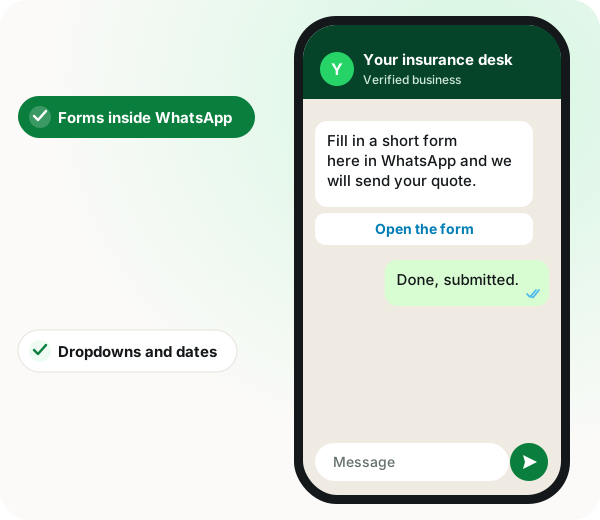
WhatsApp Flows: insurance message with an Open the form button and the customer replying the form is submitted

The short version

  • Real form UI inside WhatsApp: fields, dropdowns, dates, multi-screen.
  • Conditional logic and calculations between fields.
  • Dropdowns filled at open time by a call to your API.
  • Responses land in the CRM or a Google Sheet on submit.
Read the product documentation

WhatsApp flows in brief

WhatsApp Flows built in WappBlaster, sometimes called mini apps or native flows, are forms of several screens that open inside the chat, letting a business on a WhatsApp marketing platform gather structured answers through text fields, dropdowns, date pickers and proper rating scales rather than asking people to reply 1 to 5. WappBlaster designs them visually and sends them from an approved template or from a bot flow. The concrete differentiator is live data: dropdown options can be loaded from your own API when the form opens, and conditional logic or calculations run between fields, so the next screen adapts to earlier answers. Submitted responses are saved as super fields in the CRM, ready for segmentation, or written into a Google Sheet. A long questionnaire spreads over several screens instead of arriving as one block. Typical uses are lead qualification, bookings, surveys and applications. For a two-question exchange, ordinary chat messages stay quicker than any form.

What are WhatsApp Flows?

WhatsApp Flows are multi-screen forms that open inside a WhatsApp chat, with fields, dropdowns and dates, so users submit structured answers without a browser.

WappBlaster builds flows visually, sends them from a template or bot, fills dropdowns from your API and stores responses in the CRM or a Google Sheet.

  • Conditional logic and calculations run between fields.
  • Long forms split into screens instead of one wall of questions.
  • Responses save as super fields, ready to segment.

WhatsApp flows benefits

  • Completed long forms

    Loan and insurance applications survive where one-question messages lose people.

  • Live options

    Branch or slot lists come from current data, not hardcoding.

  • Running totals

    Order forms compute quantity and price inside the flow.

  • Structured service requests

    Category, urgency and location arrive in clean fields.

WhatsApp flows in detail

WhatsApp Flows, also called mini apps or native flows, are structured multi-screen forms that open inside a WhatsApp chat without sending the user to a browser. WappBlaster builds them visually, sends them from a template or a bot flow, applies conditional logic and calculations between fields, populates dropdowns dynamically from an API, and stores the submitted responses in the CRM or a Google Sheet.

Trusted by 3,500+ businesses

  • 4.8 / 5
  • G2
  • Capterra
  • SoftwareSuggest
  • Techjockey
  • Meta Tech Provider
  • D-U-N-S Registered
  • Aayu ENT Clinic
  • Raj
  • Queens
  • Ganesh
  • Om
  • Chanakya

Some of the businesses using WappBlaster products every day

Capabilities

WhatsApp flows: what you get

Everything here is documented and shipping today, not on a roadmap.

Multi-screen forms

Break a long form into screens so it never looks like a wall of questions.

Conditional logic and calculations

Show fields based on earlier answers and compute values, such as a quote total, inside the flow.

Dynamic dropdowns from an API

Populate options from live data, so a branch list or a slot list is current rather than hardcoded.

Send from templates or bots

Attach a flow to a template button for campaigns, or open it mid-conversation from a bot.

Responses into the CRM

Submitted answers are stored against the contact as super fields, ready to segment on.

Responses into Google Sheets

Push submissions to a sheet for teams that live in spreadsheets.

How it works

WhatsApp flows: how it is set up

  1. 1

    Design the screens

    Group the fields the way a person would expect to be asked.

  2. 2

    Add logic

    Conditional fields and any calculation the form needs.

  3. 3

    Attach it

    To a template button for campaigns, or to a bot block for conversations.

  4. 4

    Route the responses

    CRM fields, a Google Sheet, or both.

Where it earns its keep

WhatsApp flows: common uses

  • Loan and insurance applications

    Long forms that would never survive one question per message.

  • Appointment booking

    Date, time and service picked in one screen.

  • Order forms

    Quantity and variant selection with a running total.

  • Feedback and surveys

    Rating scales in a real UI rather than "reply 1 to 5".

  • Lead capture from ads

    A form that opens instantly instead of a landing page that loads slowly.

  • Service requests

    Category, urgency, description and location, structured on arrival.

If you are choosing between formats, read Flows compared with chatbot forms, see slot booking that uses in-chat forms and look at bulk WhatsApp for insurance agents.

WhatsApp Flows features compared
Feature What it does Best for
Multi-screen forms Groups fields across screens Applications and surveys
Conditional logic Shows fields based on earlier answers Quotes with calculated totals
Dynamic dropdowns Loads options from your API at open time Slot and branch pickers
Response routing Saves to CRM fields or a Google Sheet Teams working in spreadsheets

When WhatsApp Flows are the wrong choice

  • A two-question exchange is quicker as ordinary chat messages than as a form.
  • Where the answers must feed a system with no API or sheet connection, responses will sit in the CRM until someone moves them.

WhatsApp flows FAQ

Straight answers about WhatsApp flows.

What are WhatsApp Flows?

They are forms that Meta builds into WhatsApp itself. Rather than answering a bot question by question, the customer opens a proper form with real input fields inside the chat, completes it and submits it in one go, without installing anything or leaving for a web page.

Link to this answer

How is a mini app different from a chatbot?

A chatbot converses, one message at a time. A mini app presents a form. Use a bot for a short branching conversation and a mini app when you need more than about four structured fields.

Link to this answer

Where do the responses go?

Each answer is saved on the contact’s CRM record as a field, and you can also send a copy to a Google Sheet. Since the data arrives as structured fields, segments and automations can use it straight away.

Link to this answer

Can the dropdown choices be pulled from our own software?

Yes. When the customer opens the flow, WappBlaster calls your API and fills the dropdown with whatever it returns, so the choices match current availability instead of an outdated list.

Link to this answer

How much do WhatsApp Flows cost with WappBlaster?

No extra charge applies for the flow builder; it ships with the licence. A flow sent from a template button carries that template's Meta charge, passed through at cost.

Link to this answer

Is WappBlaster a WhatsApp Flows builder?

Yes. You design the screens visually, add conditional fields and calculations, attach the flow to a template button or a bot block, and route answers to CRM fields or a Google Sheet.

Link to this answer

What is the best use of WhatsApp Flows for an insurance business?

Long applications. A loan or insurance form split over several screens survives where asking one question per message loses people, and the answers arrive as clean fields.

Link to this answer

Can a WhatsApp Flow calculate a total?

Yes. Calculations run inside the flow, so an order form can show a running total as quantity and variant are chosen.

Link to this answer

Can I send a WhatsApp Flow in a bulk campaign?

Yes. Attach the flow to a button on a template and send that template as a campaign, so every recipient can open the form from the message.

Link to this answer

Can WhatsApp Flows replace a slow ad landing page?

For lead capture they often can, because the form opens instantly inside the chat instead of loading a web page.

Link to this answer

Still not answered?

Ask a real person. We reply on WhatsApp, usually within the hour.

Ask on WhatsApp

WhatsApp flows: a free demo on your own account

A short call on your real list and your real templates. No card, no sandbox.

  • Set up with you on a call, not a help article
  • Official Meta WhatsApp Business Platform
  • Flat annual fee, Meta charges passed through at cost