Can customers book an appointment without leaving WhatsApp?
Yes. Booking runs either as a chatbot conversation or as a mini-app form inside the chat, so no website or app is involved.
Link to this answerWhatsApp appointment booking lets customers reserve a time slot by chatting with a business on WhatsApp, with no website form or phone call. No-shows are usually a reminder problem, not a customer problem. Take the booking where the customer already is and remind them on the same thread.
Included in the platform licence. Not a paid add-on.
The short version
WhatsApp appointment booking in brief
WhatsApp appointment booking on WappBlaster, a WhatsApp business messaging platform, rests on two building blocks: event types, each with its own booking fields, and availability slots attached to those events. Customers then reserve through either a conversational bot or a native mini-app form, depending on how much detail the booking needs. The feature that sets it apart is approval by message: an admin can accept or reject a requested slot from their personal WhatsApp, with no dashboard login. Going live takes 4 steps: create the event type, add the slots, connect the WhatsApp number, and switch reminders on, which the page rates as the single most effective setting against no-shows. Alerts fire when a booking is made and reminder webhooks run before the appointment. Clinics, salons, repair technicians, tutors and sales teams offering demos or test drives all use it. Bookings live in the platform calendar, and copying them into Google Calendar is possible through the automations builder or a connector.
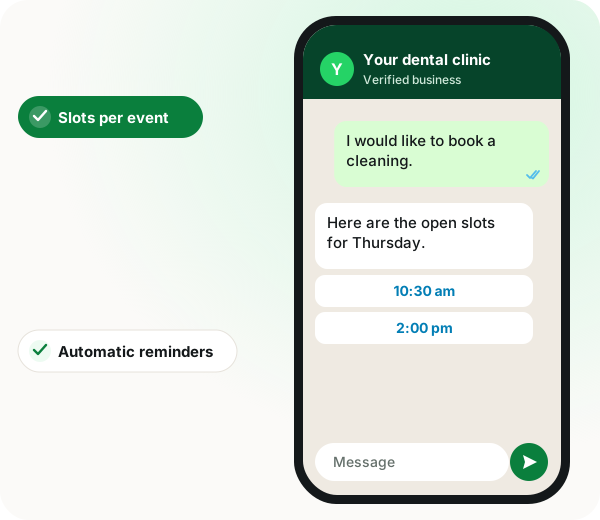
Customers open a chat, see the open slots for a service, pick a time through a bot or an in-chat form, and get automatic reminders on the same thread.
WappBlaster ties availability slots to each event type and lets an admin approve or reject a booking from their own WhatsApp.
Reminders arrive in the chat patients and clients already read.
Salons and clinics fill bookings without a call to the front desk.
Accept or decline requests without opening a dashboard.
Demo and test-drive slots can be taken straight from a campaign message.
WhatsApp appointment booking lets customers see availability and book a slot inside a WhatsApp conversation. WappBlaster provides calendar events with editable fields, availability slots assigned to each event, booking through either a chatbot flow or a mini-app form, WhatsApp alerts and reminder webhooks, and an approval step where an admin accepts or rejects a booking over WhatsApp.
Trusted by 3,500+ businesses










Some of the businesses using WappBlaster products every day
Capabilities
Everything here is documented and shipping today, not on a roadmap.
Define what each booking type collects and how the fields are labelled.
Create slots and assign them to an event, so customers can only pick times you actually have.
A conversational flow that walks through service, date and time.
A native in-chat form for when the booking needs more than a few fields.
WhatsApp alerts on booking, plus reminder webhooks before the appointment.
Accept or reject a requested booking from your own WhatsApp, without opening a dashboard.
How it works
Consultation, service visit, demo, each with its own fields.
Define the slots and attach them to the event.
Link the number so bookings and alerts flow through it.
The single highest-return setting for reducing no-shows.
Where it earns its keep
Clinics and dentists
Patients book and get reminded on the channel they read.
Salons and spas
Slot booking without a phone call.
Service and repair visits
Technician slots with an approval step.
Sales demos
Prospects book directly from a campaign message.
Coaching and tuition
Recurring class slots with reminders.
Test drives and site visits
High-intent bookings captured while interest is live.
Ships in these products
Practices fighting no-shows also read how reminders cut missed appointments, WhatsApp automation for doctors and clinics and about native in-chat forms for longer bookings.
| Feature | What it does | Best for |
|---|---|---|
| Event types with fields | Defines what each booking collects | Consultations, service visits and demos |
| Availability slots | Limits choices to times you can serve | Clinics with fixed chairs or rooms |
| Booking chatbot | Walks through service, date and time in conversation | Simple bookings with few fields |
| Booking mini app | Opens a native form inside the chat | Bookings that need more details |
Straight answers about WhatsApp appointment booking.
Yes. Booking runs either as a chatbot conversation or as a mini-app form inside the chat, so no website or app is involved.
Link to this answerNo. There is an approval step where an admin can approve or reject a requested booking directly over WhatsApp.
Link to this answerWhatsApp alerts are sent on booking, and reminder webhooks fire ahead of the appointment so you can send a nudge at whatever lead time suits your business.
Link to this answerThe booking calendar is managed in the platform. To mirror bookings into Google Calendar, use the automations builder or a connector such as Zapier, Make, Pabbly Connect or n8n.
Link to this answerBooking is part of the platform licence, not an extra module. You pay the flat yearly platform fee, and reminder messages carry Meta's usual message charge, passed through at cost.
Link to this answerYes. You define event types with their own fields, attach availability slots, and customers book through a chatbot or an in-chat form, with alerts and reminders on the same number.
Link to this answerCreate one event type per kind of consultation, attach only the slots your doctors can actually see patients, and switch reminders on, since they do the most against no-shows. Add the approval step if the front desk wants to check each request.
Link to this answerYes. Slots are created and assigned to an event, so a customer can only choose from times you have opened for that kind of booking.
Link to this answerUse the booking chatbot for short bookings with few details and the booking mini app when more fields are needed, because a native in-chat form handles longer input better than a back-and-forth conversation.
Link to this answerYes. Sales teams can let prospects pick a demo slot from a campaign message, and the same works for test drives and site visits while interest is high.
Link to this answerStill not answered?
Ask a real person. We reply on WhatsApp, usually within the hour.
Engagement and retention
Related features
Same licence, same login. These work together out of the box.
A short call on your real list and your real templates. No card, no sandbox.