WappBlaster: WhatsApp Business API in Gurgaon, From Verification to First Message
The WhatsApp Business API in Gurgaon is the team version of WhatsApp, where many agents share one verified number and company systems send messages directly. The documents, steps and timing for a Gurgaon business moving from the WhatsApp Business app to the API, plus the signs that the free app still covers everything you need.
What does a Gurgaon business need for the WhatsApp Business API?
For a Gurgaon business, the WhatsApp Business API needs a registration document, a live website or public page, a number off the WhatsApp app and an acceptable display name.
WappBlaster prepares each item with Gurgaon firms on a video call and adds campaigns, inbox and chatbot, priced at ₹7999 ($200) annually.
Two starter templates are usually filed with the application.
Meta's review causes most of the wait.
The number stops working in the phone app once moved.
WhatsApp business API in Gurgaon benefits
Site-visit confirmations
CRM bookings trigger instant confirmations.
Workshop booking messages
Dealers confirm service slots automatically.
Corporate notices
Firms reach clients on an official number.
Team inbox
Several staff share one line.
What does a Gurgaon business need to get the WhatsApp Business API?
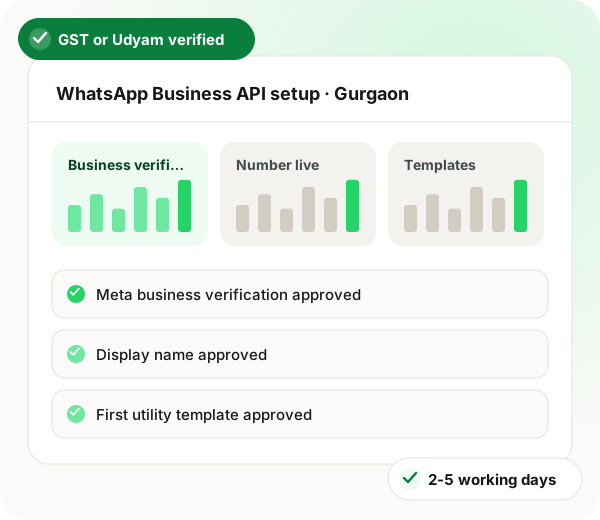
WappBlaster takes Gurgaon businesses from the free app to the WhatsApp Business API in four stages. To begin, your Meta Business portfolio is set up (or an existing one is used) and Meta checks it against your Udyam, GST or shop-licence paperwork. Next comes the phone number: a new SIM works, and so does the one you use today, after WhatsApp is uninstalled from that handset. Third, Meta approves the display name that customers will see above your messages. Finally, the first templates are submitted, and approval frequently comes within the day. The whole run usually lasts two to five working days, the slow part being Meta's paperwork check. Because the bare API is only a connection with nothing to click, WappBlaster adds a dashboard with campaigns, a team inbox and a chatbot, plus analytics, webhooks and a REST API. The price is ₹7999 ($200) yearly with Meta's charges at cost, and every step is handled remotely from Bikaner.
WhatsApp Business API in Gurgaon, in short
Platform fee
₹7999 ($200) / yr
Flat, no seat or contact tiers
Meta’s charge
At cost
Per delivered template, itemised
Setup
2-5 working days
Mostly Meta’s document review
Template languages
Hindi, English
Hindi and English
Trusted by 3,500+ businesses
4.8 / 5
Meta Tech Provider
D-U-N-S Registered
Some of the businesses using WappBlaster products every day
What you need ready
The Gurgaon API checklist: five things to have ready
With these in hand before the first call, the only wait left is on Meta's side.
1
A registration document
Udyam, GST or shop-licence paperwork in the exact name customers should see. When the paperwork and the chosen display name disagree, Meta often holds verification back.
2
A live website or public page
Meta looks for public proof that the business exists. A simple site or listing with the same name, your Gurugram address or phone, and working contact details is usually enough.
3
A number off the WhatsApp app
Pick a line able to receive Meta's code by text or voice call, and log it out of both WhatsApp phone apps. Your existing number can move across if you are ready to give up the app on it.
4
A display name Meta will accept
Use your brand or registered name. Generic labels such as 'Best Deals Gurgaon', or a person's name with no visible business link, tend to be rejected at review.
5
Two starter templates
Usually one utility message, such as a booking or service confirmation, and one marketing message. WappBlaster drafts both with you so they can be submitted the moment verification clears.
WhatsApp Business API for Gurgaon businesses
Gurgaon, recorded as Gurugram in the Census of India 2011 with 876,969 residents, is a city where a company's WhatsApp traffic can outgrow a single phone quickly, especially on the sales side. Moving to the API keeps the same channel customers already use while letting a whole team share one number and connect it to their own systems. Meta will approve your API templates in Hindi as well as English. WappBlaster works from Bikaner, Rajasthan, and completes the Meta paperwork with you on a video call rather than in person.
Real estate developers and brokers
A brokerage usually reaches the API when one phone cannot cope with a launch weekend: enquiries from portals and ads arrive faster than one person can type, and launch updates cannot be scheduled from the app. On the API, the same number feeds a shared inbox for every agent, and a webhook records each enquiry in the CRM automatically, with its source attached.
Corporate services and IT-BPM firms
Firms that send service updates and account notices to client contacts tend to need what the app lacks: utility templates triggered by their own systems, a verified name above each message, and a record of who said what. The REST API lets a ticketing tool send an update the moment a status changes, with no one copying text into a phone by hand.
The same whatsapp business api setup is also written up for Delhi and Jaipur.
Can I keep my existing Gurgaon business number on the API?
Yes, as long as you first take it off the phone app it runs on today. After the switch, staff reach that number from WappBlaster's dashboard rather than the phone app. The number itself, and the fact that customers already have it saved, stays exactly the same.
There is no Meta subscription. Instead Meta charges for every delivered template, priced by whether it counts as a marketing, utility or authentication message and by the recipient's location, and from 1 October 2026 it bills replies sent within the customer service window too, as it announced. WappBlaster's platform fee is separate: ₹7999 ($200) for the year.
Which documents does Meta accept from a Haryana business?
Meta takes a Udyam certificate, a GST registration or a shop and establishment licence, as long as it shows the registered business name you want customers to see. A website or public listing with matching details helps Meta confirm the business is real.
Yes. WappBlaster's REST API and webhooks send and receive messages from your own systems. Shopify, WooCommerce and Google Sheets have built-in connectors, as do popular CRMs. A webhook can post every new enquiry into the CRM so sales never has to retype a lead.
Can WappBlaster set up the WhatsApp Business API for a Gurugram brokerage?
Yes. It completes the Meta paperwork with you on a video call from Bikaner, then puts every agent on one number with a shared inbox, while a webhook records each enquiry in the CRM with its source attached.
When does a brokerage outgrow the WhatsApp Business app?
Typically on a launch weekend, when portal and ad enquiries arrive faster than one person can type and updates cannot be scheduled from the app. The API spreads that load across a shared inbox.
Which two templates should a Gurgaon business submit first?
Usually one utility message, such as a booking or service confirmation, and one marketing message. WappBlaster drafts both with you so they go in the moment verification clears.
Can a ticketing tool send client updates through the API?
Yes. The REST API lets a ticketing tool send a utility template the moment a status changes, under the firm's verified name, with no one copying text into a phone.
How long does API setup take for a Gurgaon company?
Two to five working days in most cases, most of it Meta's document review. With the registration document, website, a free number and two starter templates ready, Meta's side is the only wait.
Does Meta need to see a Gurugram address on our website?
It needs public proof that the business exists. A simple site or listing with the same name, your Gurugram address or phone and working contact details usually does it.
WhatsApp Business API demo in Gurgaon: see it with your own contacts
A free demo on Google Meet, Zoom or AnyDesk, using your list and a message you would really send.
You leave with a written price: the platform fee and Meta's charge as separate lines.