Calls Management Software by RMDialer, your Android call CRM without IVR
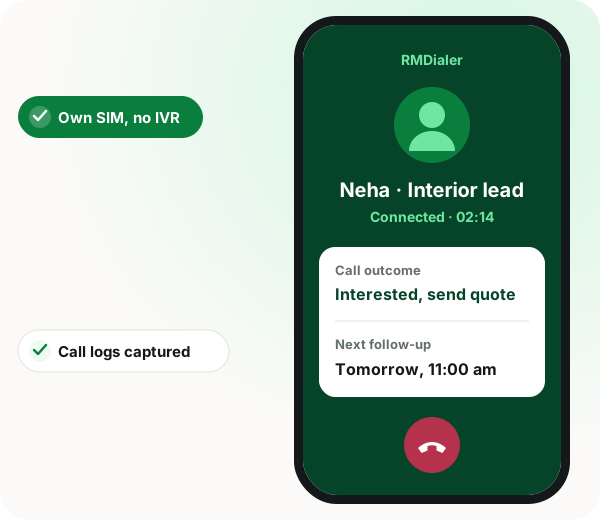
Calls management software is a record-keeping layer for business phone calls, tracking who rang whom, what was said and what happens next. This is RMDialer, sold as calls management. Your team calls from their own SIM. RMDialer captures every log, adds remarks and reminders, sends WhatsApp after the call, and gives managers a live pipeline view, with no cloud dialer, no IVR and no virtual number.
Calls management software keeps every business call accounted for, with automatic logs, remarks, reminders and a manager view, while leaving the way calls are placed unchanged.
RMDialer does this on Android through each rep's own SIM, with no IVR, VoIP or virtual number, at ₹1908 ($29) per user per year.
Incoming, outgoing and missed calls are logged with duration and time.
Post-call WhatsApp runs on the official Meta API.
Small teams avoid a ₹50000 PBX project.
Calls management software benefits
Lead history that stays
When a rep leaves, their call history remains with the company.
Context for the second call
Remarks on budget and objections are there before you redial.
Callbacks on time
Reminders surface on their date with WhatsApp or in-app alerts.
Team pipeline view
Managers see open leads, last touch and pending reminders across reps.
What is RMDialer Calls Management?
RMDialer is WappBlaster’s calls management software for Android: an app that records, organises and reports on every business call instead of leaving it in the phone log. Calls management software differs from call centre software in what it replaces. A call centre platform replaces how calls are placed, routing them through a cloud PBX and an IVR menu, which means provisioning, a rented number and a project. Calls management leaves the calling alone and adds structure around it: automatic logs for incoming, outgoing and missed calls, remarks and statuses per contact, follow-up reminders that surface on their date, post-call WhatsApp on the official Meta API, and a manager view of who called whom. RMDialer dials through the SIM already in the phone, so there is no IVR, no VoIP and no virtual number to rent, and call costs stay on the mobile plan you already pay for.
Trusted by 3,500+ businesses
4.8 / 5
Meta Tech Provider
D-U-N-S Registered
Some of the businesses using WappBlaster products every day
The problem
Why spreadsheets and dialer apps break down
Call history lives on individual phones
When a rep leaves, their lead history walks out the door. Central call logs fix accountability and handoffs.
IVR dialers are overkill for SMB teams
Small teams need SIM simplicity, not ₹50000 PBX projects. Calls Management works on the phones you already own.
No context at follow-up time
Without remarks on each call, the second conversation starts from zero. Structured notes save deals.
Capabilities
What Calls Management includes
Everything below is in the box. Nothing here is a paid add-on to RMDialer Calls Management.
Automatic call logs
Captures incoming, outgoing, and missed calls with duration and timestamp, synced for managers.
Remarks per contact
Add notes after every call: budget, objections, next step. Search history before you dial again.
Follow-up reminders
Schedule callbacks with WhatsApp or in-app alerts so hot leads get touched on time.
Post-call WhatsApp
Enable Auto WhatsApp After Call integration to send catalogues or pitches automatically after each call.
Lead pipeline view
See open leads, last touch, and pending reminders across the team, export for reporting.
No IVR or cloud dialer
Reps use their SIM and native dialer. Software adds intelligence without changing how they call.
In the app
Calls management software on a real account: RMDialer Calls Management
Screenshots from a working account, with customer and staff names masked.
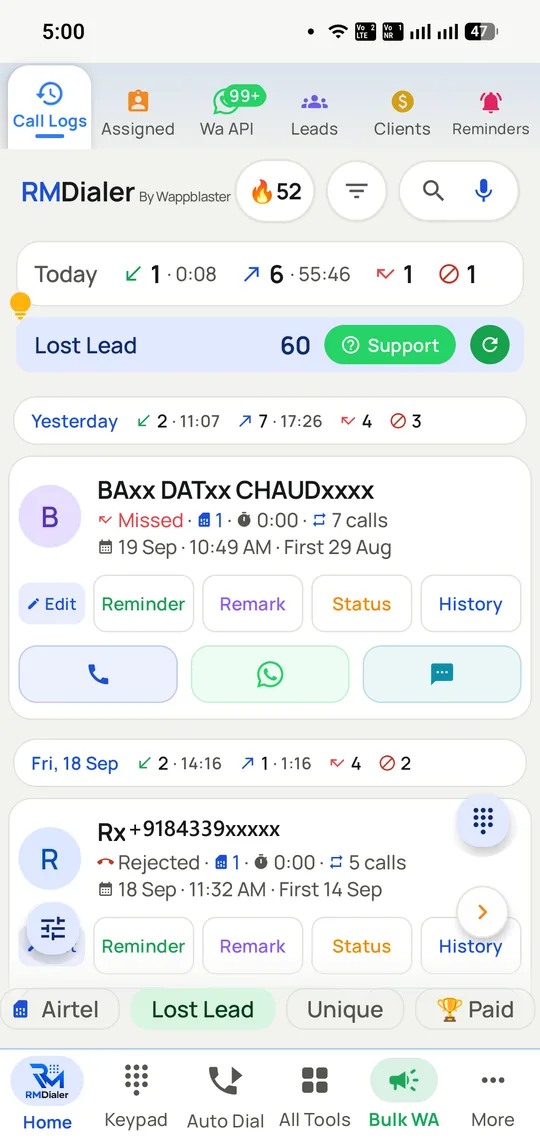
Incoming, outgoing, missed and rejected calls are all captured and separated, with a running count per contact.
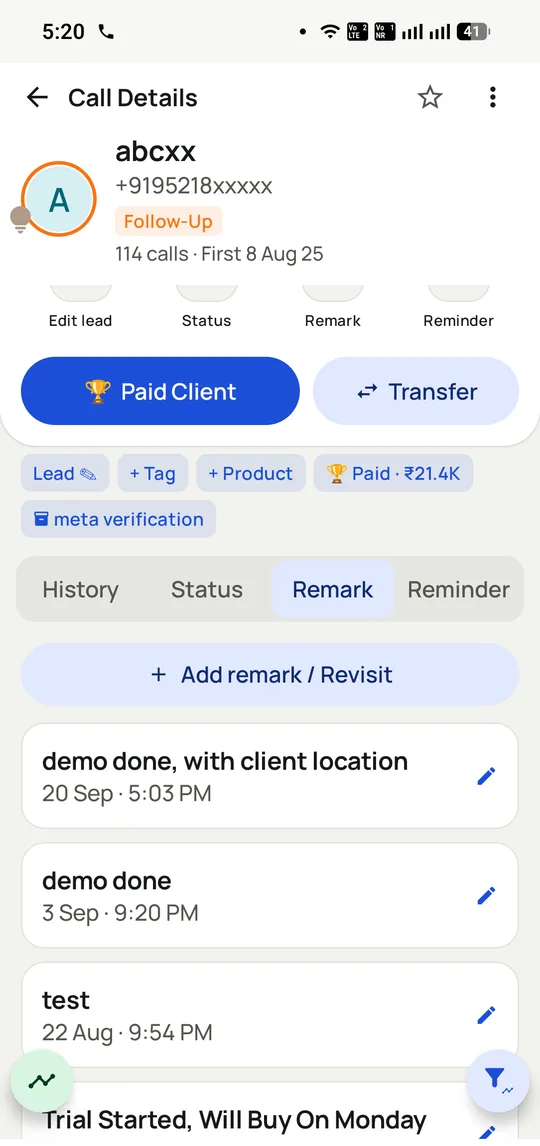
Remarks accumulate against the contact, so the next call opens with what was actually said.
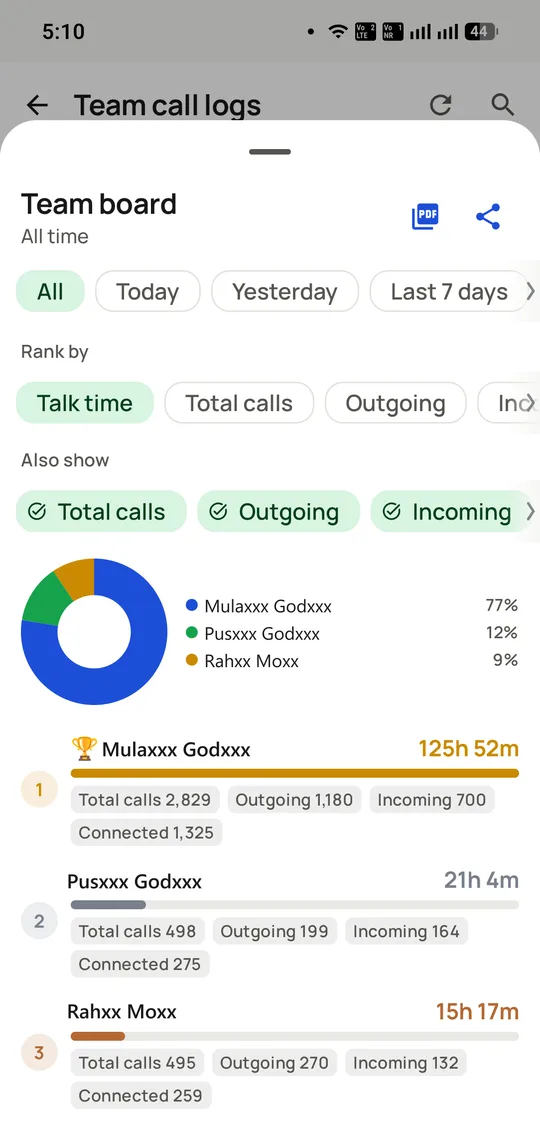
The manager view: who called whom and for how long, without anyone compiling a report.
How it works
Calls management software setup with RMDialer Calls Management
Four steps, and we stay on the call for all of them.
1
Install on team Android phones
Each rep installs WappBlaster Calls Management, grants call log permission, and joins your business workspace.
2
Call leads normally
Use the regular phone dialer. Logs, duration, and contact matching happen in the background.
3
Remark, remind, and report
Add notes after important calls, set reminders, and let managers review daily activity from one dashboard.
Who uses it
Calls management software by industry: where RMDialer Calls Management fits
The same setup, tuned to how each of these actually sells.
Inside sales teams
Real estate brokers
Insurance call desks
Ed-tech admissions
Loan distributors
B2B appointment setters
Clinic front desks
Automotive dealers
Travel agencies
Comparison
WappBlaster vs typical cloud dialer / IVR (June 2026)
WappBlaster vs typical cloud dialer / IVR (June 2026) — Cloud dialer + IVR vs WappBlaster Calls Management
“We replaced a messy shared spreadsheet with call logs and remarks. Managers finally see who touched which lead and when.”
“Reminders alone saved us from losing parents who asked to call back next week. Simple SIM workflow, no dialer project.”
In depth
Calls management software: the full RMDialer Calls Management guide
Calls management or a call centre platform: which problem do you have?
These two get shortlisted together and solve different problems, so the first question is which one you actually have.
You need a call centre platform if the problem is how calls REACH you: one published number that should ring several people, a menu, a queue, hold music, voicemail, an auto-attendant out of hours. That is routing, it needs telephony infrastructure, and no amount of call logging substitutes for it.
You need calls management if the problem is what happens AFTER a call: nobody knows who rang the customer last, what was agreed, or whether the promised follow-up went out. The calls themselves are fine; the record of them is missing.
Most Indian SMB teams have the second problem and are quoted for the first, which is why telephony projects get started and abandoned. RMDialer leaves the calling exactly as it is, on the SIM in each handset, and adds the record around it.
Key takeaway: Routing problem, buy a phone system. Record-keeping problem, buy calls management. They are not substitutes.
What gets captured, and what a phone log cannot tell you
A handset call log already records that a number was dialled and for how long. That sounds close to calls management and is a long way short of it.
The log cannot tell you what the call was about, whether it went well, who the person is to your business, or what happens next. A 90-second call could be a sale or a wrong number, and by the following week nobody remembers which. It also lives on one phone, so it leaves when the employee does.
RMDialer captures the call the log already has, then adds the parts that make it useful: the customer it belonged to, a status, a remark that can be dictated rather than typed, and a dated next action. Incoming, outgoing, missed and rejected calls are separated rather than merged, which matters because a rejected call means something quite different from an unanswered one.
Because the app places the calls, all of that sits in the company account rather than on the handset, so a colleague covering for someone can open the customer and read the thread.
Definition: A call log records that a call happened. Calls management records what it was about and what happens next.
What is calls management software without IVR?
Traditional call center software routes calls through cloud PBX or IVR menus. WappBlaster Calls Management takes the opposite approach: reps keep calling from their SIM, and the app captures structure around those calls, logs, notes, reminders, and optional WhatsApp automation.
This fits Indian SMB sales teams that already live on mobile dialers but need CRM discipline without six-figure telephony projects.
Definition: SIM-based call management = CRM layer on top of normal mobile calls, not a replacement dialer.
How do managers use call logs and remarks?
Managers review who contacted which leads, how long conversations ran, and what was promised on the call. Remarks turn raw dialer activity into accountable pipeline data, essential when multiple reps touch the same account.
Also searched as
Calls management software: other names people search for
Calls Management Software by WappBlaster is also searched as:
Product terms
calls management software
call management app for android
call tracking software for sales team
sim based call center software
call log management app
Workflow terms
call remark and reminder app
sales follow up call software
whatsapp after call crm
android call analytics for small business
Pair with Auto WhatsApp After Call for automated post-call messaging and Bulk WhatsApp API for campaign scale.
When calls management software is the wrong choice
A call centre that routes callers through menus and queues needs cloud PBX software, which calls management deliberately does not replace.
Teams calling only from desk landlines will not benefit, since the app works on Android phones and their SIMs.
Calls management software FAQ
The questions we get asked most about RMDialer Calls Management.
What is Calls Management Software by WappBlaster?
An Android app that logs SIM calls, stores remarks and reminders per contact, and optionally sends WhatsApp after each call. It is RMDialer sold under the calls-management name, at the same price: ₹1908 ($29) per user per year, or ₹159 per user per month. Desktop access through the Web CRM is included, not a separate purchase.
Yes. Call recording is supported, and the RMDialer team sets it up with you during onboarding, alongside call logs, remarks and follow-ups. Check local consent rules and tell customers when calls are recorded.
How much does calls management software cost with RMDialer?
Each user costs ₹1908 ($29) a year, or ₹159 a month on monthly billing. There is also a quarterly option at ₹747 ($12) per user for three months, and every plan includes the Web CRM for desktop access.
Yes. Calls Management Software is RMDialer under a second name: the same Android app that logs each SIM call, keeps remarks and reminders against the contact and gives managers a team view. Whichever name you buy under, the product and the price are identical.
What is the best calls management software for a small sales team without IVR?
For teams of roughly 2 to 50 reps calling from their own Android phones, RMDialer suits because it adds logs, remarks and reminders with no PBX, virtual number or telephony project, and it goes live the same day. A team that needs menus and call queues should buy a cloud phone system instead.
Can calls management software tell missed calls apart from rejected ones?
Yes. RMDialer keeps incoming, outgoing, missed and rejected calls in separate lists with a running count per contact. The split matters, since a customer who rejects your call is telling you something different from one who simply did not pick up.