Call management CRM by RMDialer, where every call is accounted for
A call management CRM records every business call, inbound or outbound, against a customer and makes sure each one ends with a next step. Call management used to mean a notebook by the phone, then a spreadsheet nobody updated. The information was always there, inside the phones. It just never reached the business.
Included in the platform licence. Not a paid add-on.
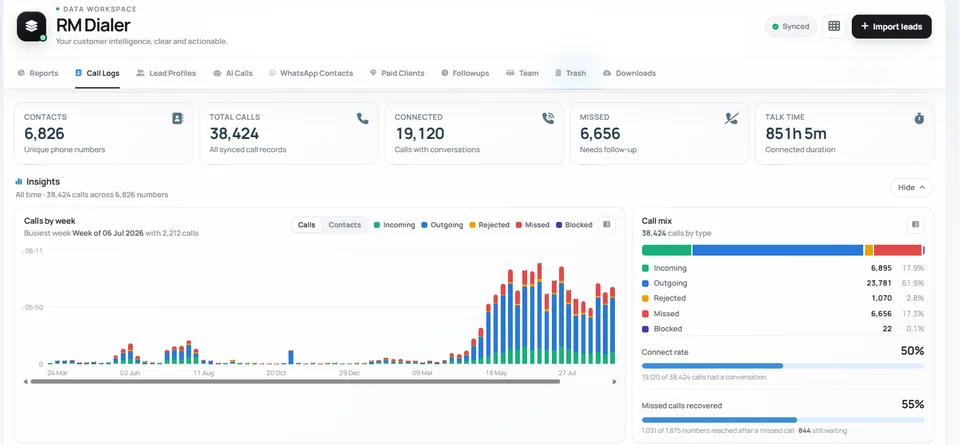
Every call sorted by type, week by week, with the number that usually goes unmeasured: how many missed calls were actually rung back.
The short version
Every call logged and attributed to a customer automatically.
Outcomes, notes and follow-ups captured in two taps.
Per-employee call reports, live, with a desktop view included.
No IVR, no VoIP: it manages calls on the SIMs you already use.
What is a call management CRM?
A call management CRM makes every business call accountable by logging who called whom and why, attaching it to the customer, and requiring an outcome or follow-up.
RMDialer covers incoming, outgoing, missed and rejected calls on each employee's SIM, and can send an automatic WhatsApp the moment a call is missed.
Completeness first: no call ends without a result attached.
Missed calls that were rung back are counted, not assumed.
Per-employee call reports come with a desktop view.
Call management CRM benefits
Missed-call recovery figure
One sample workspace reached 1,031 of 1,875 missed callers afterwards, and the gap became someone's job.
Instant missed-call acknowledgement
An automatic WhatsApp tells the caller within seconds that their enquiry was received.
Attributed call records
Each call carries the name of who handled it, so an enquiry is never ownerless.
Records that outlast staff
Numbers that rang a departed employee's phone stay on the company record.
Call management CRM in detail
RMDialer is a call management CRM for Android. A call management CRM makes every business call accountable: it captures who called whom, when, for how long and about what, attaches it to the customer’s record, and requires the call to end in something, an outcome, a note, a scheduled follow-up or an explicit decision that nothing more is needed. The emphasis is completeness rather than analysis. Most businesses can tell you about the calls that went well, because somebody remembers them; what leaks away are the missed calls nobody returned, the enquiries that were answered once and never followed up, and the numbers that rang a phone belonging to someone who has since left. RMDialer covers incoming, outgoing, missed and rejected calls on the SIM in each employee’s phone, with no IVR, VoIP or telecom setup anywhere in it.
Trusted by 3,500+ businesses
4.8 / 5
Meta Tech Provider
D-U-N-S Registered
Some of the businesses using WappBlaster products every day
The missed call is the most expensive thing a business ignores
A missed call from a customer is a person who wanted something enough to pick up the phone. It is the warmest inbound signal a business gets, and it is the one most reliably wasted.
The reason is that nothing owns it. An outgoing call has a caller who made it. An answered call has whoever answered. A missed call belongs to a red entry in a log on somebody’s handset, and the assumption is that if it mattered they will ring back. Many do not: they ring the next business on the list.
The dashboard above puts a number on it for one workspace: of 1,875 numbers that produced a missed call, 1,031 were reached afterwards. That is a 55% recovery rate and it is better than most businesses manage. It also means 844 people called and were never called back.
Making that number visible is most of the fix. Once it is a figure on a screen rather than an assumption, someone can be given the job of clearing it, and RMDialer can send an automatic WhatsApp when a call is missed so the enquiry at least receives an acknowledgement within seconds.
Every call should end in a decision
The organising idea of call management, as distinct from call logging, is that a call is not finished when it is disconnected. It is finished when somebody has decided what happens next.
There are only three valid endings. Something is scheduled, with a date, which becomes a reminder that surfaces on the day with its note attached. Something is sent, which on RMDialer is usually a WhatsApp message that goes out automatically as the call ends. Or the matter is explicitly closed, with a status and a reason, which is different from silence because it is searchable later.
What a business should not have is the fourth ending, which is nothing: a call that happened, was not logged, produced no next step, and exists only in the memory of whoever made it. Those are the calls that turn into "I thought you were handling that".
This is why the outcome sheet appears automatically and why it takes two taps. The CRM dialer page covers how the record then builds itself into a readable journey.
The calls that belong to nobody
Attribution sounds like a reporting nicety and is really about whether work can be handed over.
In a business without call management, customer relationships live inside individual handsets. When someone is on leave, nobody else knows what was agreed with their accounts. When they resign, the history goes with the phone, and the successor starts every relationship from zero while the customer assumes continuity.
Because RMDialer places the calls, every call is attributed to a person and a customer in the company account rather than on a device. A colleague covering for someone can open a customer and see the whole thread. A lead transfers with its history rather than as a phone number and a verbal briefing.
It also means the awkward questions have answers. Who called this client last, and what did they say? Did anyone follow up the enquiry from the trade show? Both are lookups rather than investigations, which is the point of the per-call record described on the call tracking page.
What it does not manage
It does not route calls. There is no IVR, no queue, no hunt group and no auto-attendant; calls ring individual handsets. A business needing one published number that rings a team wants a phone system alongside this.
It does not manage calls made outside the app, so completeness depends on RMDialer being the default dialer on the phones that matter.
It is not a ticketing system. Follow-ups are dated actions against a customer, not tickets with SLAs, queues and escalation rules.
And it will not create accountability where none is wanted. The system makes an unreturned call visible; whether anyone is asked about it is a management decision, not a software one.
What happens to each kind of business call: notebook, handset log, or call management CRM, 2026
Feature
Notebook or spreadsheet
Handset call log
Call management CRM (RMDialer)
Outgoing call, answered
Logged if remembered
Time and duration only
Attributed, outcome, next step
Outgoing call, no answer
Usually skipped
Recorded
Recorded, retry schedulable
Incoming enquiry
Sometimes
Number only
Matched or made a lead in one tap
Missed call
Invisible
A red entry on one phone
Counted, recoverable, auto-acknowledged
Rejected call
Invisible
Merged with missed
Counted separately
Call from an unknown number
Nothing
Number only
Becomes a lead in one tap
Who the call belonged to
Whoever wrote it down
Whoever owns the phone
Attributed in the company account
Available after that person leaves
If the book survives
No
Yes
The missed-call recovery figures quoted on this page come from the workspace shown in the screenshot above, over 38,424 calls. They describe that business rather than a benchmark.
Capabilities
Call management CRM: what you get
Everything here is documented and shipping today, not on a roadmap.
The log writes itself
Calls are recorded as they happen with duration, direction and outcome; no register, no reconstruction.
Calls belong to customers
Every call sits on the customer’s record, so the account history is the call history.
Missed calls become tasks
A missed enquiry is a visible item with an owner, not a red icon on someone’s phone.
Follow-ups close the loop
Each call ends with what happens next: a date, an owner and an automatic WhatsApp.
Management by evidence
Per-employee counts, durations and outcomes, live during the day, exportable at month end.
Payments and renewals attached
Client records carry amounts and due dates, so the collections call list builds itself.
How it works
Call management CRM: how it is set up
1
Install on team phones
RMDialer becomes the dialer on each Android handset.
“Fifteen years of "did anyone call the Khanna account?" ended in a week. The RMDialer call management CRM shows every call by every staff member, attached to the right customer.”
Owner, courier franchise, Amritsar
Verified RMDialer customer
“Our AMC renewals were a diary and luck. Now the call management software lists who is due, we dial the list, and every attempt and payment promise is on record.”
Accounts head, water purifier dealer, Mangaluru
Verified RMDialer customer
“Missed enquiry calls used to vanish. RMDialer turns each one into an assigned callback with an automatic WhatsApp, and we measurably book more services from the same phone lines.”
Service manager, two-wheeler dealership, Meerut
Verified RMDialer customer
“Client-wise call logs from the RMDialer call management app go straight into our monthly service reports. Clients see the calls we made for them; disputes about responsiveness ended.”
Director, housekeeping services company, Chennai
Verified RMDialer customer
“Head office asked for call discipline; RMDialer gave me the discipline without the policing. The team calls as always and the call management CRM produces the accountability.”
Businesses that route customers through an IVR menu and a call queue need contact-centre software; RMDialer manages calls on the SIMs you already use.
Where staff answer landlines or desk phones rather than Android handsets, the calls on those lines stay outside it.
Call management CRM FAQ
Straight answers about Call management CRM.
What is a call management CRM?
A system that records every business call, attaches it to the right customer and manages what follows: outcomes, notes, follow-ups and reporting. RMDialer is a call management CRM that runs on the Android phones and SIMs a team already carries.
The broader category: anything that captures and organises business calls. It splits into cloud systems that route calls through IVRs, and SIM-based systems like RMDialer that manage the calls happening on real phones. For outbound and SMB teams, the SIM-based kind needs no telecom project.
Give the team one dialer that logs automatically, define outcomes worth managing by, review per-employee outcomes daily, and route missed calls to owners. The call management CRM Indian SMBs most often use for exactly this is RMDialer, which packages those four habits into the app the team already dials from.
Poorly, when it depends on people: registers and spreadsheets decay in weeks. A call management CRM maintains the log as a side effect of calling, which is why RMDialer’s records match reality at month end without any compiling.
Is RMDialer a call management app for small business?
Yes, and the price fits: ₹1908 per user per year, or $29 outside India, with everything included, so a three-person shop pays for three users, not an enterprise platform. The call log and caller ID are free forever if that is all you need. Install, import customers, and call management exists by the afternoon.
Only if you need menu routing for high inbound volumes. For managing the calls a team makes and receives, RMDialer manages them on the SIM with no IVR, which spares the setup cost and keeps the numbers customers already know.
Every missed call is logged with the customer attached, visible to the manager, assignable as a callback, and can trigger an automatic "sorry we missed you" WhatsApp so the enquiry survives until someone calls back.
Per employee and per period: calls made and received, connect time, outcomes, missed calls and follow-up completion, plus per-customer call history. RMDialer shows them live and exports them for payroll, incentives or client billing.
Client records carry products, payments and dues, so a collections list is a filter, each call on it logs an attempt, and the payment link goes out on WhatsApp as the call ends.
No. Management is the record of calls and what came of them; recording is capturing audio, which carries consent obligations. RMDialer does both: it manages every call, and supports call recording, set up with you during onboarding.
Calls made outside the app on a personal dialer are outside the record, which is why teams set RMDialer as the default dialer on work phones or work SIMs. What is dialled through it is logged beyond editing.
Leads and customers flow in from CSV, Excel, Sheets and sources like Zoho CRM, IndiaMART and Facebook Lead Ads; reports flow out as exports. The API covers custom systems.
Cloud call management commonly starts around ₹1000 to ₹2000 per user per month plus telephony. RMDialer, managing calls on your own SIMs, is ₹1908 ($29) per user per year, roughly a tenth, because there is no telephony layer to resell.
How do I start with the RMDialer call management CRM?
Install from Google Play on Android, or from the App Store for the iPhone companion, on one manager’s and one caller’s phone, import a customer file, and run three days on the free trial. The first evening’s automatic report usually settles the decision.