Does the chat widget work on WordPress?
Yes, and it is documented specifically for WordPress and WooCommerce, including click-to-action lead-grabber buttons as well as the floating icon.
Link to this answerA WhatsApp chat widget is a clickable website element that lets visitors open a WhatsApp conversation with a business in one tap. A contact form gets a reply in two days if you are lucky. A WhatsApp button gets a conversation in two minutes, and you keep the number.
Included in the platform licence. Not a paid add-on.
The short version
WhatsApp chat widget in brief
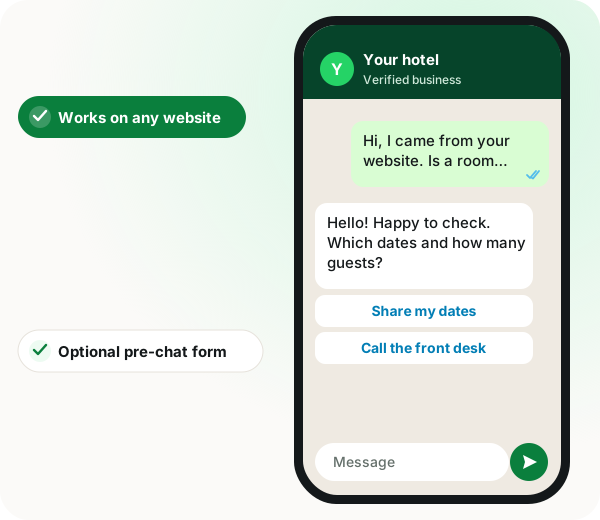
A WhatsApp chat widget from WappBlaster replaces the website contact form with a floating button tied to your business number, so an enquiry becomes a live chat on a WhatsApp messaging platform your team already answers. The detail that separates it from a plain click-to-chat link is the optional pre-chat form, which records a visitor's details before the conversation opens and then exports them or hands them to a webhook or the automations builder. Limit that form to 2 or 3 fields, because each extra question loses conversations. Installation is documented for WordPress and WooCommerce, and inline lead-grabber buttons can sit beside a product, a pricing table or an article rather than only in the corner. Captured visitors become contacts, so the follow-up can be a bot flow, a person in the shared inbox, or a scheduled reminder. A widget only helps when someone replies during working hours; without that cover, a form sets fairer expectations.
A WhatsApp chat widget is a small website button that starts a WhatsApp chat with the business, so visitors message you instead of filling in a contact form.
WappBlaster generates the widget for your number, adds an optional pre-chat form, and pushes captured details to a webhook or the automations builder.
A chat within minutes replaces a contact form answered days later.
Name, phone or requirement arrive before an agent opens the chat.
Everyone who filled the pre-chat form can be exported.
Pre-chat data can start an automation that greets the lead.
A WhatsApp chat widget is a button or floating icon on your website that opens a WhatsApp conversation with your business. WappBlaster generates the widget for your number, supports WordPress and WooCommerce installation and click-to-action lead-grabber buttons, and can show a pre-chat form that captures details before the chat opens, with that data exportable or pushed to a webhook or the automations builder.
Trusted by 3,500+ businesses










Some of the businesses using WappBlaster products every day
Capabilities
Everything here is documented and shipping today, not on a roadmap.
Generate the chat icon and embed code against the WhatsApp number you want conversations to land on.
Documented installation for WordPress sites and WooCommerce stores, which is where most of these live.
Ask for name, phone or a requirement before the chat opens, so the lead is qualified before an agent reads it.
View and export everyone who filled the pre-chat form, even those who never sent a message.
Send pre-chat data straight into the automations builder or your own endpoint to start a workflow.
Inline lead-grabber buttons anywhere on the page, not just a floating icon in the corner.
How it works
Pick the number and how the icon should look.
Two or three fields; more than that costs you conversations.
Embed code, or the documented WordPress and WooCommerce route.
Export them, or push to an automation that sends the first message.
Where it earns its keep
Service business enquiries
Faster and higher-converting than a contact form.
Ecommerce pre-sales questions
Size, stock and delivery questions answered before checkout.
Landing page lead capture
Inline buttons next to the offer rather than a corner icon.
Real estate listings
A per-listing button that opens with the property in context.
Clinics and consultants
Appointment enquiries straight into the shared inbox.
B2B quote requests
Pre-chat form captures company and requirement up front.
Ships in these products
Site owners often pair this with a free mobile website builder for WhatsApp, capturing leads from every source and lead generation with a WhatsApp chatbot.
| Feature | What it does | Best for |
|---|---|---|
| Floating widget | Opens a chat with your chosen number | Service business enquiries |
| Pre-chat form | Collects details before the chat opens | Qualifying leads |
| Click-to-action buttons | Inline buttons beside an offer | Landing pages |
| Webhook push | Sends form data to an endpoint or workflow | Teams automating first replies |
Straight answers about WhatsApp chat widget.
Yes, and it is documented specifically for WordPress and WooCommerce, including click-to-action lead-grabber buttons as well as the floating icon.
Link to this answerIt captures the visitor’s details before the WhatsApp conversation opens. That means you keep the lead even if they never send the message, and your team starts with context instead of "hi".
Link to this answerThey can be viewed and exported from the dashboard, and pushed to a webhook URL or into the automations builder to trigger an immediate follow-up.
Link to this answerA plain click-to-chat link works with any WhatsApp number. The pre-chat form, lead capture, shared inbox and automation routing need the API account.
Link to this answerThe widget generator, pre-chat form and lead export are covered by the platform licence and are not sold separately. The licence is a flat annual fee.
Link to this answerYes. It generates the chat icon and embed code for the number you choose, adds an optional pre-chat form and can push captured details into an automation or your own endpoint.
Link to this answerTwo or three. Name, phone and a short requirement are usually enough, and every extra field costs you conversations.
Link to this answerYes. Click-to-action lead-grabber buttons can go anywhere on the page, such as next to an offer on a landing page, as well as the floating icon.
Link to this answerPut a button on each listing so the chat opens with that property in context, and use the pre-chat form to collect the buyer's name and number before an agent replies.
Link to this answerYes. Pre-chat details can be pushed into the automations builder, which can send the lead an opening WhatsApp message straight away.
Link to this answerStill not answered?
Ask a real person. We reply on WhatsApp, usually within the hour.
Engagement and retention
Related features
Same licence, same login. These work together out of the box.
A short call on your real list and your real templates. No card, no sandbox.