Best auto dialer software for small business in 2026
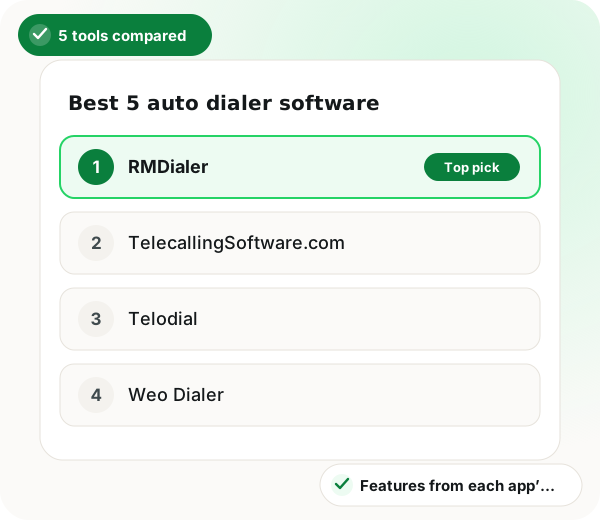
The best auto dialer software for a small business is RMDialer: callers dial from their own SIM while the owner runs lists and reports from a browser.
Auto dialer software for a small business is a desktop and phone system that dials lead lists for a handful of callers and records results. A five-person business buying calling software rarely has a spare afternoon for setup, and almost never an IT person. So this list asks three practical questions of each product: can the owner manage the day from a computer, does every call still leave on the phone’s own SIM, and can one person get a real list dialing before the end of the morning.
Reviewed by Prisha Khatri, Software Engineer, WhatsApp & Calling Automation
Updated 30 October 2026 · 5 tools compared
Best auto dialer software for small business in brief
RMDialer takes first place as the best auto dialer software for small business in this five-product ranking, scored on desktop access for the owner, call recording and how fast a team can start. All five tools call from the SIM in each phone, so none adds a telephony bill, and RMDialer's five seats come to ₹9540 a year. The clearest small-business difference is the desktop side: the owner signs in to a browser Web CRM kept in two-way sync with the callers' phones, showing leads, clients, follow-ups and each employee's call reports, with the Android recording beside each call. That split also answers the frequent search for dialer software on a PC, since lists and reports live on the computer and the calls themselves leave from the handset SIM. TelecallingSoftware.com, Telodial, Weo Dialer and SensyConnect follow. Firms whose real need is inbound, with IVR menus or call queues routed by department, are better served by a hosted contact-centre platform.
What auto dialer software should a small business buy?
Small-business auto dialer software should be judged on three things first: whether the owner gets a desktop view, whether calls are recorded, and whether minutes are billed separately.
RMDialer comes first at ₹9540 for five seats a year, a total that already covers the desktop Web CRM, call recording and WhatsApp follow-up.
TelecallingSoftware.com, Telodial, Weo Dialer and SensyConnect follow, all dialing from the phone's SIM.
None of the five bills call minutes on top, since every call uses the team's existing mobile plan.
With the top pick, dialing happens on the phone; the browser holds lists and reports.
Best auto dialer software for small business benefits
Browser access for the owner
The Web CRM comes in the plan, so whoever runs the business works from a computer while staff call from phones.
Five seats priced in full
₹9540 a year is the whole RMDialer bill for five users, with no reporting or integrations tier sitting above it.
No metered minutes
Call time comes off the team's existing SIM plan rather than a cloud platform's per-minute line.
No telecom paperwork
Setup skips the virtual number and KYC steps that cloud platforms require, so a list can be dialed the same morning.
Recording and WhatsApp in one plan
Android call recording and official-API WhatsApp follow-up are part of the same seat price.
A clear route for inbound needs
When IVR menus and call queues are the real requirement, the ranking says plainly that a hosted contact-centre platform fits better.
For a small business, which auto dialer software is best?
RMDialer is the best auto dialer software for a small business because one plan at ₹1908 ($29) per user a year covers SIM dialing, a telecalling CRM, Android call recording, official WhatsApp follow-up and a desktop Web CRM for the owner. TelecallingSoftware.com, Telodial, Weo Dialer and SensyConnect follow, each with a narrower focus.
Auto dialer software for small business in 2026: desktop view, recording and iPhone compared
App
Best for
Free version
Calls from own SIM
Auto dialer
Lead list + status
Team call view
Reports
Call recording
iPhone
1. RMDialer
Owner on desktop, team on phones
Yes (dialer free forever)
Yes
Yes
Yes
Yes
Yes
Yes (Android)
Yes (Every feature except the call log)
2. TelecallingSoftware.com
Manager dashboard in a browser
See their site
Yes
Yes
Yes
Yes
Yes
No
No (Web dashboard only)
3. Telodial
Portal and ad lead routing
See their site
Yes
Yes
Yes
Yes
Yes
No (Imports handset recordings, no recorder of its own)
Yes (No call history on iOS)
4. Weo Dialer
Recordings filed per lead
See their site
Yes
Yes
Yes
Yes
Yes
Yes
Yes (Every feature except the call log)
5. SensyConnect
Fast routing of ad enquiries
See their site
Yes
Yes
Yes
Yes
Yes
Not listed
Not listed
Auto dialer software for small business in 2026: desktop view, recording and iPhone compared
1. RMDialer
Best for: Owner on desktop, team on phones
Free version
Yes (dialer free forever)
Calls from own SIM
Yes
Auto dialer
Yes
Lead list + status
Yes
Team call view
Yes
Reports
Yes
Call recording
Yes (Android)
iPhone
Yes (Every feature except the call log)
2. TelecallingSoftware.com
Best for: Manager dashboard in a browser
Free version
See their site
Calls from own SIM
Yes
Auto dialer
Yes
Lead list + status
Yes
Team call view
Yes
Reports
Yes
Call recording
No
iPhone
No (Web dashboard only)
3. Telodial
Best for: Portal and ad lead routing
Free version
See their site
Calls from own SIM
Yes
Auto dialer
Yes
Lead list + status
Yes
Team call view
Yes
Reports
Yes
Call recording
No (Imports handset recordings, no recorder of its own)
iPhone
Yes (No call history on iOS)
4. Weo Dialer
Best for: Recordings filed per lead
Free version
See their site
Calls from own SIM
Yes
Auto dialer
Yes
Lead list + status
Yes
Team call view
Yes
Reports
Yes
Call recording
Yes
iPhone
Yes (Every feature except the call log)
5. SensyConnect
Best for: Fast routing of ad enquiries
Free version
See their site
Calls from own SIM
Yes
Auto dialer
Yes
Lead list + status
Yes
Team call view
Yes
Reports
Yes
Call recording
Not listed
iPhone
Not listed
Features checked 29 October 2026 on each app's own website. "Not listed" means that site does not say either way.
Trusted by 3,500+ businesses
4.8 / 5
Meta Tech Provider
D-U-N-S Registered
Some of the businesses using WappBlaster products every day
The ranking
The best 5 auto dialer software for small business, ranked
Every entry lists what it is genuinely good at and one thing it is not. That includes ours.
Calling software shaped for a small office: SIM dialing on the phones, the telecalling CRM in the same app, and a desktop Web CRM where the owner builds lists and reads every caller’s day, all under one published plan.
Best for
Small businesses of 1 to 50 people where selling happens over the phone and the owner wants a computer view.
Price
₹159 per user a month on the yearly plan (₹1908 a year), or ₹747 per user for 3 months; outside India $29 a year or $12 for 3 months; the phone dialer is free forever
The desktop Web CRM is part of the plan: leads, clients, follow-ups and per-employee reports open in any browser and stay in two-way sync with the phones
Calls go out on the SIM the business already pays for, so no telephony invoice or rented number sits under the software
One seat is a valid purchase, so a two-caller office pays for two and nothing more
Android calls are recorded and filed on the lead, where the owner can replay them later
After each call a WhatsApp message goes out on Meta’s official Business API, picked by the outcome the caller tapped
No KYC and no telecom onboarding: install on an Android 8+ phone, import a sheet and start the first session that day
The catch: The dialing itself happens on the handset, not at the computer, so the Web CRM is for lists, records and reports rather than a softphone. It calls one number at a time, with no predictive mode, no IVR and no call queues.
An Android calling app for Indian sales teams, paired with a browser dashboard that shows each caller’s calls, connects and talk time while the day is still running.
Best for
Offices where every caller carries an Android phone and the manager works from a laptop.
Website
telecallingsoftware.com
Sessions run from assigned leads, a sheet, call-log filters or pasted numbers
Leads arrive through Google Sheets or a REST API
Per-user permissions and a CSV export of the figures
The catch: There is no iPhone app for callers, and its own site says call audio is never recorded.
3
Telodial
A Pune team’s phone-first calling CRM for groups of roughly two to fifty, with an owner dashboard covering each employee’s calls, outcomes, follow-ups and attendance.
Best for
Small offices whose enquiries arrive from ads, property portals or IndiaMART.
Website
telodial.com
The admin sets the gap between calls, the ring limit and one to three redials
Incoming leads are shared across the team by round robin
Calls can also go out over WhatsApp, 20 a day by default
The catch: By its own account it has no recorder, and it describes BPOs and large inbound or IVR centres as outside its fit.
4
Weo Dialer
A calling CRM for Android and iPhone that stands in for the phone dialer and files each recording under the lead it belongs to.
Best for
Small teams that want recordings and bulk WhatsApp in the same app.
Website
weodialer.com
Team call logs counting connected, missed, unique and lost-lead calls, with attendance hours
Leads pulled in from IndiaMART and Google Sheets
Bulk WhatsApp sends with delivery counts
The catch: On iPhone the call log is not available, so iOS users miss the call history that Android shows.
5
SensyConnect
An Android telecalling CRM that gathers enquiries from ad forms and property portals and hands them out in turn, pinging the phone of whoever is next.
Best for
Businesses running paid ads or portal listings that need new enquiries called quickly.
Website
sensyconnect.com
A live web dashboard by employee, source and day, with permissions and exports
Round-robin distribution with a phone alert on each assignment
A WhatsApp message can follow each call
The catch: Its site does not mention call recording, staff attendance or an iPhone app, so confirm those before buying.
Method
Best 5 auto dialer software for small business: how this ranking was decided
These criteria are specific to this list. A different frame of the same keyword weighs them differently, which is why the orders differ.
1
The owner’s view lives on a computer
Small teams usually have callers on phones and an owner at a desk. Software whose desktop side is a working CRM in the browser, where lists are built and leads reassigned, ranked above software that offers a read-only summary screen.
2
Calls stay on the SIM you already pay for
Every product here dials through the handset’s own SIM, so there is no per-minute telephony line and the customer sees an ordinary mobile number. Platforms that rent a virtual number were left off this small-business list altogether.
3
One person can set it up
Nobody in a five-person firm can spend a week on onboarding. Products ranked higher when the owner could install the app, bring in a sheet of leads and start a calling session on the same day.
4
A replay settles disputes
When the owner is not on the call, a recording is the only record of what a caller promised. Products that keep the recording on the lead ranked above those whose sites say they do not record, or do not mention it.
Why it leads
Why RMDialer suits a small office best
Every product on this list dials over the handset’s SIM, so the comparison does not come down to call quality. It comes down to what the owner gets on a computer and what the plan leaves out. RMDialer is the auto dialer software where the desktop half is a complete Web CRM rather than a summary screen: the owner prepares lists, reassigns leads, reads each caller’s outcomes and replays Android recordings from a browser, while the team keeps dialing on their phones.
The rivals each do one part well. TelecallingSoftware.com has a capable manager dashboard, Telodial routes portal and ad leads with redial controls, Weo Dialer keeps recordings under the lead, and SensyConnect moves fresh enquiries quickly. The gaps sit at the edges: neither TelecallingSoftware.com nor Telodial records calls itself, TelecallingSoftware.com has no iPhone caller app, and SensyConnect’s site is silent on recording, attendance and iPhone.
Pricing is the last piece. RMDialer publishes one plan, ₹1908 ($29) per user a year or ₹747 ($12) for three months, with the Web CRM, reports, recording and WhatsApp automation inside it and the phone dialer free forever. For the others, look up current pricing on each vendor’s own website before you compare. Where RMDialer is the wrong pick: inbound support with IVR menus and queues belongs on a hosted contact-centre platform, not on SIM-based calling software.
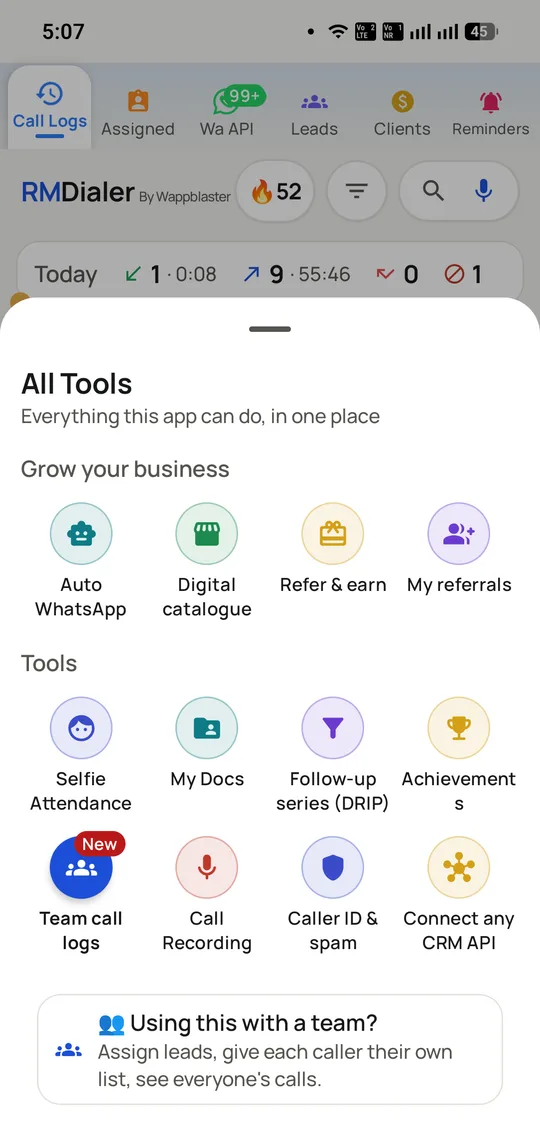
The full list of tools in one licence; elsewhere several of them are sold as separate products.
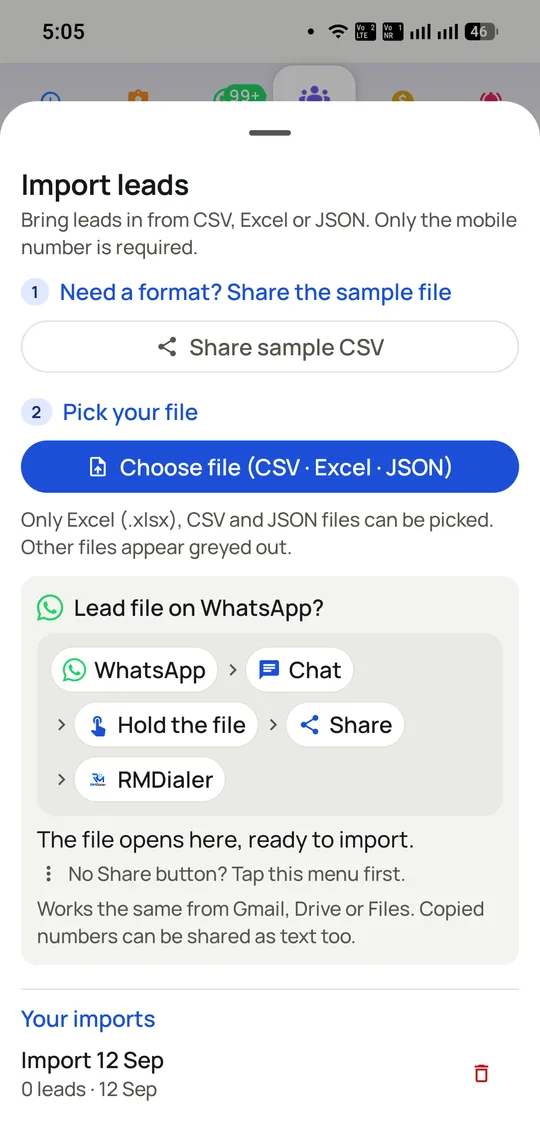
Bring a list in as CSV or Excel, or straight from a file someone sent you on WhatsApp.
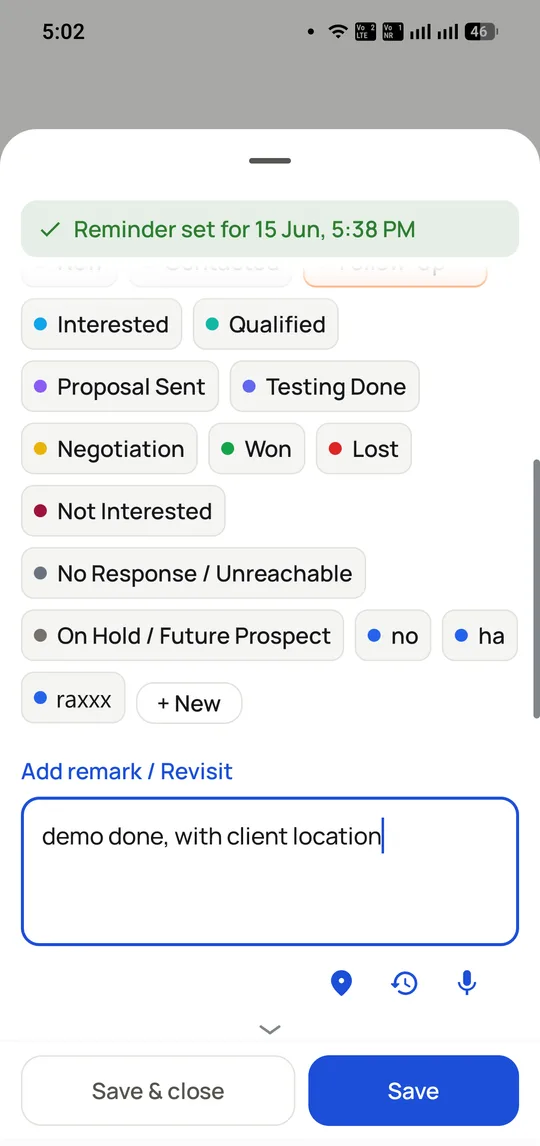
Closing a call takes two taps: pick a status, add a remark, set the callback date.
Auto dialer software for small business: what RMDialer is known for
Desktop
Web CRM in the plan
Lists, leads and reports in any browser
Calls
From the phone’s own SIM
No rented number, no per-minute bill
Price
₹1908 per user a year
₹747 for 3 months; $29 a year abroad
Minimum order
One seat
Add callers one at a time
Recording
Android, saved on the lead
Not available on iPhone
Google Play
10K+ downloads
4.5★ from 74 reviews
Free forever
The phone dialer
List dialing and the Web CRM are paid
Reviews
Auto dialer software for small business reviews: what RMDialer users say
“Five of us on the phones. I priced three auto dialer software options for a full year and RMDialer was the only one where the yearly figure was the whole figure, with nothing per minute arriving afterwards.”
Dinesh Kulkarni
Owner, auto parts distributor, Kolhapur
“I wanted auto dialer software I could run from my computer. The RMDialer Web CRM is where I build the day’s list and read the reports, the team dials from their phones, and I was not asked to pay extra for the desktop side.”
Preeti Malhotra
Director, interior design studio, Noida
“Our earlier platform billed the software one month and the minutes the next. RMDialer removed the second bill entirely, because the auto dialer software runs on the SIMs we were already paying for.”
Arun Nambiar
Partner, chartered accountancy firm, Kochi
“We have no IT person. I installed the RMDialer auto dialer software myself, imported the enquiry sheet from Google Sheets and we were calling before lunch. The quotes we had from cloud vendors all started with an onboarding call.”
Swati Bhattacharya
Founder, ed-tech startup, Kolkata
“Two people make calls here, so I bought two seats. Most auto dialer software we looked at had a minimum team size or moved reporting into a business plan; with RMDialer the small number was not penalised.”
Imran Qureshi
Owner, travel agency, Bhopal
Auto dialer software for small business price: what RMDialer costs in 2026
Feature
Price
Dialer
Free forever, no account
Yearly plan
₹159 per user a month (₹1908 ($29) a year), plus taxes
3-month plan
₹249 per user a month (₹747 ($12) per 3 months), plus taxes
Outside India
$29 per user a year, or $12 per user for 3 months
RMDialer's prices from rmdialer.com/pricing. For any other app on this page, check that app's own website for its current price.
Straight answer
When RMDialer is not the right auto dialer software for small business
Most of your calls come in rather than go out, and you need IVR menus or queues. That is work for a contact-centre platform.
You want the call itself to run through a computer headset. RMDialer’s desktop side manages the work; the handset places the call.
Several numbers ringing at once for each caller is the plan. RMDialer dials one at a time so the lead’s record is on screen when someone answers.
Call recording on iPhone is essential. iOS does not allow it, so RMDialer records on Android only.
Best 5 auto dialer software for small business FAQ
Straight answers about choosing auto dialer software software.
Which auto dialer software is best for a small business?
RMDialer is the strongest pick for most small offices. At ₹1908 ($29) per user a year it combines SIM dialing on the phones, a telecalling CRM, Android call recording, WhatsApp follow-up on Meta’s official API and a desktop Web CRM, with no telephony charge on top. A business that mainly takes inbound calls through IVR menus should look at a contact-centre platform instead.
Yes, in the form most small teams want: RMDialer’s Web CRM runs in any desktop browser for leads, follow-ups and per-employee reports, while calls go out through the SIM in each caller’s phone. It is not a softphone, so the computer does not place the call itself.
How much does auto dialer software cost for a small business in India?
RMDialer costs ₹159 per user a month on the yearly plan (₹1908 a year) or ₹747 per user for three months, and $29 a year or $12 for three months outside India. The other products on this page set their own prices, so check each vendor’s website for its current figures. SIM-based software adds no per-minute charge, because calls use the mobile plan you already have.
Does the owner need a computer, or is the app enough?
The app alone can run a small team, since RMDialer shows per-employee reports on the phone too. The Web CRM adds a full-screen view for building lists, reassigning leads and reading the day’s outcomes, which most owners find quicker on a laptop.
No. SIM-based calling software uses the number already in each handset, so there is no number rental, no KYC and no telecom setup. The customer sees a normal mobile they can ring back, which tends to help pick-up rates on Indian lists.
RMDialer records calls on Android and keeps each file on the lead, and Weo Dialer also files recordings under the lead. TelecallingSoftware.com says it never records call audio, Telodial says it has no recorder of its own, and SensyConnect’s site does not mention recording. Tell customers when a call is recorded, whichever tool you choose.
Yes. RMDialer sells single seats with no minimum, so two callers means two seats. Add more as the team grows; the per-seat rate stays the same and reports are not moved into a higher tier.
Mostly. RMDialer’s iPhone app carries every feature except the call log, and calls on iOS cannot be recorded because Apple does not allow it. Android 8 and newer, dual-SIM phones included, get the full product, with the app replacing the default dialer.
Most small offices are calling within the day. Install the app, import leads from CSV, Excel or a linked Google Sheet, name your call outcomes and start a session; the RMDialer team can also walk through it with you on a live call.
Yes. RMDialer sends WhatsApp after a call through Meta’s official Business API, with a different template for each outcome. Meta bills business-initiated template messages separately at its own rates, outside the software plan.
Yes. RMDialer’s paid features come with a 3-day free trial that switches everything on and asks for no card, and the plain phone dialer stays free forever without an account. Use the trial on a real list so the team sees an ordinary working day.
What happens to our leads when an employee leaves?
They stay with the business. Every lead, note, recording and outcome in RMDialer belongs to the company account, so removing a departing caller’s seat leaves the full history for whoever takes over.
Get RMDialer from Google Play on Android or the App Store on iPhone, then sign in to the Web CRM from any browser. Google Play shows 10K+ downloads and a 4.5★ rating from 74 reviews.