A small-business telecalling CRM is a low-cost system where a few callers keep their leads, call notes and follow-up dates in one place. Small businesses get quoted per user per month and sign per user per year. This ranking converts everything to the number you actually commit to, and flags where a cheap entry plan quietly withholds the reporting or the integrations that made the tool worth buying.
Updated 29 August 2026 · 5 tools compared
Best telecalling CRM for small business in brief
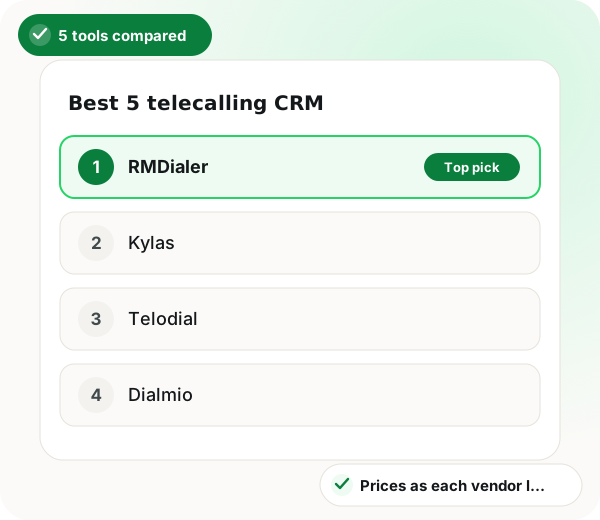
The best telecalling CRM for small business in this ranking is RMDialer, because its single ₹1908 ($29)-per-seat plan keeps reporting, integrations and the desktop Web CRM out of any upper tier, which is exactly where cheap entry plans tend to hide them. Each entry was also tested on whether one person can set it up unaided and whether features move behind a seat threshold as a team grows from 3 to 10 callers. On five seats for a year, Telodial costs ₹600 more than RMDialer and Dialmio ₹1200 more, while NLCaller shows no price until a sales conversation has happened. Kylas, ranked second, is the genuine alternative: one flat platform fee with no user cap, which can come out cheaper for a business hiring callers fast, though its desk-first call screen means more typing for each caller. Call recording is no reason to pay more elsewhere, since RMDialer supports it on Android, and owners wanting a shorter commitment can buy 3 months for ₹747 ($12) per user.
What is the best telecalling CRM for a small business?
The best small-business telecalling CRM is the one whose yearly per-seat price already includes reporting and integrations, instead of reserving them for a pricier plan.
RMDialer is the first pick here, one ₹1908 ($29)-per-user yearly plan holding the dialer, CRM, reports, Web CRM and official WhatsApp, so five seats cost ₹9540.
Monthly quotes are converted into the yearly figure a small business actually signs.
Kylas is the named alternative for owners who want one flat fee for unlimited users.
Automatic WhatsApp needs a business number verified on Meta first, which takes a couple of days.
Best telecalling CRM for small business benefits
Growth without re-platforming
Seat price and feature set hold steady from three callers to thirty, so a growing team never has to migrate.
Locked features named upfront
Anything a rival keeps for a pricier plan is spelled out, so it does not surface in month two.
A flat-fee option on the list
Owners hiring quickly can weigh Kylas's single platform fee against paying for each seat.
Callbacks as a worklist
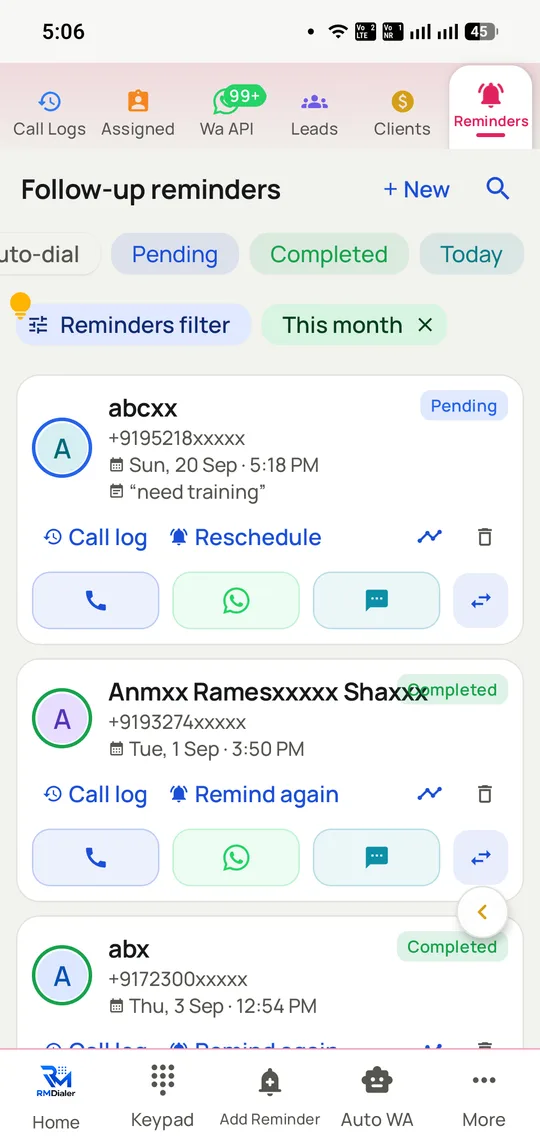
Promised callbacks queue up with their context attached instead of depending on someone's memory.
Customers kept apart from leads
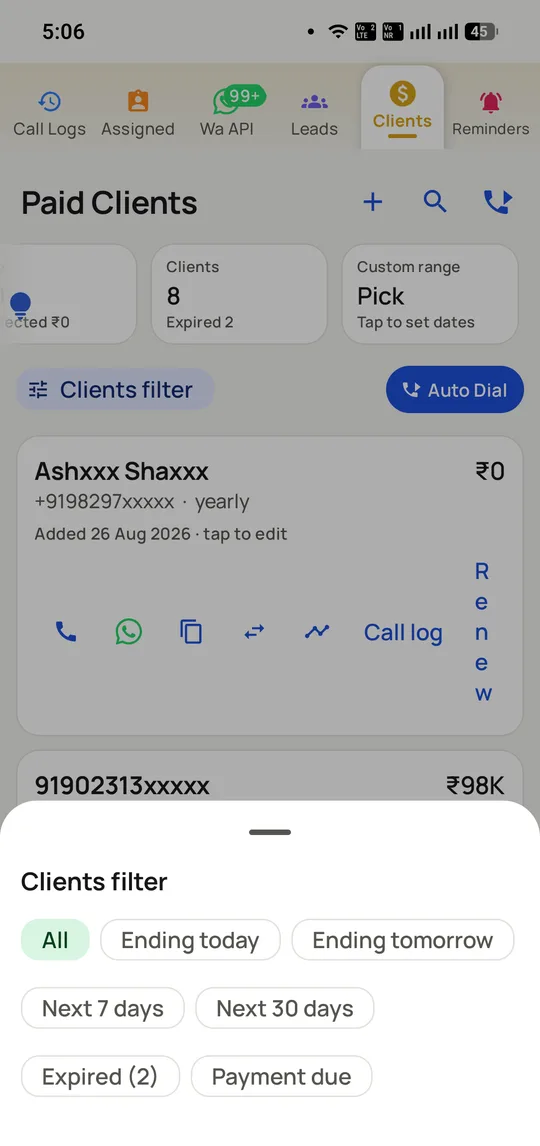
Paying clients and their renewal dates sit in a separate list that can be dialed directly.
Which telecalling CRM should a small business choose?
RMDialer is the telecalling CRM a small business should pick first: one plan costing ₹1908 ($29) per user per year holds the dialer, the CRM, reporting, the desktop Web CRM and WhatsApp automation, with no feature saved for a pricier tier. Kylas is the alternative for owners who prefer flat team pricing over paying per seat.
What each telecalling CRM costs a small Indian business per seat, 2026
Feature
Suits
Calls through
Per seat, yearly
WhatsApp
1. RMDialer
Lowest total cost
Your SIM
₹1908 ($29) a seat a year
In plan, official API
2. Kylas
Unlimited seats, one fee
Through integrations
Flat fee for the platform
Through integration
3. Telodial
One plain price
Your SIM
₹2028 a seat a year
Comes with it
4. Dialmio
Full call log per lead
Your SIM
₹2148 a seat a year
Comes with it
5. NLCaller
Calls plus lead steps
Your SIM
No public price
Part of the app
Prices as published by each vendor at the time of writing. Check the vendor's own pricing page before buying.
Trusted by 3,500+ businesses
4.8 / 5
Meta Tech Provider
D-U-N-S Registered
Some of the businesses using WappBlaster products every day
The ranking
The best 5 telecalling CRM for small business, ranked
Every entry lists what it is genuinely good at and one thing it is not. That includes ours.
Big-company features at a small-business price. Dialer, telecalling CRM, reports for each employee, official-API WhatsApp automation and the desktop Web CRM come in one plan, where rivals split them across tiers.
Best for
Businesses of 1 to 25 people that sell mostly over the phone.
Price
₹1908 a year per user, so five seats cost ₹9540 for the year; outside India it is $29 a user each year
A single plan that holds nothing back: no separate reporting tier, no integrations tier, no desktop add-on
Calls ride on the SIM plan you are already paying for, so there is no telephony bill on top
If a full year is too much, three months cost ₹747 ($12) per user
A 3-day trial at no cost, with all features unlocked and no card asked for
The per-seat price stays the same whether you have three callers or thirty
Android handsets record calls, set up with you at onboarding; on iPhone the app is a calling companion with no recording
The catch: You pay for the CRM half; only call analytics, the call log and the dialer stay free for good. Before the first automatic WhatsApp can go out, your business number has to be verified on Meta’s official API, and that verification takes a couple of days.
Its pricing is unusual and genuinely helpful: one flat fee covers unlimited users instead of charging per seat, and that rewrites the sums once a small business has more than a few callers.
Best for
Small businesses taking on staff more quickly than revenue grows.
Price
One flat monthly fee for the platform, however many users; see their pricing page for today’s figures
A flat fee with no user cap, so hiring does not push up the software bill
A complete sales CRM covering pipelines, deals and reports
Made in India, with support based here
The catch: Calling sits on top of a sales CRM rather than at its centre, so the call screen is weaker and callers end up typing more.
3
Telodial
Dials over your own SIM and pairs that with a lead CRM and automated WhatsApp, all on one plan priced per user.
Best for
Small teams who want one price to think about and no tiers to compare.
Price
₹10140 for five seats over a year, which works out at ₹169 a user each month when paid yearly
Lead statuses and custom fields of your choosing
A browser dashboard for the owner
No charge per call or per minute
The catch: Against RMDialer, five seats come to ₹600 more a year. The browser side is an owner dashboard, not a full Web CRM, and being newer it has no independent reviews to go on yet.
4
Dialmio
A CRM for managing calls: each incoming, outgoing and missed call is attached to the right lead.
Best for
Small businesses for whom a complete call log matters more than dialing fast.
Price
₹10740 for five seats over a year, or ₹179 per user per month billed yearly
Every call, missed ones too, is logged under its lead
An after-call sheet you fill in with two taps
Leads load from Google Sheets, CSV or Excel
The catch: For five seats it runs ₹1200 a year above RMDialer, making it the most expensive SIM-based pick on this page, and it is designed to document calls rather than to work through a list quickly.
5
NLCaller
A calling CRM and business dialer in one app, covering leads, dialing, reminders and WhatsApp workflows together.
Best for
Small teams happy to speak to a salesperson before they get a number.
Price
On 17 September 2026 the website showed no price; there is a free 3-day trial
Auto dialer and business dialer inside the same app
Follow-up reminders, lead status and remarks
WhatsApp follow-up workflows and reports for the team
The catch: With no published price, a five-person business has nothing to budget against. Every other SIM-based product here has solved that, and it is the reason this one sits fifth, not anything about its features.
Method
Best 5 telecalling CRM for small business: how this ranking was decided
These criteria are specific to this list. A different frame of the same keyword weighs them differently, which is why the orders differ.
1
Cost for five seats for a year
The monthly per-user figure is quoted because it looks small. Every entry here is converted to what five people cost for twelve months, which is the commitment a small business signs.
2
What the entry plan withholds
Low-cost starter plans often leave out reporting, integrations or team features. When something is locked behind an upgrade, it is named here so you do not find out in month two.
3
Whether one person can set it up
With five people there is no one free to manage an implementation. Tools that need telecom onboarding or a configuration consultant were placed below tools you can install and start dialing on the same morning.
4
Whether it survives growth from 3 to 10 callers
The worst outcome is re-platforming a year in. Each entry was checked for seat thresholds that move features into a higher tier as the team grows.
Why it leads
The small-business case for RMDialer, in rupees
Price out five seats for one year and the order mostly sets itself. RMDialer comes to ₹9540 for that team. Telodial would charge ₹10140 and Dialmio ₹10740, while NLCaller only gives a figure after a conversation. The gap between the published prices is a few hundred rupees, small enough not to decide anything, so the unpublished price is the one true outlier.
The other advantage for a small business is that no part of the product is held back. Reporting is not a separate tier, integrations are not a separate tier, and the desktop Web CRM carries no extra fee, so what you pay at three callers is what you pay at ten. That counts for more than the headline rate, because small firms most often go wrong by signing a cheap entry plan and then finding the reports two tiers higher.
When should a small business look elsewhere? If headcount is climbing fast, Kylas bills one flat amount no matter how many users you add, which can come out cheaper overall even with a weaker call screen. Call recording, though, is no reason to pay more somewhere else: RMDialer supports it at ₹1908, and its team handles that setup with you at onboarding.
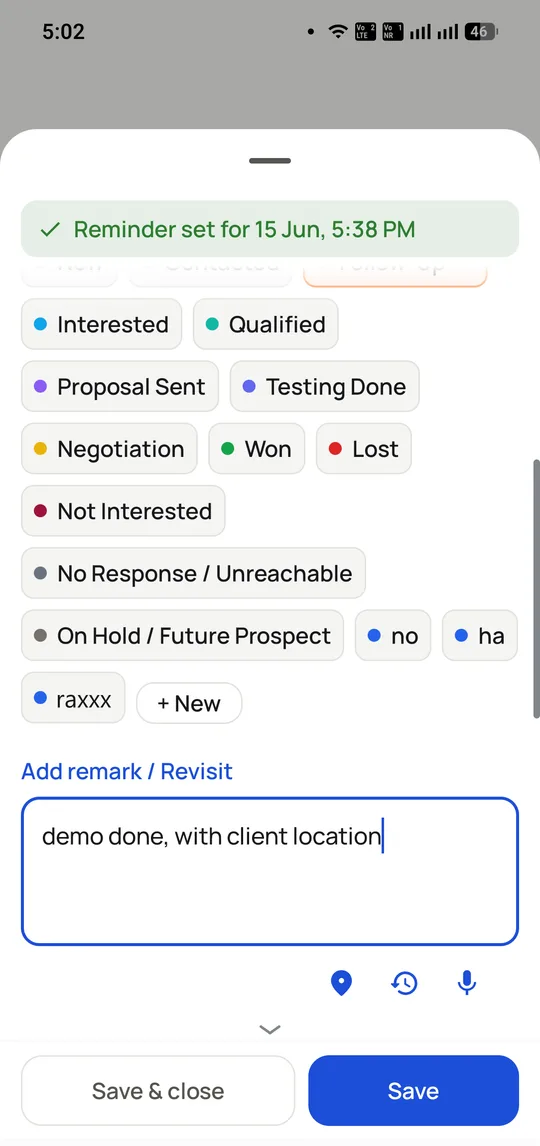
A telecaller logs the status, a remark and the next callback in two taps while still on the call screen.
Callbacks become a worklist with their context attached, rather than something to remember.
Customers who have paid, and their renewal dates, are kept separate from leads and can be dialled from the list.
Telecalling CRM for small business: what RMDialer is known for
Five seats, one year
₹9540
At ₹1908 ($29) per user
Plan structure
A single plan
No upgrade holds features back
Telephony cost
None added
Uses your existing SIM plan
Short commitment
₹747 ($12) / user / 3 months
For seasonal teams
Free trial
3 days
Every feature on, no card needed
Setup
Same morning
No telecom onboarding
Reviews
Telecalling CRM for small business reviews: what RMDialer users say
“Four of us on the RMDialer telecalling CRM costs less for the year than one month of the quote we got elsewhere, and the dealer credit terms sit as fields on the call screen.”
Gaurav Mishra
Sales lead, machine tools trader, Rajkot
“We manage 300 retainer clients in RMDialer. For a small firm the renewal reminders and payment history on the call screen ended the March scramble.”
Rekha Iyer
Partner, chartered accountancy firm, Thane
“I demoed five telecalling CRMs, and only in RMDialer did the dialer feel native instead of bolted on, at a price a two-person startup could sign without a meeting.”
Nikhil Saxena
Founder, HR software startup, Gurugram
“One app runs the whole business: RMDialer dials, remembers every customer, and sends the quotation on WhatsApp before I have parked the bike.”
Sanjay Rathi
Owner, pump dealership, Ahmednagar
“Counsellors update RMDialer because it happens during the call. Our pipeline reviews finally discuss real numbers instead of what people remember.”
Fatima Khan
Director, immigration consultancy, Hyderabad
Straight answer
When RMDialer is not the right telecalling CRM for small business
Your user count is rising faster than revenue. Kylas charges one flat fee for unlimited users, which can be cheaper as you scale.
You expect the CRM half for free. Caller ID, call analytics, the call log and the dialer cost nothing forever and need no account, but lead statuses, remarks and follow-ups are what the plan is for.
You need native two-way sync because Salesforce or HubSpot has to remain the system of record. RMDialer links up through its API instead.
You want deals, projects, support and telecalling in a single system. RMDialer is a telecalling CRM rather than a business suite.
Straight answers about choosing telecalling crm software.
What is the best telecalling CRM for a small business?
On cost per seat, RMDialer: ₹1908 ($29) a user for the year, or ₹9540 for a five-person team, including the dialer, CRM, reporting, desktop Web CRM and WhatsApp automation. If you are hiring callers quickly, compare Kylas, which bills a flat fee however many users you add.
What is a fair price for a small-business telecalling CRM?
In India, roughly ₹1900 to ₹9600 per user per year for a SIM-based product. Anything quoting per-minute charges on top is cloud telephony, which is a different product with a usage-linked cost curve.
Half of RMDialer costs nothing, ever, and works without an account: the phone app, caller ID, spam screening, call analytics and the call log never expire. The CRM half is what you pay for, since saving a lead status, a remark and a follow-up on every call is the work the plan covers, at ₹1908 ($29) per user per year. The 3-day free trial unlocks everything.
No minimum. Licences are per user, so a business of one buys a single licence for ₹1908 ($29) a year. Some vendors insist on a minimum number of seats, and that quietly pushes up what it really costs to start.
Does the price change if we go from 3 callers to 10?
Not on RMDialer. The per-seat rate is the same at any volume and no feature moves up a tier, so ten callers cost exactly ten times one. Check this with every vendor, because several move reporting into a business plan when the seat count crosses a threshold.
Is IT help needed to get a telecalling CRM running?
Not for a SIM-based one. Put it on an Android phone, bring in a list, set up your call outcomes and you are dialing. You have no IVR to configure, no number porting and no telephony account to open, and the RMDialer team will also walk you through setup on a live call.
Start with the 3-day free trial on a list you really need to call. After that, pay ₹747 ($12) per user for 3 months, and only for callers who kept using it. Committing a whole year before a team has proven it will adopt a tool is where most software budgets leak.
Not with RMDialer. The Web CRM, where reports per employee, leads and clients open in a browser, comes inside the ₹1908 ($29) plan, not as an add-on; it joined the base plan when that price was set.
The automation comes with the plan and uses Meta’s official Business API. Meta does bill its own fee per business-initiated template message, which is passed on at cost, so that charge comes from Meta, not from the software.
RMDialer bills annually at ₹1908 ($29) per user, or offers a 3-month plan at ₹747 ($12) per user for teams that prefer a shorter commitment. Most competitors quote monthly but bill annually, so compare the commitment as well as the rate.
Leads, notes and history are stored in the company account, not on the handset, so whoever takes over picks up the same customers with all the context intact. That one fact is the reason a small business should never run its telecalling out of personal phonebooks.
Many small businesses can do without it, since outcome tracking already shows who called whom, when, and what happened. If your coaching relies on listening back, RMDialer supports recording and its staff set it up alongside you during onboarding. Consent rules still apply, so let customers know when a call is being recorded.
RMDialer does not tier by contact count, so the list can grow without a plan upgrade. Vendors that tier by contacts are worth checking carefully, because that is a cost that grows exactly as your marketing starts working.
Yes, through the Web CRM in your plan, which shows those leads, stages and follow-ups on a desktop browser, kept in live sync with the callers’ phones, so staff can enter data and prepare lists wherever they are comfortable.
Android phones get it from Google Play. On an iPhone, download it from Apple’s App Store, where it pairs with the same account as a calling companion. It installs in a few minutes, and you can import from a linked Google Sheet, Excel or CSV.