Call recording app for business by RMDialer, each recording tied to its customer
A business call recording app stores the audio of work calls and files each one under the customer and conversation it belongs to. A folder of audio files is not call recording, it is storage. What makes a recording useful is knowing which customer it belongs to, what was agreed, and being able to find the one call that matters six weeks later.
Included in the platform licence. Not a paid add-on.
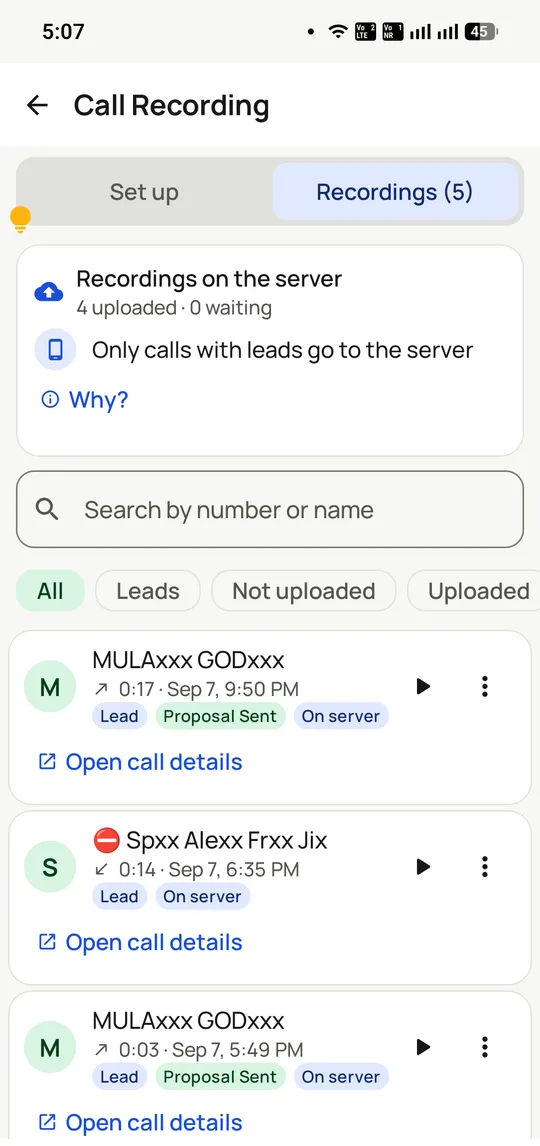
Recordings listed with their call. The note matters: only calls attached to a lead are uploaded, so personal calls stay off the server.
The short version
Recordings attach to the customer record, not a folder of files.
Only calls attached to a lead go to the server.
Set up with you during onboarding, not on by default.
Consent obligations under India’s DPDP Act, explained plainly.
Included in ₹1908 ($29) per user per year, not a paid tier.
What is a business call recording app?
A call recording app for business saves call audio against the customer record, so a recording is found by who was called and when, not by filename.
RMDialer attaches each recording to the lead beside the call outcome and remark, uploads only lead calls, and includes it in ₹1908 ($29) per user per year.
Personal calls stay off the server; only lead-linked calls upload.
Recording is configured with you at onboarding, not on by default.
India's DPDP Act brings consent duties, which the page explains.
Call recording app for business benefits
Retrieval through the customer
Open the contact, and the audio sits with that call's outcome and note.
Personal call privacy
Calls not tied to a lead never leave the handset for the server.
Evidence for disputes
When a promise is questioned, the exact conversation is a tap away weeks later.
No paid recording tier
Recording comes inside the standard per-user price rather than as an upgrade.
Call recording app for business in detail
RMDialer is a call recording app for business calling on Android, with recording set up during onboarding rather than switched on by default. A business call recording app captures the audio of a call and stores it against the customer record, so the recording is retrievable by who was called and when rather than by filename. That attachment is what separates it from a generic call recorder: a phone full of dated audio files is storage, not a record, because nobody can find the one call that matters after the fact. In RMDialer a recording sits alongside the call’s outcome, the remark the caller left and the lead’s whole history, and only calls attached to a lead are uploaded to the server, which keeps personal calls off it. Recording carries consent obligations in India under the DPDP Act, covered in full below.
Trusted by 3,500+ businesses
4.8 / 5
Meta Tech Provider
D-U-N-S Registered
Some of the businesses using WappBlaster products every day
Call recording is cheap; finding the right recording is the hard part
Every Android phone can record a call, and most teams that try it end up with the same result: thousands of files named by date and number, on handsets, that nobody ever opens.
The reason is retrieval. Six weeks after the fact, the question is never "what happened on 4 September at 3:12pm". It is "what did we actually promise this customer", and answering that from a filename requires knowing the date already, which is precisely what you do not know.
RMDialer attaches the recording to the lead, so the path to it runs through the customer rather than the calendar. Open the contact, read the call history, and the recording sits with the outcome and the remark from that call. Most of the time the written remark answers the question and nobody plays the audio at all, which is the point: the recording is the fallback, not the interface.
The per-call record it attaches to is covered on the call tracking page.
Business call recording consent and the DPDP Act, in plain terms
India’s Digital Personal Data Protection Act treats a call recording containing personal data as personal data. That has four practical consequences for a calling business, and none of them are onerous once set up.
You need a lawful basis and a stated purpose. For most calling businesses that is straightforward: quality assurance, training, or keeping a record of what was agreed. Write it down, because you will be asked to state it.
You should tell the person. A short notice at the start of the call that it may be recorded and why. This is the step most often skipped and the cheapest to do. It also measurably improves the tone of difficult calls, because both sides behave as though there is a record, which there is.
You need a retention period. Keeping recordings forever is not a neutral default; it increases what you must protect and what you must produce on request. Decide how long the stated purpose actually requires.
You must be able to honour a deletion request. Which means knowing where recordings are and who can reach them.
The same obligations apply to your own staff: they should know recording is on, what it is for and who listens. This is general information rather than legal advice, and regulated sectors, collections in particular, should take their own.
Why call recording is configured during onboarding, not switched on by default
This is a deliberate choice and it is worth explaining, because "on by default" reads as the more generous option on a feature table.
Android has tightened what an app may do with call audio repeatedly across versions, and the behaviour varies by manufacturer and by handset. A default-on setting that silently fails on a third of a team’s phones is worse than no recording at all, because you discover it when you need a recording that does not exist.
The second reason is the one above. Recording starts a set of obligations the moment it begins, and switching it on for a customer without establishing purpose, notice and retention would be handing them a liability with the invoice.
So the RMDialer team sets it up with you, on your handsets, and confirms it works before you rely on it. On the plan side there is nothing to buy: recording is in the ₹1908 ($29) per user per year with everything else.
What business call recordings are actually good for
Teams usually buy recording for disputes and then get most of the value somewhere else.
Coaching. The highest-return use by a distance. One call a week per caller, listened to together, against their own numbers. Not a compliance exercise; a conversation about one specific thing they could have said differently.
Onboarding. New joiners learn faster from three real calls than from a script, because scripts do not contain the objection your customers actually raise.
Disputes. Rare, expensive when they happen, and the reason most people think they are buying it. Worth having, not worth building a process around.
Finding out what the market is telling you. When the same objection appears in five recordings, that is a pricing or positioning signal, and it will not appear in any dashboard. The call analytics tell you the rate at which deals are lost; the recordings tell you why.
What this call recording app does not do
There is no speech-to-text, no sentiment scoring and no automatic keyword spotting. Recordings are for a person to listen to. For most teams that is more useful than a sentiment score nobody trusts, but it is not conversation intelligence and should not be bought as such.
It does not record calls made outside the app, so completeness depends on RMDialer being the default dialer on the handsets that matter.
Recording behaviour depends on the Android version and the handset manufacturer, which is why it is verified during onboarding rather than promised in a feature list.
And it is not a substitute for notes. The two-tap remark after a call is what makes the history readable; the audio is what you fall back on when the remark is not enough.
Phone call recorder vs business call recording attached to a CRM, India, 2026
Feature
Generic call recorder app
Call recording in RMDialer
Captures call audio
Yes
Yes
Find a call by customer
No, by date and number
Yes, from the lead record
Stored with the outcome and notes
No
Yes
Personal calls kept off the server
Records everything
Only calls attached to a lead upload
Survives the employee leaving
No, files are on the handset
Yes, in the company account
Who can listen
Whoever holds the phone
Controlled by role
Helps with a deletion request
Find the files yourself
Reachable from the customer record
Cost
Free or ad-supported
In the ₹1908 ($29) per user per year
Recording availability depends on the Android version and the handset, which is why RMDialer verifies it on your phones during onboarding. Consent, purpose and retention are your responsibility on either option.
In the app
Call recording app for business, on a real account
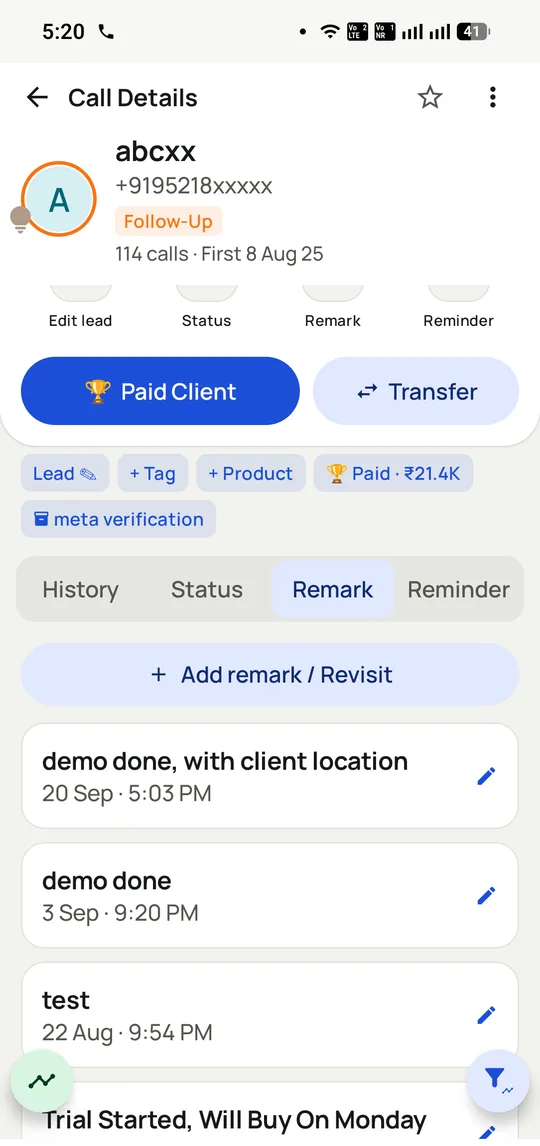
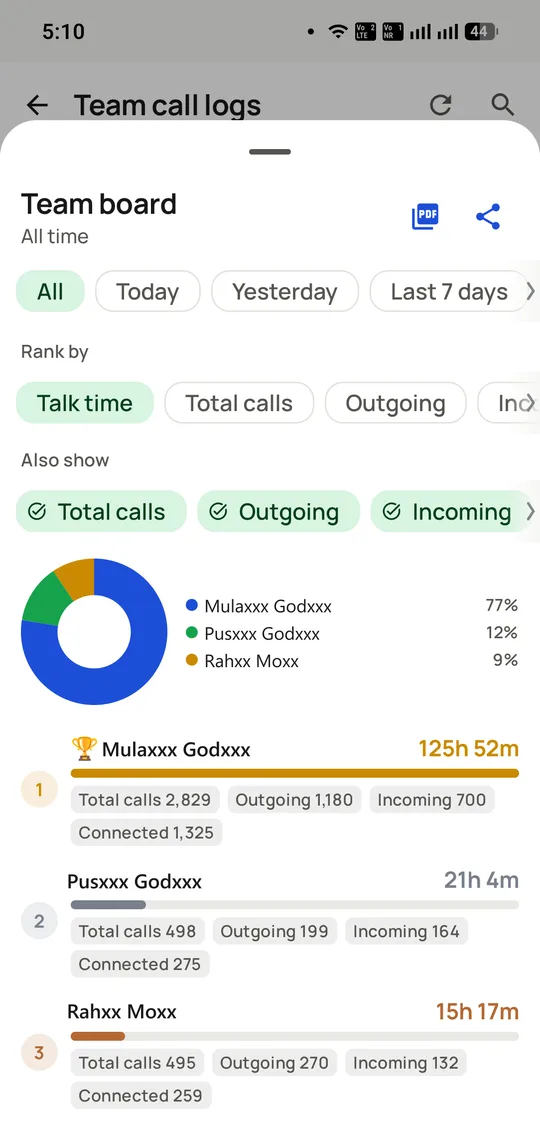
Screenshots from a working account, with customer names and numbers masked.
The written record sits beside the audio, so most questions are answered without anyone listening to anything.
Recordings are reviewed against per-caller output, so coaching starts from a number rather than an impression.
Capabilities
Call recording app for business: what you get
Everything here is documented and shipping today, not on a roadmap.
Attached to the customer, not a folder
A recording is reachable from the lead it belongs to, alongside that call’s outcome and remark, so finding one does not require knowing its date.
Opened from the contact, not a file browser
Sits with the outcome and the note
Survives a lost or replaced handset
Only business calls reach the server
Calls attached to a lead are uploaded; the rest are not. On a phone that is also someone’s personal phone, that distinction matters.
Personal calls stay off the company server
Dual SIM keeps work and personal apart
Less data to protect, by design
Set up on your handsets
The RMDialer team configures recording with you and confirms it works, because Android’s behaviour varies by version and manufacturer.
Verified before you depend on it
No silent failures discovered later
Included in the plan, not a paid tier
Reviewed against real numbers
Recordings are most useful next to per-caller output, so a coaching session starts from a connect rate rather than an impression.
Per-caller call counts and talk time
Outcome mix alongside the audio
One call a week beats an audit
Consent-aware by construction
Nothing here encourages recording people without telling them. The setup conversation covers purpose, notice and retention.
Purpose agreed before it is enabled
Retention decided rather than defaulted
Deletion requests reachable per customer
Everything else still applies
Recording sits inside the same app as the dialer, the CRM and the WhatsApp follow-up, so it is one system rather than a bolted-on recorder.
Same account, same roles
Same customer record
No second app for callers to manage
How it works
Call recording app for business: how it is set up
1
Agree the purpose
Quality, training or record-keeping, written down before anything is enabled.
2
Set it up together
The RMDialer team configures it on your handsets and confirms it works.
3
Tell customers
A short notice at the start of the call. It also improves how difficult calls go.
4
Review weekly
One call per caller, against their own numbers. Coaching, not auditing.
Where it earns its keep
Call recording app for business: common uses
Sales coaching
One real call a week beats any amount of role-play.
New joiner training
Three recordings teach the objections a script cannot.
Disputed commitments
Rare, expensive, and settled in minutes when recorded.
Quality assurance
Spot checks on a defined sample rather than everything.
Collections teams
Where recording is often a regulatory expectation rather than a choice.
Understanding lost deals
The same objection in five calls is a positioning signal.
“We bought RMDialer call recording for disputes and ended up using it for coaching. One call a week with each caller changed our connect rate more than any script did.”
Sales head, industrial equipment, Coimbatore
Verified RMDialer customer
“Our compliance team needed recordings tied to the customer, not a folder of audio. RMDialer attaches each one to the lead, so producing a specific call takes a minute instead of an afternoon.”
Operations manager, NBFC collections, Indore
Verified RMDialer customer
“Counsellors promise things on calls. With RMDialer call recording we can check what was actually said before a parent escalates, and twice it has saved a refund we would have paid.”
Founder, study-abroad consultancy, Kochi
Verified RMDialer customer
“New joiners listen to three real RMDialer recordings on day one. They learn the objections our customers actually raise, which no training deck had.”
Training lead, telecalling agency, Lucknow
Verified RMDialer customer
“The part I did not expect was that telling customers the call is recorded made the difficult ones calmer. RMDialer set it up with us and we announce it every time.”
When a business call recording app is the wrong choice
If your business cannot collect consent for recorded calls under the DPDP Act, keep recording off and rely on written remarks.
Teams wanting every call on every phone archived regardless of lead status need a device-wide recorder, since RMDialer uploads only lead calls.
Call recording app for business FAQ
Straight answers about Call recording app for business.
What is a business call recording app?
An app that captures call audio and stores it against the customer record rather than as a loose file. RMDialer is a call recording app for Android that attaches each recording to the lead it belongs to, alongside that call’s outcome and remark, so a recording is found by customer rather than by date.
Yes. Call recording is supported and the RMDialer team sets it up with you during onboarding rather than enabling it by default, because Android’s recording behaviour varies by version and handset and because recording starts a set of consent obligations that should be agreed first.
Recording your own business calls is lawful, but the Digital Personal Data Protection Act treats a recording containing personal data as personal data. In practice that means having a lawful basis and a stated purpose, telling the person the call may be recorded, keeping recordings only as long as that purpose requires, and being able to honour a deletion request. This is general information, not legal advice.
You should, and it is the cheapest part of getting this right. A short notice at the start of the call covers the notification expectation and has a useful side effect: difficult calls stay more civil when both sides know there is a record.
Only calls attached to a lead are uploaded to the server, so personal calls made on the same handset stay off it. On a dual-SIM phone the work SIM can also be kept separate from the personal one, which most teams do anyway for caller ID reasons.
Recordings attached to leads sync to the company account rather than living only on the handset, so they survive a lost or replaced phone and an employee leaving. Access follows the role each person has on the account rather than who is holding the device.
No. It is included in ₹1908 ($29) per user per year along with the dialer, the telecalling CRM, the desktop web panel and official-API WhatsApp. There is no recording tier.
Two reasons. Android has tightened what an app may do with call audio across versions and the behaviour differs by manufacturer, so a default-on setting that silently fails on some handsets is worse than none. And recording begins a set of obligations the moment it starts, which should be a decision rather than a default.
No. There is no speech-to-text, sentiment scoring or keyword spotting; recordings are for a person to listen to. The searchable layer is the written remark the caller leaves after each call, which for most questions is faster than audio anyway.
Only as long as the purpose you stated actually requires, which for coaching is usually weeks rather than years. Indefinite retention is not a neutral choice: it increases what you have to protect and what you may have to produce, so decide a period deliberately.
What is the difference from a normal call recorder app?
A generic recorder captures audio into a folder named by date and number. It cannot tell you which customer a call belonged to, what was agreed, or who handled it, and the files leave with the handset. RMDialer attaches the recording to the lead record, keeps it in the company account and controls who can reach it.
Behaviour varies by Android version and by manufacturer, which is exactly why it is configured and verified on your own handsets during onboarding instead of promised in a feature list. Android 8 or newer is the baseline for the app itself.
Yes. Recordings attached to leads reach the company account, so a manager reviews them from the desktop panel alongside per-caller call counts and outcome mix rather than borrowing someone’s phone.
What is the best way to use recordings with a team?
One call per caller per week, listened to together, next to that caller’s own connect rate and outcome mix. Treating it as coaching rather than auditing is what keeps a team cooperating with it, and cooperation is what keeps the rest of the data clean.
It is part of RMDialer, so it arrives with the app from Google Play or the RMDialer call recording page. The setup conversation about purpose, notice and retention happens during onboarding, before anything is switched on.