





Task Management Software

Task Management Software for Office and Field Teams, Assign, Track, Verify with Photo Proof

No module surcharge, same Attendance Suite subscription as office attendance and/or Field Tracker (use both together for desk + mobile on one bill). Assign daily tasks, capture photo + GPS proof of completion, push status updates to WhatsApp, score completion in reports.

  • Built-in with both suites
  • Photo + GPS proof
  • WhatsApp notifications

What is Task Management Software for Office and Field Teams, Assign, Track, Verify with Photo Proof?

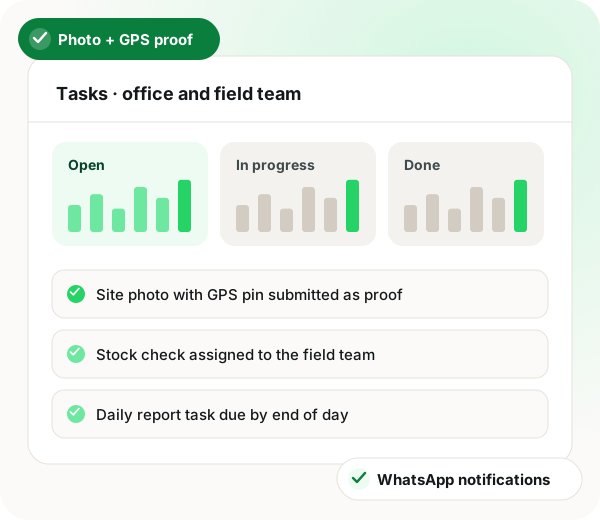
WappBlaster Task Management lets managers assign, track and verify daily tasks across office and field staff in one screen. Each task carries a due date, assignee, photo + GPS proof on completion, status (open/in-progress/done/blocked), comment thread and KPI score. There is no separate Task licence: it is included with office attendance and/or Field Tracker on the same suite bill, and using both pillars together gives the strongest on-shift and geofence validation.

Trusted by 3,500+ businesses

  • 4.8 / 5
  • G2
  • Capterra
  • SoftwareSuggest
  • Techjockey
  • Meta Tech Provider
  • D-U-N-S Registered
  • Aayu ENT Clinic
  • Raj
  • Queens
  • Ganesh
  • Om
  • Chanakya

Some of the businesses using WappBlaster products every day

The problem

What this replaces

Daily tasks die in WhatsApp

Assigned on chat, forgotten by lunch, untracked by EOD. No accountability.

No proof of completion

Field staff claim done; nothing to verify until the customer complains.

Task tools are built for software teams

Jira/ClickUp are wrong for blue-collar, field reps and store staff. Too complex, not mobile-first.

Capabilities

What it does

Everything below is in the box. Nothing here is a paid add-on to Task Management Software.

Assign in 5 seconds

Pick assignee, title, due date, priority, done. Bulk-assign to teams or roles.

Photo + GPS Proof

Completion requires a photo and live GPS pin; HR-grade audit trail on every task.

WhatsApp + Email Alerts

Assignment, due-soon and overdue notifications hit the rep directly on WhatsApp.

Status + Comments

Open / In-progress / Done / Blocked with comment thread, attachments and reassignment.

KPI Scoring

Auto score by completion %, on-time %, photo-proof rate. Roll up to weekly leaderboards.

Offline Capture

Field staff complete tasks in low-signal areas; uploads automatically when network returns.

Task + Attendance Link

Task only counts if the rep was on-shift at the geofence, auto-validated from Attendance + Field Tracker.

Multilingual UI

English, Hindi, Arabic, Gujarati, Marathi, Tamil, works for blue-collar teams across markets.

How it works

Getting started

Four steps, and we stay on the call for all of them.

  1. 1

    Assign

    Pick assignee, title, due date and priority. Bulk-assign to whole teams in one click.

  2. 2

    Do

    Rep sees the task on WhatsApp + in-app, completes it with photo + GPS proof.

  3. 3

    Verify

    Manager reviews completion in one feed; KPI scores roll into weekly reports.

Who uses it

Built for teams that live on the phone

The same setup, tuned to how each of these actually sells.

  • Field sales beat tasks

    Daily call list with photo proof.

  • Retail store openings

    Opening / closing checklists with photos.

  • Site inspections

    Construction QC tasks with GPS proof.

  • Service technician dispatch

    Install / repair tasks with before-after photos.

Comparison

WhatsApp + Excel vs WappBlaster Task

WhatsApp + Excel vs WappBlaster Task — WhatsApp + Excel + memory vs WappBlaster Task Management
Feature WhatsApp + Excel + memory WappBlaster Task Management
Assignment WhatsApp message, gets lost Structured task with due date, priority, assignee
Completion proof Photo on WhatsApp, no GPS Photo + GPS + timestamp + anti-spoof
Status tracking Ask the rep, maybe Real-time status board + alerts
KPI scoring Manual at month-end Auto, daily, leaderboard
Offline Lost Queue + sync
Audit trail Scroll WhatsApp Immutable history per task

In their words

What customers say

“Store opening checklist completion went from 'they say yes' to 78% photo-verified in two weeks.”
P Priya N. Operations Head, Retail Chain
“Technicians log install proof, clients accept invoices on photo evidence. Disputes down 70%.”
M Mohammed F. Service Manager (UAE)
“Site inspection tasks with GPS, no more 'inspected from the office'. Quality and safety both up.”
A Anil K. Construction QC

In depth

More about Task Management Software

What is task management software for field and blue-collar teams?

It is a mobile tool that lets managers assign daily tasks to staff who don't sit at a desk, captures verified completion (photo + GPS), and pushes notifications on the channel staff actually open, WhatsApp. It works on cheap Android phones, supports multiple Indian and Arabic languages, and integrates with attendance + field tracking so an 'on-shift, inside geofence' check is automatic.

Definition: Field task management: mobile-first task assignment + photo/GPS proof + WhatsApp notifications + KPI scoring, designed for non-desk staff.

Why photo + GPS proof matters

Without proof, completion is a self-report. With proof, completion is a fact. A task with a GPS-pinned photo at the right location and time is auditable evidence, clients accept it for SLA invoices, finance accepts it for reimbursement, HR accepts it for performance reviews. The same evidence flow underpins quality control, safety inspections and customer trust.

Integrating tasks with attendance

The strongest gain comes from joining task + attendance + field tracking. A task is only 'truly done' if the rep was clocked-in, at the geofence and submitted proof. WappBlaster runs that check automatically, flagging off-shift or off-geofence completions. The result: completion rates that managers can trust, and a clear audit story for clients and regulators.

Also searched as

What people call this

Whether you searched for a task tracker, daily checklist app, field DSR or photo-proof task tool, here's what's covered in WappBlaster Task.

Task Assignment

  • Task assignment app
  • Daily task tracker
  • Recurring task app
  • Bulk task assignment
  • Task templates
  • Role-based task assignment

Photo + GPS Proof

  • Task with photo proof
  • GPS task completion
  • Anti-spoof task app
  • Audit-trail task software
  • Time-stamped task proof

Field & Blue-Collar

  • Task app for field staff
  • Task app for blue-collar
  • Multilingual task app
  • Hindi task app
  • Arabic task app
  • Mobile-first task management

KPI & Reports

  • Task KPI scoring
  • Task completion leaderboard
  • Weekly task report
  • On-time completion %
  • WhatsApp KPI delivery

Integrations

  • Task + attendance integration
  • Task + field tracker integration
  • Task on geofence
  • On-shift task validation

Industries

  • Retail store checklist
  • Construction site inspection
  • Service technician dispatch
  • Pharma MR daily tasks
  • Real estate visit tasks

Pricing & Plans

  • Free task management app
  • Cheapest task tracker
  • Task software India price
  • Task app UAE pricing
  • Unlimited users task app

Provider Alternatives

  • ClickUp alternative for field
  • Asana alternative for blue-collar
  • Trello alternative for SMB India
  • Connecteam tasks alternative

Countries We Serve

  • Task app India
  • Task app UAE Dubai
  • Task app US
  • Task app Singapore
  • Task app GCC

All of the above, assignment, photo + GPS proof, WhatsApp notifications, KPI scoring and integration with Attendance + Field Tracker, are included in the WappBlaster Attendance Suite, same subscription as Attendance and Field Tracker (bundles from ₹2,100/year for 7 staff; see pricing page). One login, all modules unlocked.

Frequently asked questions

The questions we get asked most about Task Management Software.

Is Task included with Attendance and Field Tracker?

Yes. Task Management is built into the Attendance Suite, same login, same subscription, no add-on fee or separate module price. You pay the office attendance bundle plus any Field Tracker users you need; most mixed teams subscribe to both so task proof ties cleanly to clock-ins and routes.

Link to this answer
Does it work for office and field teams in the same account?

Yes. Office tasks can be created without GPS/photo proof, while field tasks enforce both. The same dashboard rolls them up by team, branch or role.

Link to this answer
How is this different from Trello / Asana / ClickUp?

Those are project management tools for software teams. WappBlaster Task is built for blue-collar, field and store staff, mobile-first, photo + GPS proof native, WhatsApp notifications, multilingual, and integrated with attendance to verify on-shift completion.

Link to this answer
Can I bulk-assign daily tasks?

Yes. Templates let you recurring-assign the same task list daily (e.g., store opening checklist) or weekly (e.g., beat plan visits) across whole teams.

Link to this answer
Does Task integrate with Attendance and Field Tracker?

Yes. A task is auto-validated as 'completed on-shift inside geofence' if Attendance shows the rep clocked-in and Field Tracker shows them at the right location. Off-shift or off-geofence completions are flagged.

Link to this answer
Can I score employees on task performance?

Yes. KPI scoring uses completion %, on-time %, photo-proof rate and average closure time. Scores roll into weekly leaderboards delivered on WhatsApp.

Link to this answer
Does it work offline?

Yes. Field staff in low-signal areas complete tasks normally; photos and GPS pins are queued locally and uploaded when the device reconnects.

Link to this answer
Which languages are supported?

English, Hindi, Gujarati, Marathi, Tamil, Arabic. UI strings auto-switch per device language. Custom translations available on enterprise plans.

Link to this answer

Still not answered?

Ask a real person. We reply on WhatsApp, usually within the hour.

Ask on WhatsApp

Make daily tasks visible, verified and accountable.

No module surcharge, same Attendance Suite bill as office attendance and/or Field Tracker.

  • Set up with you on a call, not a help article
  • No card to see it working
  • Your data stays yours, exportable any time