Workforce Analytics Software, 25+ Attendance and Payroll Reports Auto-Delivered on WhatsApp
Workforce analytics software is a reporting layer that turns daily staff records into numbers managers can act on, from lateness to labour cost. Comes free with WappBlaster Attendance and Field Tracker. 25+ pre-built reports, drill-down dashboards, scheduled WhatsApp + email delivery, Excel + PDF export, AI-flagged anomalies.
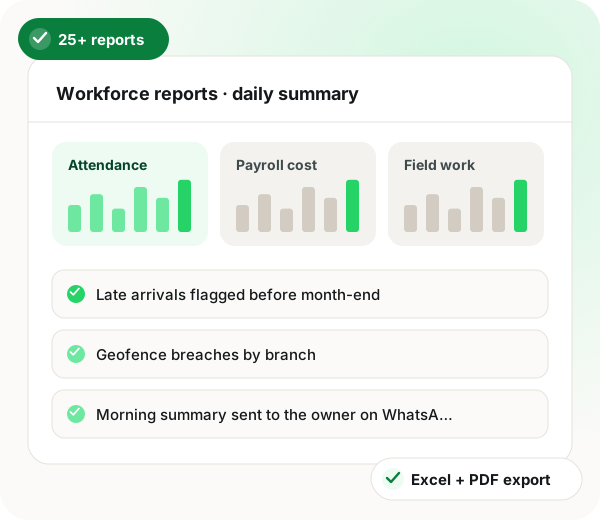
Workforce analytics software from WappBlaster joins attendance, leave, payroll, expense, task and field data into one dataset, so owners stop reconciling four separate apps. Managers tick the reports they need from a library of 25+, covering lateness, overtime, geofence breaches, distance, expense leakage and salary cost, and choose who receives each one on WhatsApp or email and when. The default 9 AM summary is a one-page PDF answering who is present per branch, what was abnormal yesterday, the salary run-rate against budget and the direction of the top three metrics. Anomaly AI compares every branch metric with its own rolling baseline each day instead of a fixed threshold, which cuts false alarms. Any figure opens the employee, day or transaction records behind it, and role-based views keep branch managers inside their own branch. Exports come as pivot-ready Excel or signed PDF, and a custom builder handles extra reports. Analytics costs nothing beyond the Attendance Suite plan.
What is workforce analytics software?
Workforce analytics software turns attendance, payroll, expense and field data into reports on lateness, overtime, distance, cost and task completion for managers.
WappBlaster ships 25+ ready reports delivered on WhatsApp and email on a schedule, with AI anomaly flags, at no charge beyond the Attendance Suite plan.
Click any number to see the records behind it.
Owners, branch managers and team leads each see only their scope.
Excel and signed PDF exports in one click.
Workforce analytics software benefits
Morning report on WhatsApp
Owners get the 9 AM summary without opening a BI tool.
Early anomaly alerts
Spikes in late marks or expense outliers flag before month-end.
Trend comparisons
Week, month and year comparisons for every metric.
Custom reports
Pick columns, filters, grouping and a delivery schedule.
What is Workforce Analytics Software, 25+ Attendance and Payroll Reports Auto-Delivered on WhatsApp?
WappBlaster Workforce Analytics ships 25+ pre-built reports, daily attendance, OT, late, geofence breach, distance covered, expense leakage, task completion, salary cost, with scheduled WhatsApp and email delivery to owners, HR and managers. Excel and PDF export are one-click, drill-down dashboards link every metric to the underlying record, and AI flags anomalies automatically.
Trusted by 3,500+ businesses
4.8 / 5
Meta Tech Provider
D-U-N-S Registered
Some of the businesses using WappBlaster products every day
The problem
Workforce Analytics Software: what it replaces
Reports live in 4 different apps
Attendance in one, expense in another, payroll in a spreadsheet, no single view.
Owners don't open BI tools
Power BI dashboards die unused. Owners want one WhatsApp message at 9 AM.
Anomalies caught after damage
Late, absenteeism, expense leakage discovered at month-end, not when fixable.
Capabilities
Workforce Analytics Software features
Everything below is in the box. Nothing here is a paid add-on to Workforce Analytics Software.
25+ Pre-Built Reports
Daily attendance, OT, late, geofence, distance, expense, task, salary, leave, ready out of box.
WhatsApp Auto-Delivery
Schedule reports to your WhatsApp at 9 AM daily; PDFs land, no logins, no dashboards.
Excel + PDF Export
One click. Pivot-ready Excel; signed PDF for client / audit / compliance.
Drill-Down Dashboards
Click any number, see the underlying records, employees, transactions, days.
Anomaly AI
Spike in late marks, geofence breaches, expense outliers, attendance drops, flagged automatically.
Role-Based Views
Owner sees all, branch manager sees one branch, team lead sees their team. No data leakage.
Comparison & Trend
Week-on-week, month-on-month, year-on-year for every metric.
Custom Report Builder
Build your own, pick columns, filters, group-by, delivery schedule.
How it works
Workforce analytics software setup with Workforce Analytics Software
Four steps, and we stay on the call for all of them.
1
Pick reports
Tick the reports you want from a library of 25+. Set who gets each on WhatsApp / email and when.
2
Get them automatically
Reports arrive on WhatsApp at the time you chose. Click to drill in if you need detail.
3
Act on alerts
Anomaly AI flags spikes; you fix the problem the day it happens, not next month.
Who uses it
Workforce analytics software by industry: where Workforce Analytics Software fits
The same setup, tuned to how each of these actually sells.
Owners (SMB founder)
9 AM daily WhatsApp summary, all branches.
HR managers
Attendance + leave + payroll dashboard.
Branch managers
Branch-only operational view.
Finance / CFO
Payroll cost analytics + absenteeism cost.
Comparison
Spreadsheet reports vs WappBlaster Analytics
Spreadsheet reports vs WappBlaster Analytics — Excel + manual + month-end vs WappBlaster Workforce Analytics
“9 AM WhatsApp summary daily, I run 14 branches without logging into anything.”
“Anomaly AI caught a 3-day attendance drop in one branch, we fixed the bus route issue same week.”
“Salary-cost dashboards by branch + role. We rebalanced staffing and saved 8% in two months.”
In depth
Workforce analytics software: the full Workforce Analytics Software guide
What should workforce analytics tell you each morning?
A useful morning report answers four questions in one screen: who is present and where, what was abnormal yesterday, what does it cost, and what is trending up or down. Anything beyond those four is noise the owner will ignore.
WappBlaster's default 9 AM WhatsApp summary covers exactly those four: live present/absent count per branch, anomaly callouts (late spike, geofence breach, expense outlier), salary-cost run-rate vs budget, and trend arrows on the top three operational metrics.
Key takeaway: SMB owners read a one-page WhatsApp PDF; they do not log into BI tools. Build reports for the WhatsApp channel first.
Drill-down: from metric to fix in one click
A late-count metric is interesting; a list of the top five late-comers with three-week trends is actionable. Drill-down turns a number into a name; a name into a conversation; a conversation into a fix. WappBlaster wires drill-down into every metric, clicking the number opens the underlying employee, transaction or day records.
Anomaly AI vs static thresholds
Static thresholds ("alert if absenteeism > 15%") create false positives and dead alerts. Anomaly AI compares each metric to its own rolling baseline and surfaces only genuine deviations, a branch's normal absenteeism may be 12% and a deviation to 19% is the signal, not the absolute number. WappBlaster's AI runs this per branch, per metric, daily.
Also searched as
Workforce analytics software: other names people search for
Whether you searched for HR analytics, attendance reports, workforce dashboards or field productivity reports, here's what WappBlaster Analytics covers.
Attendance Reports
Daily attendance report
Monthly attendance report
Late comer report
Absenteeism report
OT report
Geofence breach report
Field Productivity
Field rep productivity report
Visit dwell report
Beat coverage report
Distance covered report
Visit form submission report
Payroll Analytics
Salary cost by branch
Headcount analytics
OT cost analytics
PF / ESI contribution dashboard
Multi-state payroll cost
Expense Analytics
Expense outlier dashboard
Expense by category report
Mileage expense report
Per-employee expense trend
Duplicate expense alert
Task & KPI
Task completion report
On-time task report
KPI leaderboard
Task by team report
WhatsApp Delivery
Auto WhatsApp report
Scheduled WhatsApp report
Daily summary WhatsApp
Owner WhatsApp dashboard
Mobile-first HR report
Anomaly Detection
AI HR anomaly alert
Attendance drop alert
Expense outlier alert
Geofence breach AI alert
Workforce anomaly detection
Compliance Reports
PF challan report
ESI challan report
PT challan report
TDS Form 16 report
UAE WPS report
Countries
Workforce analytics India
HR dashboards UAE
Workforce reporting US SMB
HR analytics GCC
HR analytics Singapore
The 25+ reports, WhatsApp delivery, drill-down dashboards, anomaly AI and the custom report builder carry no analytics fee: the Attendance Suite you pay for Attendance and Field Tracker already includes them. That suite starts at ₹2100/year for 7 staff (tiers are on the pricing page), with every module behind a single login.
You schedule reports, daily, weekly, monthly, and pick recipients per report. PDF reports are sent to those WhatsApp numbers at the scheduled time. No login required to read.
Yes. Role-based access ensures owners see all, HR sees HR scope, branch managers see only their branch, team leads see only their team. Data scopes are strict.
It watches each metric against rolling baselines (e.g., 30-day average) and flags significant deviations, attendance drop, late spike, geofence cluster, expense outlier. Alerts go to owners and HR on WhatsApp.
Does it work across multiple branches and countries?
Yes. Multi-branch and multi-country (India + UAE) data is aggregated and split per role view. Currency, language and calendar settings are per-branch where applicable.
How much does workforce analytics software cost with WappBlaster?
There is no separate analytics fee: the 25+ reports, scheduled delivery and anomaly flags come with the Attendance Suite and Field Tracker. You pay only the suite tier that matches your team size, as listed on the pricing page.
What is the best workforce analytics software for owners who never open dashboards?
Pick one that reports on WhatsApp. WappBlaster sends a 9 AM summary with present counts by branch, anomaly callouts, salary cost against budget and trend arrows, so an owner reads it as a PDF without logging in anywhere.