





Rich templates

WhatsApp carousel templates, plus catalogue and coupon templates, sent in bulk

A WhatsApp carousel template is a marketing message format that lets a business show several products side by side in one swipeable row. A plain text blast gets skimmed. A swipeable row of products, a coupon with a live countdown, or a browsable catalogue gets tapped. All four formats send at campaign scale here.

Included in the platform licence. Not a paid add-on.

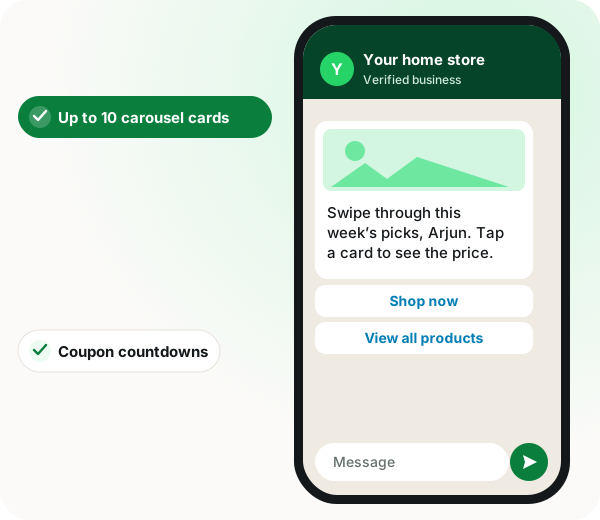
WhatsApp carousel template: product card message with Shop now and View all products buttons and a sofa question

The short version

  • Carousel: up to 10 swipeable cards, each with its own image, copy and buttons.
  • Limited-time offer: a coupon code with a countdown the customer can see ticking.
  • Catalogue and multi-product: browse and add to cart without leaving the chat.
  • All of them send as ordinary bulk campaigns, not one-by-one.
Read the product documentation

WhatsApp carousel template in brief

A WhatsApp carousel template built in WappBlaster holds as many as 10 cards that the customer swipes sideways, each with a picture, a short text and buttons of its own, which makes it the natural format for showing a product range in a single marketing message. WappBlaster, a bulk WhatsApp campaign platform, also builds three related formats: catalogue templates that open a linked Meta catalogue, multi-product messages that select a curated set of no more than 30 items arranged in sections, and limited-time-offer templates showing a coupon beside a countdown to expiry. The concrete advantage is that every one of these goes out as a bulk campaign to a list or segment, not composed for one chat at a time. AI drafting helps write copy before submission, and a clean marketing template usually clears Meta review within minutes. The catalogue-based formats require the number to be connected to a Meta catalogue beforehand, so brands without product photos may start with a single-image template.

A WhatsApp carousel template is an approved marketing message holding up to ten swipeable cards, each carrying its own image, headline and call-to-action button.

WappBlaster builds carousels, catalogue messages, multi-product sends and countdown offers, and sends every one as a bulk campaign, with AI drafting before Meta review.

  • Limited-time offers show a live countdown beside a copy-code button.
  • Multi-product messages pick up to 30 catalogue items across sections.
  • A clean marketing template is usually approved in minutes.
  • Range in one message

    Show ten products in a single send instead of ten separate texts.

  • Built-in urgency

    The countdown is part of the message, so the copy need not invent a deadline.

  • In-chat browsing

    Catalogue templates open your Meta catalogue without a site visit.

  • Per-recipient links

    Dynamic website buttons land each person on their own order or city page.

WhatsApp supports interactive marketing template formats beyond plain text: carousel (up to ten swipeable cards, each with its own image and buttons), catalogue and multi-product messages (products pulled from a linked Meta catalogue), and limited-time-offer templates (a coupon code with a visible expiry countdown). WappBlaster creates all of these and sends them as bulk campaigns rather than one at a time.

Trusted by 3,500+ businesses

  • 4.8 / 5
  • G2
  • Capterra
  • SoftwareSuggest
  • Techjockey
  • Meta Tech Provider
  • D-U-N-S Registered
  • Aayu ENT Clinic
  • Raj
  • Queens
  • Ganesh
  • Om
  • Chanakya

Some of the businesses using WappBlaster products every day

Capabilities

WhatsApp carousel template: what you get

Everything here is documented and shipping today, not on a roadmap.

Carousel marketing templates

One message, up to ten cards the customer swipes through, each with its own image, headline and call-to-action button. Ideal when one message has to cover a range rather than a single product.

Limited-time offer templates

You set a coupon code and an end time, and WhatsApp shows the customer a timer counting down to it next to a button that copies the code. The deadline is built into the message itself, so the copy does not have to manufacture urgency.

Catalogue templates

Opens your linked Meta catalogue inside the chat, so the customer browses the full range without a website visit.

Multi-product messages

Pick a specific subset of catalogue items, up to 30 across sections, so a campaign shows the right ten products rather than everything.

Dynamic website buttons

A button whose URL is completed per recipient, so the link lands on their order, their booking or their city’s page.

Templates written by AI

Generate a template draft from a plain description, then edit before submitting it to Meta for approval.

How it works

WhatsApp carousel template: how it is set up

  1. 1

    Link your catalogue

    Connect a Meta catalogue to the WhatsApp number if you plan to use catalogue or multi-product formats.

  2. 2

    Build the template

    Choose the format, add cards, images, coupon code or product set, and map the variables.

  3. 3

    Submit for approval

    Meta reviews the template. Approval is usually minutes for a clean marketing template.

  4. 4

    Send it as a campaign

    Pick the audience and send, exactly as with a text template.

Where it earns its keep

WhatsApp carousel template: common uses

  • Fashion and apparel drops

    A carousel of ten looks beats one photo of one look.

  • Festive coupon pushes

    A limited-time-offer template with a real countdown to midnight.

  • Electronics and appliances

    Multi-product messages showing the three models in a price band.

  • Restaurant menus

    Catalogue templates so ordering happens inside the chat.

  • Real estate listings

    A carousel card per property with a dynamic button to that listing.

  • Travel packages

    Cards per destination, each linking to its own booking page.

To choose the right rich format, compare carousel and catalogue templates head to head, list messages against buttons and selling from a catalogue inside WhatsApp.

WhatsApp carousel template and rich formats compared
Feature What it does Best for
Carousel Up to ten cards, each with an image and button Product ranges and collections
Limited-time offer Coupon code with a visible expiry timer Flash sales
Catalogue Opens the linked Meta catalogue in chat Shops without a website
Multi-product A chosen set of up to 30 items Curated picks per segment
  • If you have no product imagery or catalogue, a plain text or single-image template will be quicker to approve and send.
  • Catalogue and multi-product formats need a Meta catalogue linked to the number first, which takes setup time.

WhatsApp carousel template FAQ

Straight answers about WhatsApp carousel template.

What is the difference between a catalogue template and a multi-product message?

A catalogue template opens your whole linked catalogue. A multi-product message shows a chosen subset, up to 30 items grouped into sections, which is usually the better campaign format because it is curated.

Link to this answer

Is a linked Meta catalogue required for every format?

No, only the catalogue and multi-product messages pull from one. Carousels and limited-time offers are built from images and text you upload yourself, without any catalogue connected.

Link to this answer

Can coupon codes be different per customer?

Not inside a limited-time-offer template, because the code is written into the template and every recipient of that campaign gets the same one. To give each customer a unique code, put it in a variable of a regular template, or issue it from a bot flow.

Link to this answer

Still not answered?

Ask a real person. We reply on WhatsApp, usually within the hour.

Ask on WhatsApp

WhatsApp carousel template: a free demo on your own account

A short call on your real list and your real templates. No card, no sandbox.

  • Set up with you on a call, not a help article
  • Official Meta WhatsApp Business Platform
  • Flat annual fee, Meta charges passed through at cost