Dialer with WhatsApp by RMDialer: the call ends, the message has gone
A dialer with WhatsApp is a calling app that sends a chosen WhatsApp message to the customer straight after each call ends. Most calls end with an intention to send something. The catalogue, the price list, the location, the payment link. Later arrives, twenty calls have happened, and it never went.
Included in the platform licence. Not a paid add-on.
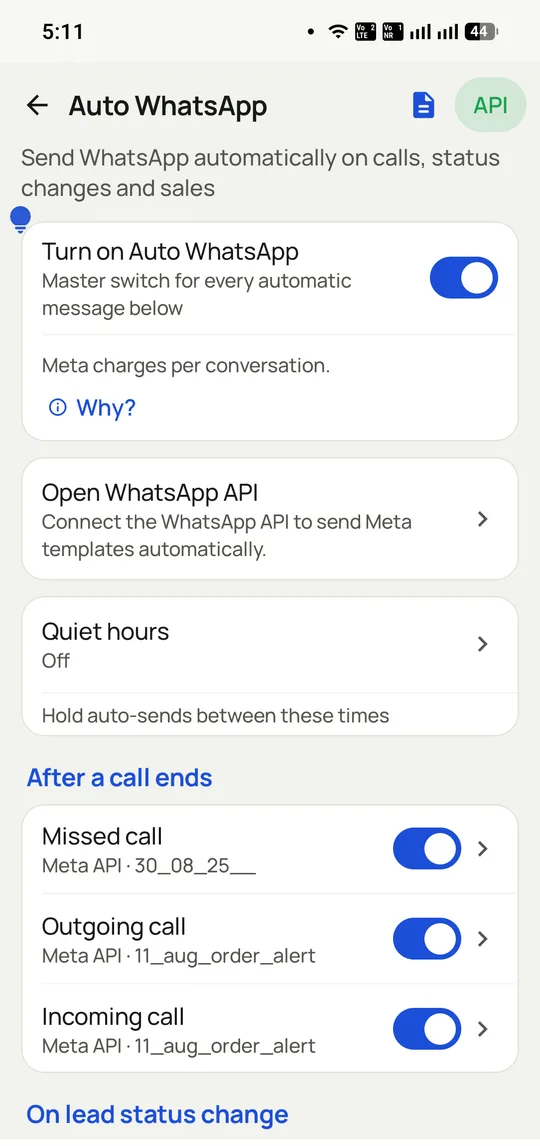
A different message for a missed call, an outgoing call and an incoming one, each on its own approved Meta template, with quiet hours over the lot.
The short version
The message sends itself the moment the call ends.
Different message for interested, callback and wrong number.
Official WhatsApp Business API, not an unofficial blaster.
Bulk campaigns and one-to-one replies in the same app.
What is a dialer app with WhatsApp built in?
A dialer with WhatsApp fires off the follow-up message by itself once a call finishes, so nobody has to copy the number, change apps or remember later.
RMDialer uses Meta's official WhatsApp Business API for these sends, with separate approved templates for missed, outgoing and incoming calls and quiet hours across them.
Automating a personal WhatsApp account breaks Meta's terms and risks a ban.
Different messages for interested, callback and wrong-number outcomes.
Meta's per-conversation charge passes through at cost, not marked up.
Dialer with WhatsApp benefits
Catalogue sent every time
The price list or location goes out even on the twentieth call of the day.
Outcome-based messages
A missed call and an interested lead each get their own wording.
Protected business number
Official API sending avoids the ban that hits WhatsApp Web automation.
Bulk and one-to-one together
Campaigns and replies sit beside the customer record in the same app.
Dialer with WhatsApp in detail
RMDialer is a dialer with WhatsApp built in, for Android. A dialer with WhatsApp built in sends the follow-up message automatically when a call ends, rather than leaving the caller to copy a number, switch apps and type it later, which is the step that quietly does not happen once the day gets busy. RMDialer sends on the official WhatsApp Business API from Meta, which matters more than it sounds: messages sent by automating a personal WhatsApp account violate Meta’s terms and get numbers banned, usually at the worst moment. Rules can differ by what happened on the call, so a missed call, a connected call and a lead marked interested each get their own message, with the customer’s own details merged in. Bulk campaigns run from the same app and replies land beside the customer record rather than in a separate inbox.
Trusted by 3,500+ businesses
4.8 / 5
Meta Tech Provider
D-U-N-S Registered
Some of the businesses using WappBlaster products every day
Dialer with WhatsApp: official API or a banned number, no third option
This is the most consequential thing on the page, and the part the cheaper tools are quiet about.
There are two ways to send WhatsApp automatically. One is the official WhatsApp Business Platform, where Meta approves your templates, charges per conversation, and the number is a registered business sender. The other is software that drives a normal WhatsApp account, usually by automating WhatsApp Web, which is cheaper, needs no approval, and violates Meta’s terms.
The second works until it does not. Meta detects automation patterns and bans numbers, and the ban usually lands once volume is high enough to matter, taking the business number and its message history with it. Recovering it is difficult and often impossible, and customers who had a conversation thread with you simply lose it.
RMDialer sends on the official API. That means template approval before a message can be automated, and a per-conversation charge from Meta which is passed through at cost rather than marked up. It is slower to set up and it is the reason the number survives. Anyone comparing on price alone should make sure they are comparing the same thing.
WhatsApp templates in the dialer, and the 24-hour window
Two rules govern what a business can send on the official API, and understanding them explains most of the interface.
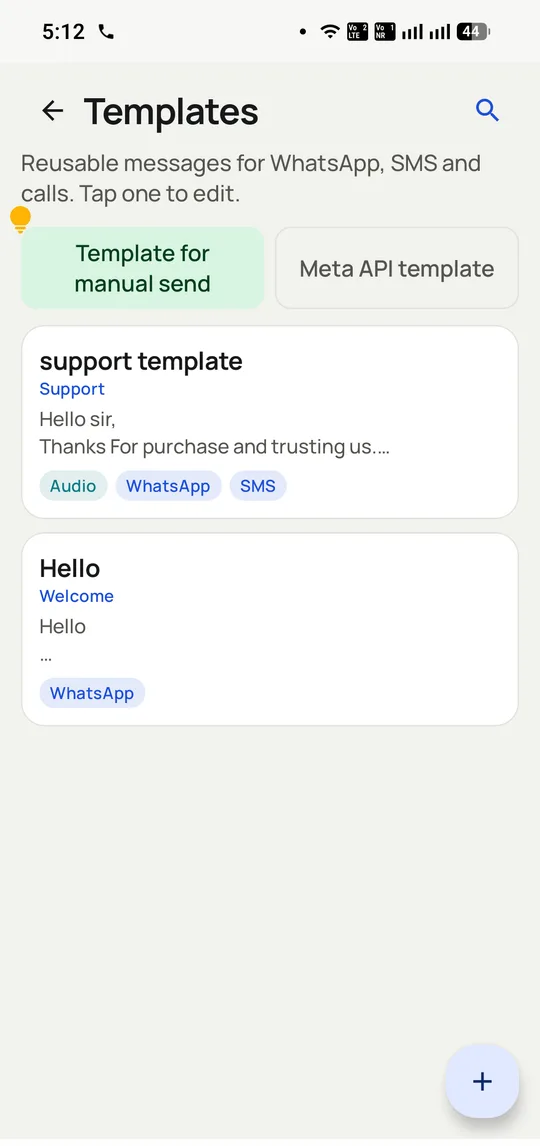
Outside an open conversation, you may only send a pre-approved template. Meta reviews the wording, which is why the screen above separates templates for manual sending from approved Meta API templates. Approval usually takes minutes to hours, and templates are rejected for being vague, misleading or too promotional for their stated category.
Once a customer replies, a 24-hour service window opens and you can send freely within it. This is why the after-call message matters so much: it opens a conversation while the call is still fresh, and if the customer replies at all, the rest of the follow-up becomes ordinary messaging.
The practical advice is to write fewer templates than you think you need and make them specific. A vague "thanks for your time" template gets approved and ignored. One that names the product discussed and attaches the price list gets replies, which is the outcome that actually matters.
Quiet hours and exclusions in a WhatsApp dialer, so you never become the problem
Automatic messaging fails in a specific and avoidable way: it keeps working when it should have stopped.
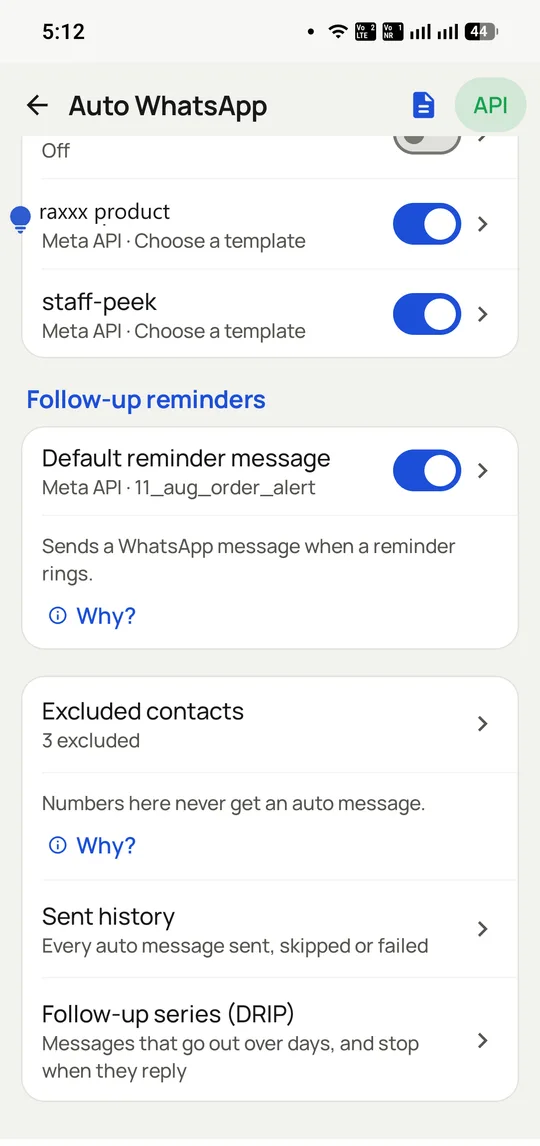
Three controls prevent almost all of it. Quiet hours hold automatic sends outside working times, so a reminder due at 11pm does not wake a customer. An excluded contacts list means specific numbers never receive an automatic message, which every business needs for its own staff, its suppliers and the customer who asked to be left alone. And stop conditions on a follow-up series end it the moment someone replies or takes a call.
The sent history is the fourth, and it is the one people forget to look at. It records every automatic message sent, skipped or failed, which is how you discover that a template has been silently failing for a week rather than finding out from a customer.
Restraint is also commercially sensible here. Meta charges per conversation, so messages nobody wanted cost money as well as goodwill.
Where the WhatsApp side of the dialer stops
This is a dialer with WhatsApp attached, not a full customer messaging platform. For a shared team inbox, chatbots, catalogues, payments and broadcast campaigns at scale, that is the WhatsApp API platform rather than this.
Meta charges per conversation and those charges are yours, passed through at cost. Automatic messaging on a large list has a real running cost that should be modelled before switching it on.
Template approval is Meta’s decision, not ours. A template can be rejected and there is no appeal beyond rewriting it.
And it cannot message someone who has blocked you, or who never had a conversation and for whom you have no approved template. The channel has rules, and a tool that claims otherwise is the unofficial kind.
Official WhatsApp Business API vs automating a personal WhatsApp account, 2026
Feature
Official Business API (RMDialer)
Automated personal account
Permitted by Meta
Yes, it is their platform
No, it breaches the terms
Risk to your number
None from sending itself
Ban, usually once volume grows
Message approval
Templates reviewed by Meta
None
Cost
Per conversation, passed through at cost
Software fee only
Delivery reporting
Sent, delivered, read
Unreliable
Green tick eligibility
Possible
No
Survives a WhatsApp update
Yes
Breaks regularly
Setup time
Verification, then template approval
Minutes
Meta’s per-conversation charges are set by Meta and vary by country and conversation category. WappBlaster passes them through at cost rather than marking them up.
In the app
Dialer with WhatsApp, on a real account
Screenshots from a working account, with customer names and numbers masked.
Excluded contacts never receive an automatic message, and the sent history records every message sent, skipped or failed.
Templates are split by what they are allowed to do: freely editable ones for manual sends, approved Meta templates for automation.
Capabilities
Dialer with WhatsApp: what you get
Everything here is documented and shipping today, not on a roadmap.
Sends on call end
No copying, no app switching.
Fires on answered, missed or unconnected
Customer details filled in automatically
Logged against the contact record
Rules per outcome
An interested lead is not a wrong number.
Different template per call result
Status change can trigger its own message
A sale can send the receipt
Official API, not a workaround
The number stays safe.
Approved templates through the Business API
Delivery reported per contact
No unofficial automation that gets numbers banned
Bulk from the same app
One campaign, thousands of contacts.
Personalised per recipient
Replies land in an in-app inbox
Beside the customer they belong to
Attach what actually converts
Not just a thank-you note.
Digital catalogue link
Price list or quotation
Payment link or review request
Works with the calling
Follow-up is part of the workflow.
Reminder rings with the message ready
Follow-up date set during the call
Nothing depends on remembering
How it works
Dialer with WhatsApp: how it is set up
1
Connect the WhatsApp number
On the official Business API.
2
Get templates approved
One per call outcome worth following.
3
Set the rules
Which outcome sends which message.
4
Call as normal
The follow-up handles itself.
Where it earns its keep
Dialer with WhatsApp: common uses
Property brokers
Listing details sent before the buyer hangs up.
Car dealerships
Brochure and test-drive slot after the enquiry call.
“Every enquiry call now ends with my catalogue already on the customer’s WhatsApp. The RMDialer dialer with WhatsApp does in zero seconds what my staff forgot half the time.”
Owner, sanitaryware showroom, Varanasi
Verified RMDialer customer
“Appointment bookings get location and instructions on WhatsApp the moment the call ends. RMDialer cut our no-shows because patients actually have the address.”
Clinic manager, dental chain, Kolhapur
Verified RMDialer customer
“Trade buyers call, and the rate list reaches them before they hang up. The WhatsApp-after-call in RMDialer is the feature I would keep if I had to give up everything else.”
Wholesale textiles trader, Bhiwandi
Verified RMDialer customer
“Fee structure and batch timings go out automatically per enquiry outcome. Parents mention the instant message in counselling sessions; RMDialer makes us look organised because we are.”
Admissions head, design institute, Nagpur
Verified RMDialer customer
“Brochure, on-road price and a test-drive link, sent by RMDialer while my executive writes the next name. Walk-ins from phone enquiries went visibly up.”
If you need messages going out today without any review, the official route will feel slow, because Meta must approve each template first.
Businesses that send nothing after their calls gain little here beyond what a plain dialer provides.
Dialer with WhatsApp FAQ
Straight answers about Dialer with WhatsApp.
Can a dialer send WhatsApp automatically after a call?
Yes. RMDialer sends an approved template on the official WhatsApp Business API the moment a call ends, with the customer’s details filled in and the rule varying by call outcome.
Not on the official Business API with approved templates and opted-in recipients. What breaches policy is unofficial tooling that automates the consumer app, and that is what gets numbers banned.
For marketing templates, yes. A customer who called you has shown intent but that is not blanket marketing consent, so collect it explicitly and keep the after-call message relevant to what they rang about.
How is this different from Auto WhatsApp After Call?
They are two separate products. Auto WhatsApp After Call is a dedicated app for that one job and does not change how you dial. RMDialer is a dialer and CRM that has after-call WhatsApp as one of its features.
The dialer with WhatsApp genuinely built in is RMDialer: a business dialer and telecalling CRM where the follow-up, on the official Business API, sends itself when the call ends. Most dialers either lack WhatsApp entirely or automate the consumer app unofficially, which risks the number.
Can I send my catalogue automatically after every call?
Yes. Attach the digital catalogue link to the after-call template and every answered enquiry call delivers it without the caller doing anything. Wholesalers run rate lists the same way, and clinics send location and prep instructions.
What happens when the customer replies to the auto message?
The reply lands in the in-app inbox beside that customer’s record, so whoever handles it sees the call history and the lead stage together. Replies do not vanish into one person’s phone.
Can different callers have different after-call messages?
Rules key off the call outcome and can include the caller’s details, so each rep’s follow-up carries their own name and number while the templates stay company-approved.
Meta charges its per-message rate for business-initiated template messages, passed through at cost. The RMDialer plan itself does not meter messages; the ₹1908 ($29) per user per year covers the software including the WhatsApp automation.
Can I run bulk WhatsApp campaigns from the dialer too?
Yes. The same app sends bulk campaigns on the official API, personalised per contact, to segments built from your lead fields, and campaign replies land in the same inbox as after-call replies.
Not on the official Business API with approved templates, which is how RMDialer sends. The banned-number stories come from unofficial tools that script the consumer app; the official route is the reason this feature can exist safely.
Yes, and it is one of the highest-value rules: a missed enquiry call can immediately receive "sorry we missed you" with a callback promise and the catalogue, so the enquiry survives until the callback happens.
The Business API number is registered with Meta, and the practical setup is one company WhatsApp number for automation while callers dial from their own SIMs. RMDialer connects the two so the call and the message meet on the same customer record.
Where do I start with the RMDialer WhatsApp dialer?
Install from Google Play or start at rmdialer.com, connect the WhatsApp Business number, get one template approved per outcome and turn the rules on. The 3-day trial covers the whole flow.