Auto dialer app by RMDialer: your list, through the SIM you already have
An auto dialer app is a phone app that works through a call list for you, starting each next call without manual dialling. Most "auto dialers" want you to buy a virtual number and route calls over the internet. This one dials from the SIM in the phone your team already carries, and places the next number the moment the last call ends.
Included in the platform licence. Not a paid add-on.
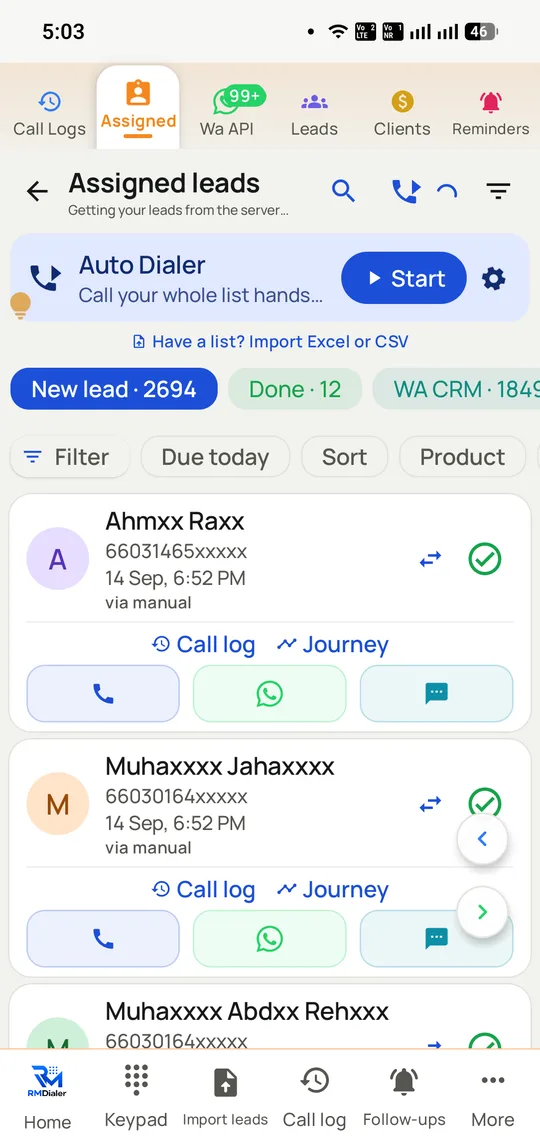
Tap Start once and the dialer works through every lead assigned to you. Counters above the list track how many are still to call, how many are done and how many already sit in the WhatsApp CRM.
The short version
Dials through your own SIM. No IVR, no VoIP, no virtual number.
Next number is placed the moment the previous call ends.
Call lists come in as saved leads, CSV or Excel files, or a Google Sheet.
Roughly 18 seconds saved per call, by the vendor’s own figure.
What is an auto dialer app?
An auto dialer app is software that rings the next number on a call list by itself as soon as one call is over, so the caller never types numbers.
RMDialer runs that list from the SIM already in your Android phone, with no virtual number or IVR, for ₹1908 ($29) per user per year.
One caller, one call at a time: no predictive pause at the customer's end.
Lists load from saved leads, CSV, Excel or a linked Google Sheet.
The vendor's own estimate is about 18 seconds saved on every dial.
Auto dialer app benefits
Hands-free list dialling
Tap Start once and the assigned leads ring one after another until the session ends.
Filtered call sessions
Build the session from status or source, so the speed goes into the right names rather than the wrong 300.
Caller context on connect
Name, lead status and the latest note appear as each number connects.
Ordinary mobile caller ID
Prospects see the rep's real mobile number, which they can ring back later.
Auto dialer app in detail
RMDialer is an auto dialer app for Android: software that places the next call on a list automatically as soon as the previous one ends, so a caller never types a number between calls. An auto dialer differs from a predictive dialer in that it rings one number at a time for one caller, rather than ringing several at once and bridging whoever answers, so there is no silent pause at the customer’s end. RMDialer dials through the phone’s own SIM rather than a VoIP line or a rented virtual number, which means no IVR to configure, no telecom onboarding and no change to how calls are billed. Lists load from saved leads, a CSV, an Excel file or a linked Google Sheet, and every call still carries the customer’s name, lead status and last note on screen as it connects.
Trusted by 3,500+ businesses
4.8 / 5
Meta Tech Provider
D-U-N-S Registered
Some of the businesses using WappBlaster products every day
What an auto dialer actually removes
The case for an auto dialer app is usually made with a productivity percentage, which is easy to say and impossible to check. The mechanism is simpler than that and worth stating plainly.
Between two manual calls a caller does four things: ends the call, finds the next record, reads a number off a screen, and types it. None of it is selling. Timed across a telecalling floor it lands at roughly 15 to 20 seconds, and RMDialer’s own figure is about 18. At 80 dials a day that is around 24 minutes per caller, and across four callers roughly an hour and a half.
The larger effect is not the arithmetic, though. It is that dialling stops feeling like work. Lists that used to be abandoned at 60% get finished, because the next call arrives whether or not the caller feels like starting it. That is also the honest risk of auto-dialling, and the reason filtering matters more than speed: a dialer that makes it effortless to call 300 people will happily help you call the wrong 300.
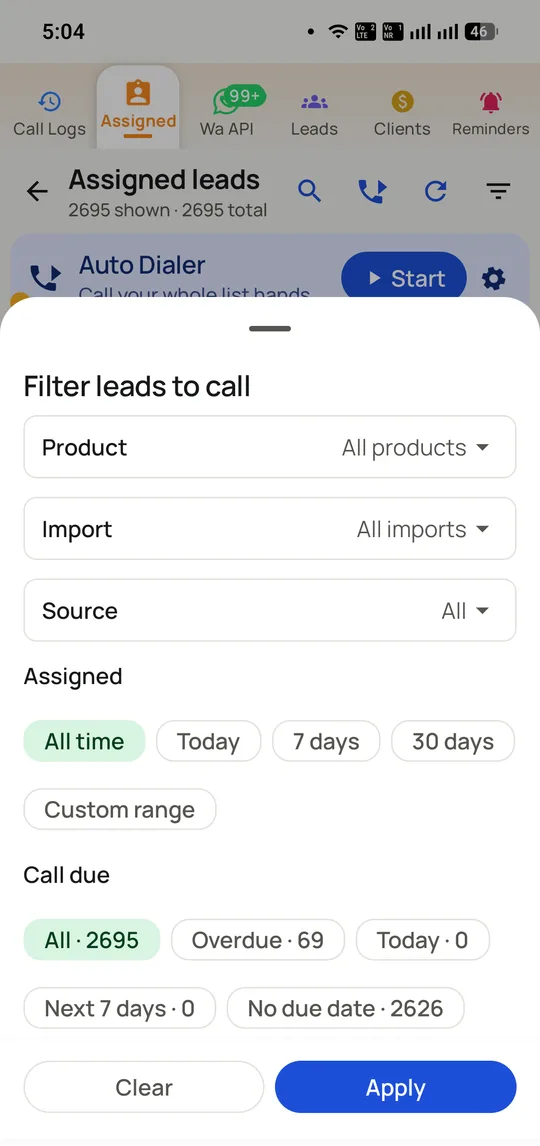
Which is why the session is built from a filter rather than a list. Status, product, import batch, source and time since last contact all narrow the set before a single number is dialled. The lead management side is where those fields come from.
Auto dialer, power dialer and predictive dialer are not the same product
These three get used interchangeably in marketing copy and they behave very differently on a floor. The distinction decides what you need to buy, so it is worth being exact.
An auto dialer places one call at a time for one caller and dials the next the moment the current one ends. One agent, one line, no waiting on either side. RMDialer is this.
A power dialer is the same idea with a fixed multiplier, dialling two or three numbers per agent to cover unanswered calls. It raises connect rates and needs multiple lines per agent, which is a telephony product rather than a phone app.
A predictive dialer rings many numbers at once across a pool of agents and uses an algorithm to guess when someone will free up. It delivers the highest throughput and it is the source of the silent pause everyone recognises and resents, because sometimes it guesses wrong and nobody is there.
For a team of two to fifty callers working their own lists, the auto dialer is usually the right shape: no infrastructure, no abandoned calls, and the customer still gets a person on the line immediately. Above that, or for pure cold outbound at volume, predictive starts to earn its complexity. The ranked shortlist of Android auto dialer apps covers who does what.
Why the outcome logging decides whether auto-dialling survives
Most auto dialer trials fail here rather than on the dialling, and it is the part demos skip.
Continuous dialling only works if recording what happened takes less time than the call saved. If logging an outcome means switching apps, finding the lead, picking a status and typing a note, the caller stops doing it by mid-morning. A week later the data is worthless and the team is back to a spreadsheet, having concluded that the dialer did not work.
RMDialer puts the outcome sheet on the call screen the moment the call ends: status, remark, follow-up date, and optionally a WhatsApp message, in two taps. The sheet auto-closes after a set interval if untouched, so a caller who ignores it is not blocked. The next number is placed either way.
That is also what makes the reporting real rather than decorative. Because the outcome is captured at the moment of the call, the call analytics and the per-employee reports describe what actually happened instead of what someone remembered at 6pm.
What it costs to run, and what it does not
A year of RMDialer costs ₹1908 per user, about ₹159 a month, and the three-month plan is ₹747 per user. Outside India it is $29 per user per year. There is a free three-day trial, and the phone dialer itself, with the call log, caller ID and call analytics, is free forever and needs no account.
The part worth understanding is what is absent from the bill. There is no per-minute charge, because RMDialer does not carry the call; the SIM does, on the plan you already pay for. There is no virtual number rental and no telephony minimum. A cloud dialer typically charges all three, and the per-minute line is the one that grows as the team gets better at its job.
Everything is in the single price: the dialer, the telecalling CRM, per-employee reports, the desktop web panel and official-API WhatsApp after calls. Comparable products commonly place reports or the web panel a tier up. The pricing page has the breakdown and the GoDial comparison puts the tiers side by side.
Where an auto dialer app is the wrong tool
Worth saying, because the answer is not always this product.
You need inbound queues, an IVR or an auto-attendant. An auto dialer app has no concept of these: calls ring a handset.
You are running predictive outbound across 50+ agents where abandoned-call economics dominate. That is a telephony platform, not a phone app.
Your callers are not in the same country as the people they call. The real-caller-ID advantage that makes SIM-based dialling work disappears once the number is foreign to the recipient.
You need every call recorded by default for compliance. Recording is supported and set up with you during onboarding rather than switched on out of the box, so a regulated collections floor should scope that first.
Manual dialling vs auto dialer vs predictive dialer for an outbound team, India, 2026
Feature
Manual dialling
Auto dialer (RMDialer)
Predictive dialer
Calls ringing per agent
One, typed by hand
One, placed automatically
Several at once
Dead time between calls
~18 seconds
Effectively none
None
Silent pause for the customer
Never
Never
When the guess is wrong
Abandoned calls
None
None
A tuned percentage
Infrastructure needed
A phone
A phone
Telephony platform and lines
Caller ID the customer sees
Your own number
Your own number
Usually a pooled number
Sensible team size
1 to 3
2 to 50
30 and up
Cost of the minutes
Your mobile plan
Your mobile plan
Per minute, billed by the platform
The 18 second figure is RMDialer’s own measurement of the find-type-wait cycle and is the kind of thing worth timing against your own team before you rely on it. Predictive behaviour varies by vendor; the column describes the dialling model rather than one product.
In the app
Auto dialer app, on a real account
Screenshots from a working account, with customer names and numbers masked.
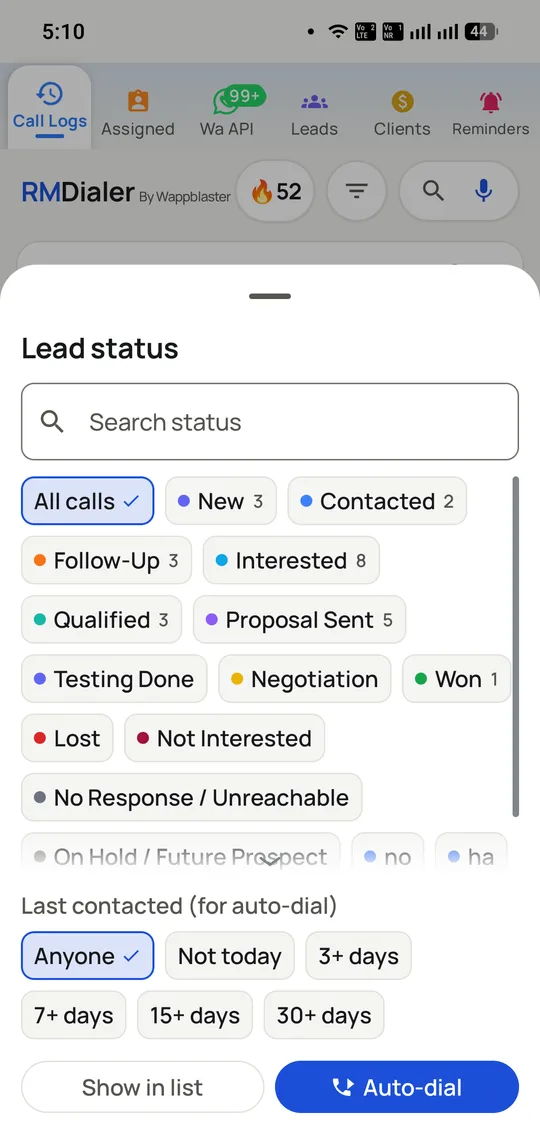
Build the session from status plus how long since the last contact, then send exactly that subset to the dialer.
Filters are what stop an auto dialer becoming a blunt instrument: 69 overdue out of 2,695 is a morning, not a month.
Capabilities
Auto dialer app: what you get
Everything here is documented and shipping today, not on a roadmap.
No telecom setup at all
Nothing to port, no IVR to build, no VoIP subscription and no rented virtual number. The app dials out through the SIM already in the handset, so call quality and call costs are whatever your existing plan gives you.
Continuous dialling
Load the list once and tap start. When a call ends the next number is placed automatically, which removes the find-it, type-it, wait cycle between every call.
Lists from wherever they live
Saved lead lists, a CSV, an Excel file, or a Google Sheet that someone else keeps updated. The dialler reads the list; you do not re-key it.
Context on every call
Auto-dialling does not mean calling blind. The customer’s name, lead status and last note are on screen as the call connects.
Two taps to log the outcome
Set the result and the next follow-up without leaving the call screen, then the dialler moves on. The logging is what usually breaks continuous dialling; here it does not.
Dual SIM and offline
Choose which SIM dials, and keep working when the network drops. Calls, notes and statuses sync when the connection returns.
How it works
Auto dialer app: how it is set up
1
Import the list
From saved leads, a CSV, Excel or a linked Google Sheet.
2
Pick the SIM
Choose which SIM places the calls on a dual-SIM handset.
3
Start the session
Tap once; the app dials the first number and continues through the list.
4
Log and move on
Two taps sets the outcome and the follow-up, then the next call is placed.
Getting the list in
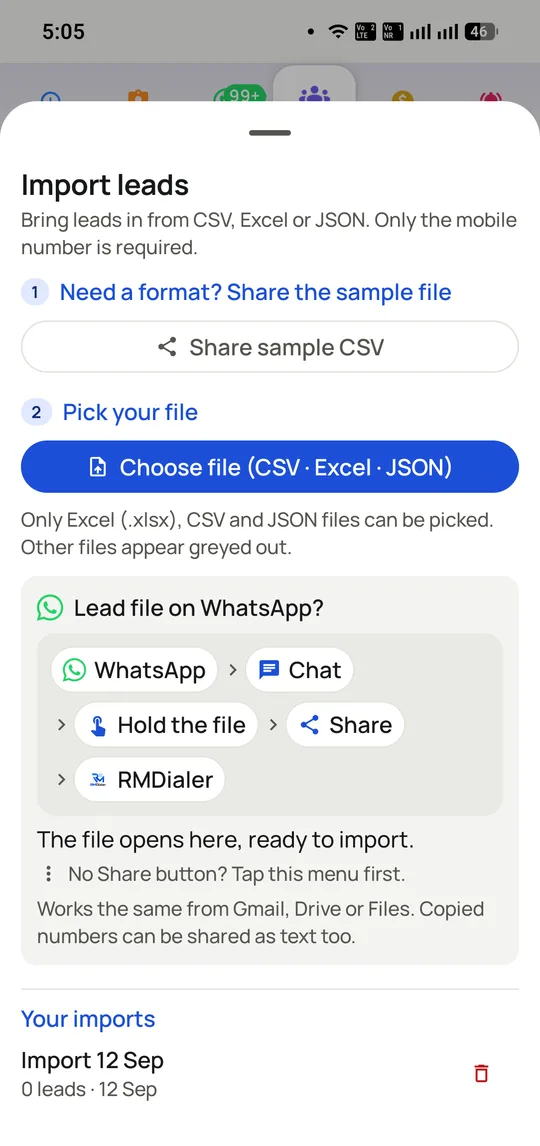
Lists arrive as CSV, Excel or JSON, or straight from a file someone sent on WhatsApp, which is how most Indian teams actually receive a list. A linked Google Sheet keeps syncing on its own.
Where it earns its keep
Auto dialer app: common uses
Telecalling teams
Hundreds of dials a day where the keypad is the bottleneck.
Real estate brokers
Working a fresh enquiry list the morning after a launch.
Insurance renewals
A monthly expiry list dialled straight through.
Coaching admissions
Seasonal spikes where the list is long and the window short.
Loan and finance agents
Qualified lists that need speed more than research.
“We moved four telecallers onto the RMDialer auto dialer and the daily call count went from around 60 to over 100 each, without anyone staying late. The list just keeps moving.”
Sales head, real estate, Gurugram
Verified RMDialer customer
“Tried two cloud dialers before this. RMDialer is the only auto dialer app that worked with our own SIMs, so customers see our real numbers and actually pick up.”
Insurance agency owner, Mumbai
Verified RMDialer customer
“During admission season we load the enquiry sheet in the morning and the RMDialer auto dialer walks the team through it. The two-tap outcome logging is the part my callers stopped complaining about.”
If you need several lines rung at once with answered calls bridged to free agents, a predictive dialer on a cloud platform fits better; this one rings a single number per caller.
Teams working only from iPhones get a calling companion rather than the full replacement dialer, because iOS keeps the system dialer closed.
Auto dialer app FAQ
Straight answers about Auto dialer app.
Does an auto dialer require an IVR or a virtual number?
RMDialer does not. Calls leave through the SIM card in the Android handset, so you never open a VoIP account, rent a number or build an IVR menu. A cloud call-centre platform carries the call on its own network instead, and that is why it has to be connected to a telecom setup before anyone can dial.
How many minutes does an auto dialer give back each day?
The vendor’s figure is around 18 seconds per call, spent finding the number, typing it and waiting. On four callers doing 80 calls each that works out at roughly an hour and thirty-six minutes a day. Time one of your own team through twenty manual dials to check it against your numbers.
Will the dialer work through a list kept in Google Sheets?
Yes. A linked Google Sheet is one of the sources, alongside leads saved in the app, CSV files and Excel files. Linking a sheet helps most when the list is kept up to date by someone other than the person making the calls.
No. As every call connects, the screen shows the customer’s name, their lead status and the last note left on them. That context is what separates a working auto dialer from simply ringing numbers at random.
Yes, RMDialer is an auto dialer app, made for Android and calling through the phone’s own SIM. The same app also holds a telecalling CRM, call outcomes, follow-up reminders and WhatsApp messages that send by themselves after each call.
Is there an auto dialer app that calls from my own SIM card?
RMDialer is the auto dialer app to shortlist when a team wants to call from its own numbers instead of a rented one. It uses the SIM that is already in the handset, and on a dual-SIM phone you can pick either slot. Cloud dialers differ on exactly this point: they send calls over VoIP or through a virtual number you lease.
How does an auto dialer improve telecaller productivity?
It removes the dead time between calls: finding the next number, typing it and waiting. At roughly 18 seconds saved per call, a caller doing 80 calls a day gets back about 24 minutes, and a four-person team about an hour and a half, before counting the calls that were simply never made because dialling felt like work.
What is the difference between an auto dialer and a predictive dialer?
An auto dialer places the next call when the current one ends, one call per caller. A predictive dialer rings several numbers at once and connects whoever answers to a free agent, which needs telephony infrastructure and creates the silent pause customers hate. RMDialer is an auto dialer: one caller, one call, through their own SIM.
To the mobile network, an auto dialer running on your own SIM looks like any other call, because the app only does the tapping for you. The rules apply to whom you ring and why: honour DND registrations when the call is promotional and keep proof of consent, exactly as you would when dialling by hand.
RMDialer costs ₹1908 per user per year, which works out at ₹159 a month, or ₹747 per user on the 3-month plan; outside India it is $29 per user per year or $12 for 3 months. Every feature is included: the auto dialer, telecalling CRM, team reports, the desktop Web CRM and auto WhatsApp after calls, with a free 3-day trial before paying. The phone dialer itself, with the call log, caller ID and call analytics, is free forever and needs no account.
Can I pause or skip numbers during an auto-dial session?
Yes. A session can be paused between calls, individual numbers skipped, and the list resumed later from where it stopped, with everything already dialled marked with its outcome.
Does the auto dialer include a CRM, or do I need a separate one?
It is built in. Every number in the list is a lead with a status, notes, custom fields and follow-up dates, updated in two taps from the call screen. Teams that already run a CRM can keep it and sync through the API instead.
Can the auto dialer send a WhatsApp message after each call?
Yes, and it is the pairing the product is named for: when a call ends, RMDialer can send your catalogue, price list or introduction on WhatsApp automatically, so every dialled contact has something in writing without the caller typing anything.
From Google Play, search RMDialer, or install it from the RMDialer auto dialer page. The iPhone app is on the App Store and runs as a calling companion, because iOS does not let a third-party app replace the system dialer or read the native call log. The desktop Web CRM that comes with the plan runs in any browser alongside either.