Call tracking software for teams by RMDialer: today’s work, without asking anyone
Call tracking software for teams captures a dated, per-employee record of every work call, so nobody has to report their own numbers. The usual way to find out how many calls were made is to ask at seven in the evening and believe the answer. The numbers are already on the phone; they just need to reach you.
Included in the platform licence. Not a paid add-on.
One number, every call ever made to it, each tagged with who called, from which SIM and what the outcome was. This is what settles a disagreement.
The short version
Calls, durations and outcomes per agent, recorded automatically.
Assign and transfer leads between team members.
Live during the day, not a report compiled at the end of it.
Reports per employee on a desktop, the Web CRM included in the plan.
How do you track a telecalling team's calls?
Track a telecalling team's calls by logging each one automatically with time, duration, direction, SIM, lead and outcome, so any call can be reconstructed later.
RMDialer builds that record itself because it places the calls, and the history survives an employee leaving, which a handset call log does not.
Tracking is per call and forensic; analytics is the aggregate view.
Leads can be assigned and transferred between team members.
Employee reports open on a desktop, with the Web CRM in the plan.
Call tracking software for teams benefits
Settled disputes
When a customer says nobody rang, the dated rows show who did and from which SIM.
Lead hand-offs with history
Transfer a lead to a colleague and the full call trail travels with it.
Live daily picture
Today's calls per agent are visible during the day, not compiled at seven in the evening.
Work tracked, not people
The records describe calls and outcomes, keeping the focus on the job rather than surveillance.
How do you track a telecalling team’s calls?
RMDialer is call tracking software for calling teams. Call tracking records each individual call an agent makes or receives, with its time, duration, direction, the SIM it went out on, the lead it belonged to and the outcome the caller recorded, so any single call can be reconstructed long after everyone has forgotten it. That is a different job from analytics, which aggregates calls into patterns, and from monitoring, which shows what is happening right now. Call tracking is what you reach for when a customer says nobody ever rang them, when a promise made on a call needs checking, or when a lead went quiet and you need to see who touched it and when. In RMDialer the record builds itself because the app places the calls, and it survives the employee leaving, which the call log on their handset does not.
Trusted by 3,500+ businesses
4.8 / 5
Meta Tech Provider
D-U-N-S Registered
Some of the businesses using WappBlaster products every day
The question call tracking exists to answer
Aggregate reporting tells you the team made 2,400 calls last month at a 48% connect rate. Useful, and no help at all when a customer emails to say nobody has contacted them since August.
That question is per-call and forensic. Who rang this number, on what date, for how long, from which SIM, and what did they record afterwards? A shared spreadsheet cannot answer it. A handset call log can answer part of it, for one phone, until that phone is replaced.
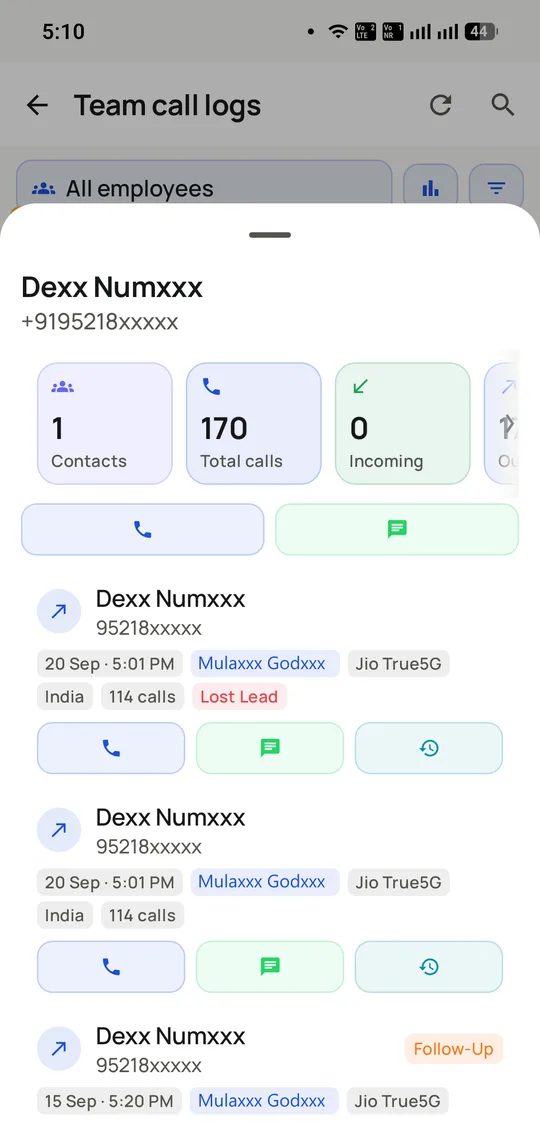
The screen above is the answer as RMDialer stores it: one contact, 170 calls, each row carrying its timestamp, the colleague who made it, the SIM it went out on and the outcome. Reading down it, the history of the relationship is legible without asking anyone to remember anything.
Most of the time nobody needs this. The times they do are disproportionately expensive: a disputed commitment, a complaint that escalated, a client who says they were promised a price, a lead that was supposedly worked and was not.
Tracking the work, not the person
Software in this category is often sold with surveillance language, and it is worth being clear about where the line sits, because teams can tell the difference and it changes whether they cooperate with the tool.
RMDialer records calls made through the app: business calls, on the company account, about company customers. It does not read personal messages, track location continuously, or log calls made outside the app. On a dual-SIM handset a caller can keep their own SIM for personal calls and the work record stays work.
That distinction matters practically as well as ethically. A team that believes a tool exists to catch them will find ways around it, and the data degrades. A team that understands it captures the work so nobody has to write a daily report tends to use it as intended, because the two-tap logging genuinely saves them the evening write-up.
The employee-facing view of the same system is on the telecaller app page, which is worth reading if you are the one introducing this to a floor.
Recording, consent and what Indian law expects
Call recording is the part of call tracking with genuine legal weight, and vendors are often vague about it. RMDialer supports recording, set up with you during onboarding rather than enabled by default.
In India, the Digital Personal Data Protection Act treats a call recording containing personal data as personal data, which means you need a lawful basis, a stated purpose, and the ability to honour a deletion request. In practice, for most calling businesses, that means telling the customer at the start of the call that it may be recorded and why, keeping recordings only as long as the stated purpose requires, and restricting who can listen to them.
Telling people is not merely a compliance chore. A stated recording notice measurably changes the tone of difficult calls in your favour, because both sides behave as though there is a record, which there is.
The same applies to your own staff: they should know recording is on, what it is used for, and who hears it. This is general information rather than legal advice, and a regulated sector, collections in particular, should take its own.
It records that a call happened and what the caller said about it. It does not verify that the caller’s summary was accurate, unless the call was recorded.
It only sees calls placed through the app. A caller who dials from the native phone app, or from a second handset, produces no record, which is why teams that care about completeness make RMDialer the default dialer rather than an optional one.
It is not a quality scoring system. There is no automatic evaluation of how a call was handled; someone has to listen.
And it cannot reconstruct what happened before it was installed. The history starts on the day you start, which is an argument for starting sooner rather than for waiting until the process is perfect.
Reconstructing what happened on one call: memory, handset log, spreadsheet or tracked record, 2026
Feature
Asking the caller
Handset call log
Shared spreadsheet
Call tracking (RMDialer)
That the call happened
Claimed
Yes
If logged
Yes
Exact time and duration
No
Yes
Rarely
Yes
Who in the team made it
Yes
Only on that phone
If logged
Yes
Which number it went out on
No
Yes
No
Yes
What was agreed
Disputed
No
If logged
The recorded outcome and note
Audio of the conversation
No
No
No
If recording is configured
Still available a year later
No
Not after a device change
If maintained
Yes
Survives the caller resigning
No
No
Partly
Yes
Recording availability and retention should be configured to your own legal basis and retention policy. This table describes what each source can evidence, not what you are permitted to keep.
Capabilities
Call tracking software for teams: what you get
Everything here is documented and shipping today, not on a roadmap.
Reporting nobody has to write
The call log is the report. Counts, durations and outcomes come from what actually happened rather than what someone remembered to type into a sheet.
Outcomes, not just volume
Two hundred calls means nothing on its own. Outcomes per agent show whether the dialling turned into anything, which is what coaching needs.
Lead assignment and transfer
Push a list to a caller, move a lead to a colleague who knows the account, and keep the history attached when it moves.
Guided calling sessions
Run a team through a specific list with a defined objective, rather than everyone working their own version of the same file.
Live, not end-of-day
Watch calls land while the day is still salvageable. A caller stuck at nine dials by noon is a conversation worth having at noon.
Per-employee reports on a desktop
The Web CRM, included in the plan, opens leads, clients and reports per employee in a desktop browser on the same synced account. Managers get a full screen; callers keep working in the app.
How it works
Call tracking software for teams: how it is set up
1
Add your team
Create agents and set what each can see and do.
2
Assign the work
Distribute lead lists, or let agents pull from a shared pool.
3
Let the log fill itself
Calls, durations and outcomes record as they happen.
4
Review on outcomes
Compare results per agent rather than dial counts alone.
Where it earns its keep
Call tracking software for teams: common uses
Telecalling floors
Where dial volume is the job and drift is invisible.
Distributed field teams
Managers who never see their callers in person.
Agency and outsourced calling
Client reporting from the log rather than a spreadsheet.
Seasonal hiring
Spotting who has picked it up in week one, not week four.
Multi-branch businesses
Comparing branches on the same measure.
Incentive schemes
Paying on outcomes that came from the system, not self-reporting.
“Before RMDialer, call tracking meant a register nobody filled in honestly. Now I see every collector’s calls and outcomes by lunchtime, and month-end incentives come from the report, not from arguments.”
Branch manager, NBFC, Coimbatore
Verified RMDialer customer
“We bill clients per productive call, and the RMDialer call tracking report is literally our invoice attachment. Employee call tracking that runs itself is the reason we could take on the third client.”
Founder, telecalling agency, Indore
Verified RMDialer customer
“Eleven field reps across three districts, and RMDialer shows me each one’s calls and follow-ups without a single evening phone call to ask. The per-employee view in the Web CRM is what my old CRM promised and never delivered.”
Sales director, agri-inputs distributor, Nashik
Verified RMDialer customer
“We were fair with the team about it: RMDialer tracks business calls on the work app, nothing else. Adoption was easy because the same app also dials for them and logs in two taps.”
HR and operations, diagnostics chain, Nagpur
Verified RMDialer customer
“The pattern RMDialer’s call analytics exposed was that our best closer made the fewest calls. We stopped pushing dial counts, started copying his follow-up habits, and closures went up the next quarter.”
When call tracking software for teams is the wrong choice
If your question is about trends across thousands of calls, the analytics view answers it faster than reading single-call rows.
Calls made on a desk phone or on a second handset without RMDialer installed are not tracked.
Call tracking software for teams FAQ
Straight answers about Call tracking software for teams.
Does it record the audio of calls?
Yes. RMDialer supports call recording, and its team sets it up with you during onboarding. The reporting also covers who called whom, when, for how long and what the outcome was. Recording carries its own consent obligations in India and the UAE, so tell customers when calls are recorded.
Does this need everyone on the same network or office?
No. Calls place over each phone’s own SIM and the data syncs when there is a connection, which is why it suits field teams rather than only call-centre floors.
Outcomes per agent, not dials per agent. Dial counts reward speed and punish the caller who spends eight minutes closing something. Outcomes reward the result.
Through the Web CRM, which is included in the plan rather than sold separately. It opens the same account in a desktop browser with leads, clients and reports per employee on a full screen, in sync with the app both ways. Without it the reporting still works, it is just read on a phone.
Yes. RMDialer tracks every business call an employee makes or receives on the app, with duration, outcome and the lead it belonged to, reported per person live during the day. It is employee call tracking built into the same Android app the team already dials from, not a separate monitoring installation.
The call tracking software most Indian calling teams use for this is RMDialer, on four numbers it produces automatically: calls made, talk time, outcomes logged and follow-ups completed, per telecaller per day. Outcomes matter most; dial counts alone reward speed over results. Because the log fills itself from real calls, performance conversations start from facts rather than recollections.
Tracking business calls made on a company system, who called whom, when, how long, what outcome, is standard workforce management, best done transparently: tell the team what is recorded and why, and put it in the employment terms. Recording call audio is a separate matter with its own consent requirements.
Call logs are recorded automatically from actual call events, and roles control who can edit what. A caller can add notes and outcomes; the underlying record of the call having happened is not theirs to erase.
What is the difference between call tracking and call monitoring?
Call tracking is the record: counts, durations, outcomes and reports after the fact. Call monitoring is watching activity as it happens, live during the day. RMDialer does both from the same data, a live view while the day runs and per-agent reports when it ends.
Does call tracking work for WhatsApp follow-ups too?
The auto WhatsApp messages RMDialer sends after calls are part of the same record, so a manager sees not only that the call happened but that the catalogue went out afterwards, per lead.
Reports can be exported for payroll, incentives or client billing, and agencies use exactly this to invoice on logged calls rather than self-reported sheets.
Your own call analytics are free forever in the phone app. Team-wide call tracking, per-employee reports and the desktop Web CRM are inside the one RMDialer plan: ₹1908 per user per year, ₹159 per month per user, or $29 per user per year outside India. There is no separate reporting tier or per-report charge.
The plan is per user, so a team grows one licence at a time, from a two-person shop to a floor of forty. Each person gets their own login and role, and the reports separate them automatically.
Do my employees need company phones for call tracking?
No. RMDialer tracks the calls made through the app on whatever Android phone the employee carries, dialling from a company SIM if you issue one or their own if you do not. What it tracks is the work, not the handset.