Telecalling CRM by RMDialer that your callers will actually keep updated
A telecalling CRM is a customer database designed for high-volume phone teams, where logging a call takes seconds rather than a separate form. Most telecalling CRMs fail on the same step: the caller has to stop, open another app and type what happened. If logging takes ten seconds it gets done. If it takes a minute it does not, and by Friday the CRM is fiction.
Included in the platform licence. Not a paid add-on.
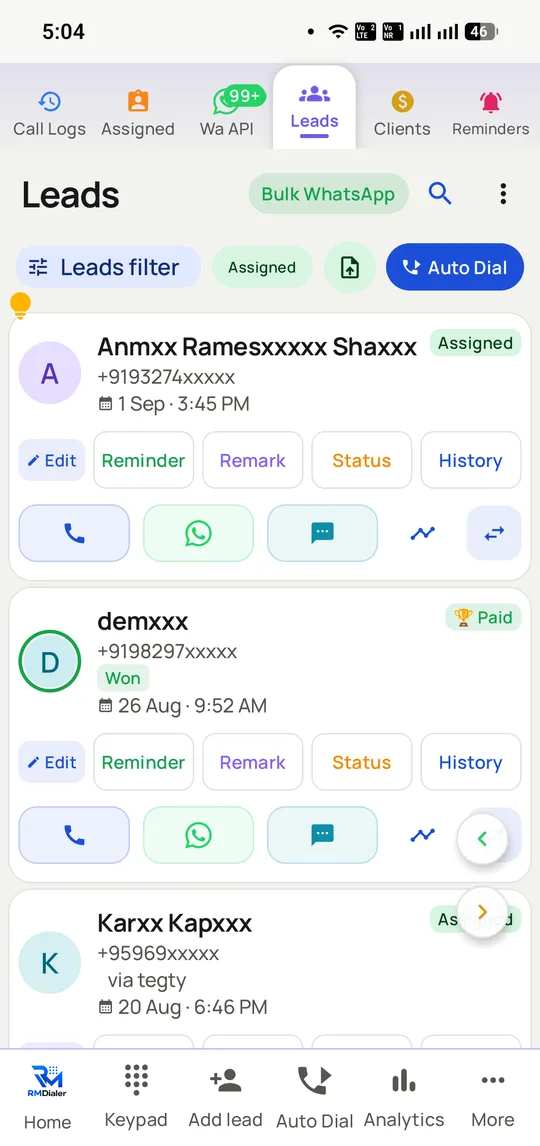
Each card shows who owns the lead, where it stands and everything that has happened to it, and puts the five actions callers use most right on the card.
The short version
Dial, know the customer, log the outcome and follow up in one app.
Two-tap logging, so the CRM stays true past Friday.
Dials from your own SIM: recipients see a normal mobile number.
WhatsApp follow-up on the official Business API, not a workaround.
What is a telecalling CRM?
A telecalling CRM organises leads around each phone call, putting the dialer, the customer record and the follow-up on one screen so callers never switch apps.
RMDialer keeps that CRM honest past Friday with two-tap logging, and sends WhatsApp follow-ups on the official Business API rather than a workaround.
The unit of work is the call, one every two or three minutes.
Deliberately narrow: no quotes, invoices or approval workflows.
Cards show the lead owner, its status and the five most-used actions.
Telecalling CRM benefits
CRM that stays current
Records update as a side effect of calling, not as homework afterwards.
Lead cards with actions
Each card shows who owns the lead and keeps common actions one tap away.
Real mobile caller ID
Recipients see a normal mobile number from the caller's SIM.
Compliant WhatsApp follow-up
Messages go on Meta's official Business API, protecting the number.
Telecalling CRM in detail
RMDialer is a telecalling CRM for Android. A telecalling CRM is a customer database built around the phone call rather than around a form: the dialer, the lead record and the follow-up live in one screen, so a caller never switches apps to record what happened. That is the distinction from a general CRM, which stores the same fields but expects someone to sit at a keyboard and fill them in afterwards. In RMDialer the list dials itself, the customer’s name, stage and last note appear before the call connects, the outcome and next follow-up are set in two taps on the call screen, and the WhatsApp message sends automatically as the call ends. It dials through the phone’s own SIM, so there is no VoIP account, no rented virtual number and no IVR to configure before the first call.
Trusted by 3,500+ businesses
4.8 / 5
Meta Tech Provider
D-U-N-S Registered
Some of the businesses using WappBlaster products every day
A telecalling CRM is not a general CRM with a dial button
Most teams arrive here having already tried a general CRM. Zoho, HubSpot, Salesforce or a homegrown sheet, all of which hold leads perfectly well and all of which a calling floor abandons within a month.
The reason is a mismatch in the unit of work. A general CRM is built around a record that someone edits: open the contact, change the field, save. That is the right shape for a deal worked over six weeks by someone at a desk. A telecalling floor’s unit of work is the call, one every two or three minutes, and the record has to update as a side effect of making it rather than as a separate task afterwards.
So the test is not which product has more fields. It is how many actions stand between hanging up and the next call. A general CRM with a click-to-dial button still asks the caller to find the record, choose a value and save. A telecalling CRM puts the outcome sheet where the call just was.
The corollary is that a telecalling CRM is deliberately narrower. There are no quotes, invoices or approval workflows here. Teams that need those keep the general CRM for the deal and sync through the API, which is covered on the CRM dialer page.
Your statuses are the schema of your sales process
The single configuration decision that determines whether a telecalling CRM produces useful data is the status list, and it is usually made carelessly in the first ten minutes.
Vendor defaults are generic on purpose: New, Contacted, Interested, Won, Lost. They are fine, and they will tell you almost nothing, because every business loses deals for reasons its own people have words for. An admissions team distinguishes "fee too high" from "chose another institute". A loan DSA distinguishes "CIBIL fail" from "documents pending". Those distinctions are the report worth having.
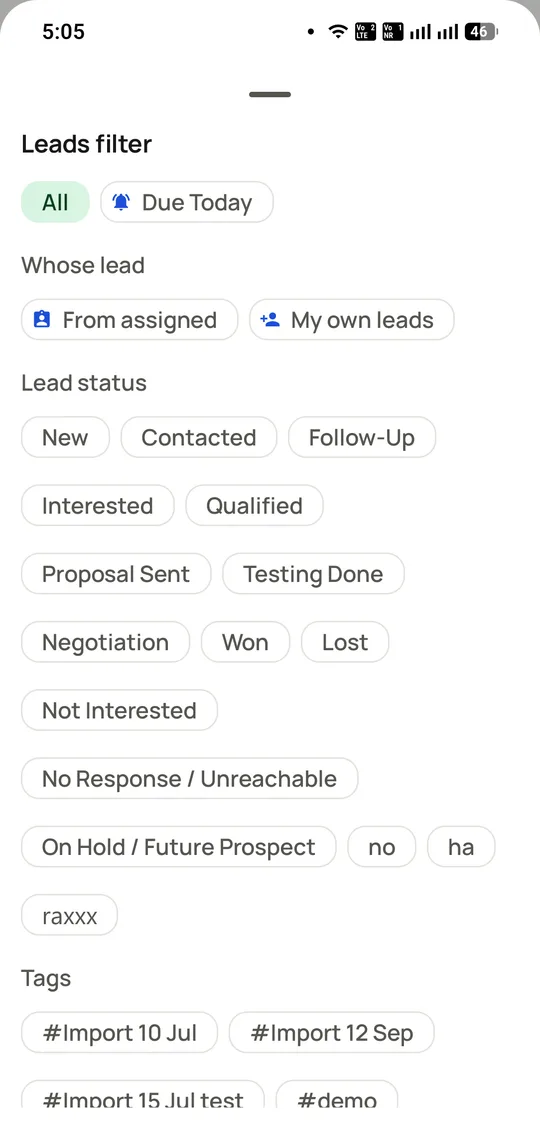
RMDialer lets you define statuses in the team’s own language, and the filter panel then becomes the way work is selected: everyone at proposal stage, everyone who went cold for a week, everyone from a specific import batch. Statuses created by a caller can require approval before they reach the rest of the team, so the list does not sprawl into forty near-duplicates.
Custom lead fields work the same way. Add the two or three that your process actually turns on, not twenty that nobody fills in, because an empty field is worse than an absent one: it makes a report look complete when it is not.
What a manager sees without asking anyone
The recurring cost of running telecalling on a spreadsheet is not the spreadsheet. It is the daily round of asking people how many calls they made and what happened, and then believing the answers.
Because the outcome is captured at the moment of the call, the report exists without anyone compiling it. Calls, connected duration, outcomes and stage changes are visible per caller during the day rather than at seven in the evening. Leads can be assigned so two callers never ring the same customer, and transferred with the whole history when someone hands over.
The part that matters for a small team is that this needs no analyst. The call log is the report. For a larger floor the desktop web panel included in the licence adds the aggregate view: connect rates, pipeline by stage, ageing and per-caller comparison.
Moving off a spreadsheet without losing what is in it
Almost every team adopting a telecalling CRM is migrating from a spreadsheet that works badly but contains everything, and the fear of losing it is the main reason migrations stall.
The import path is deliberately boring. A CSV or Excel file maps its columns to lead fields once, and the mapping is remembered for the next import. A Google Sheet can be linked instead of uploaded, so rows added by whoever maintains it keep flowing in as new leads without anyone re-importing. Duplicate numbers are detected rather than silently doubled.
Notes columns come across as remarks, so the history a team has accumulated is not stranded. Imports are tagged with a batch name, which is why the filter panel lets you call "everyone from the 12 September import" as a session six weeks later.
Export works in the same direction, in CSV, so the data is never hostage. That is worth confirming with any vendor before you commit a year of call history to them.
Spreadsheet vs general CRM vs telecalling CRM for an Indian calling team, 2026
Feature
Shared spreadsheet
General CRM
Telecalling CRM (RMDialer)
Actions to log a call
Switch app, find row, type
Open record, set field, save
Two taps, on the call screen
Dialling the next number
Read it and type it
Click to dial, one at a time
Placed automatically
Who the caller is talking to
Scroll and hope
On a screen they are not looking at
On screen before it connects
Works without a network
If offline-enabled
Rarely
Dialling yes, sync queues
Quotes, invoices, approvals
No
Yes
No, sync via API
Two callers ringing one lead
Happens constantly
Prevented by ownership
Prevented by assignment
Report at the end of the day
Someone compiles it
If the data was entered
Already exists
Typical cost per user per year
₹0 plus the lost hours
₹9000 to ₹30000+
₹1908 ($29) all in
General CRM pricing spans a very wide range by edition and region; the figure is indicative of common mid-tier plans rather than a quote. The two categories are complementary as often as they compete.
In the app
Telecalling CRM, on a real account
Screenshots from a working account, with customer names and numbers masked.
Statuses are yours, not a vendor’s fixed list. Filter by owner, stage or the import a lead arrived in, then send that set to the dialer.
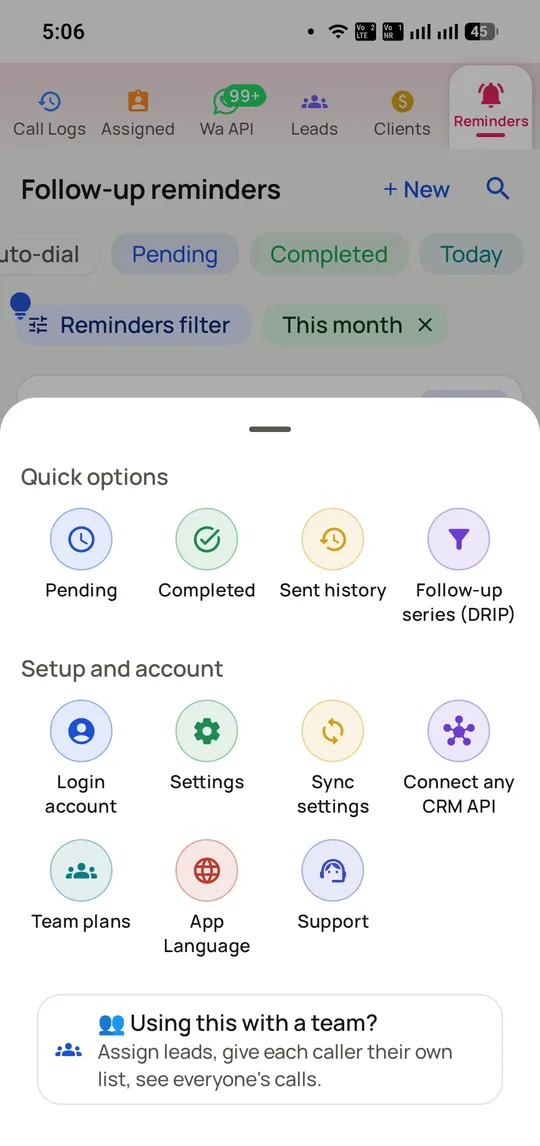
The admin a telecalling CRM needs and no more: statuses, custom fields, products, imports and exports.
Capabilities
Telecalling CRM: what you get
Everything here is documented and shipping today, not on a roadmap.
The list dials itself
No typing between calls.
Lists from saved leads, CSV, Excel or Google Sheets
Next number placed when the last call ends
Guided sessions so a team works one list
Logging that survives contact with a busy day
Two taps, on the call screen.
Outcome and lead stage set together
Note and next follow-up date in the same action
Never opens a second app
Caller context before hello
Name, status, notes and history on screen.
Matched against your records, not a public directory
Works on incoming and outgoing calls
Products bought and amounts visible
Official WhatsApp, not a workaround
Follow-up sends itself when the call ends.
Different message per call outcome
Bulk campaigns on the official Business API
Replies land beside the customer record
Manager view without a report
The call log is the report.
Calls, durations and outcomes per caller
Assign and transfer leads with history attached
Live during the day, not compiled at 7pm
Runs where your callers are
Offline-first, dual SIM, 40 languages.
Notes and statuses queue without a network
Choose which SIM dials
Android 8 and newer
How it works
Telecalling CRM: how it is set up
1
Import your leads
CSV, Excel, Google Sheets or an existing CRM.
2
Set your call outcomes
The statuses your callers actually use.
3
Write the follow-up templates
One per outcome, sent automatically.
4
Start a calling session
The list runs; the caller works.
Where it earns its keep
Telecalling CRM: common uses
Inside sales teams
High dial volume where the keypad is the bottleneck.
Deals worked over six weeks at a desk, with quotes and approvals, belong in a general CRM such as Zoho, HubSpot or Salesforce.
Teams that need invoicing inside the CRM will have to keep a second system, since none is built in here.
Telecalling CRM FAQ
Straight answers about Telecalling CRM.
What is a telecalling CRM?
It is one app where the dialer and the customer database meet. The caller places the call, sees whose number it is, records what happened and books the next contact, all while still on the call screen. RMDialer works this way on Android, calling through the SIM in the phone.
How is a telecalling CRM different from a normal CRM?
An ordinary CRM is designed for someone sitting at a keyboard who fills in a form after the conversation. A telecalling CRM is designed for someone who spends the whole shift on calls, so the record opens on the call screen itself and a call is logged with two taps instead of typed up.
No. Calls go out on the SIM card that is already in the handset, so nothing has to be set up with a telecom provider. The person you ring sees an ordinary mobile number, and that is the main reason more people answer than they do for calls from a cloud dialer.
Yes. Calls, durations and outcomes are recorded per caller automatically, visible live in the app, with no report for anyone to fill in. The Web CRM, included in the plan, opens the same reports per employee in a desktop browser.
How much does telecalling CRM software cost in India?
Nearly every vendor charges per seat. A typical Indian telecalling CRM sits between ₹599 and ₹1099 a month for each user, or roughly ₹7000 to ₹13000 per caller over a year. RMDialer charges per seat as well: ₹1908 ($29) per user per year, which works out to ₹159 per user per month, and no feature is held back for a higher plan.
For SIM-based calling teams that want dialer, CRM and WhatsApp in one app at one flat per-user price, the telecalling CRM to shortlist is RMDialer: ₹1908 ($29) per user per year with every feature included, against Runo, TeleCRM, GoDial and Calley whose plans tier by feature. The comparisons on this site put the four side by side so you can check that claim.
Yes, RMDialer is a telecalling CRM, built for Android phones. Its auto dialer works through the list on its own, each lead’s record opens on the call screen, a two-tap entry captures the outcome, the next follow-up is booked for you, and the WhatsApp message leaves the moment the caller hangs up.
What software do telecallers prefer to use, as opposed to their managers?
The tool a telecaller sticks with is the one that cuts their typing. Most of a telecaller’s day goes on keying in numbers and writing notes after each call, and RMDialer takes both of those jobs away. That is why the records stay current without a manager having to chase the team.
The working pattern is: one shared lead list with assignment, a defined set of call outcomes, follow-ups scheduled at call time, and per-caller reports reviewed daily on outcomes rather than dial counts. A telecalling CRM such as RMDialer produces all four from the calls themselves.
Yes. Any phone on Android 8 or later can run RMDialer, and you pick the SIM it calls from, whether that is a company SIM placed in the employee’s handset or the employee’s own. Either way the leads and call history belong to the company account, so when someone resigns the pipeline stays behind.
Yes. When a call comes in, RMDialer checks the number against your records and shows the caller’s name, stage and latest note before the telecaller picks up. The outcome is then logged with the same two taps used for outgoing calls, and a new enquiry can be saved as a lead, with its source, in a single tap.
How is telecaller performance measured in RMDialer?
For each telecaller, without anyone compiling it: number of calls, time connected, outcomes recorded and follow-ups closed. The figures update through the day in the app, and the bundled Web CRM shows the same numbers in a desktop browser. Judge people on outcomes, because a dial count on its own encourages the wrong habits.
Yes. Bulk messages go out from the same app through the official WhatsApp Business API, not through an unofficial workaround. Each message can be personalised for the contact, and any reply appears next to the lead record the telecaller is already working from.
How long does it take to set up a telecalling CRM?
Getting RMDialer to a usable state takes about one morning. Install the app, bring in the lead sheet, give your call outcomes their names and open a session. The one part that depends on someone else is Meta approving the WhatsApp templates used for follow-ups.
Download it from Google Play for Android, or from the App Store for the iPhone companion app. The phone dialer costs nothing and needs no account, and a free 3-day trial unlocks the CRM features as well, long enough for a team to put a full day of real calls through it before buying.