Caller ID app for business by RMDialer: know who rings before answering
A caller ID app for business names the person ringing using your own customer list, not a crowdsourced directory of strangers. A number tells you nothing. Before you say hello, the screen shows their name, what stage they are at, what they bought, and the note you wrote after the last call.
Included in the platform licence. Not a paid add-on.
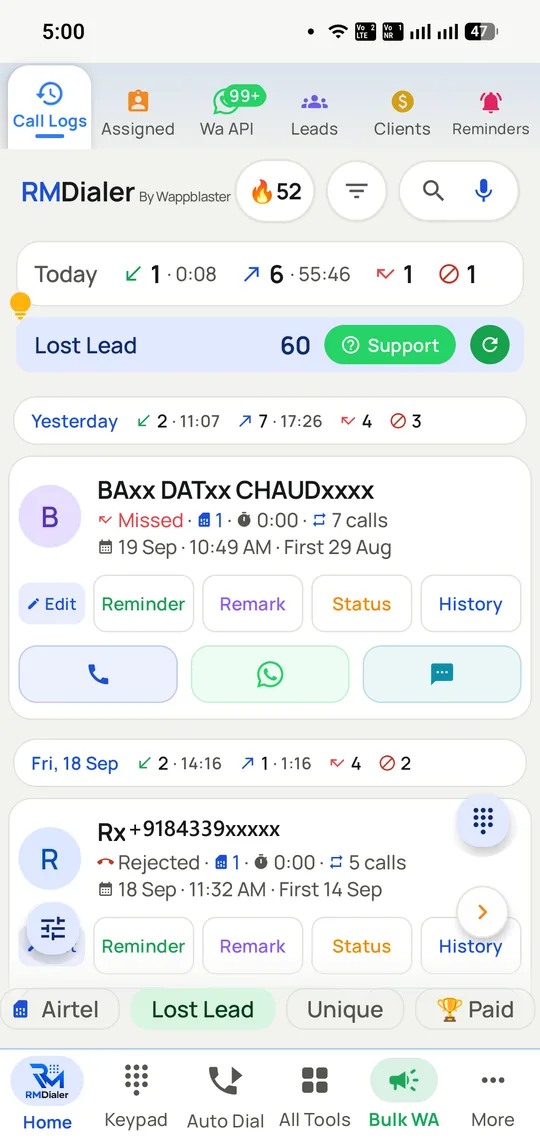
The call log reads as customers rather than numbers, with the running call count per contact and a lost-lead filter across the lot.
The short version
Name, status, notes and history on screen before you answer.
Matched against your own records, not a public directory.
Two taps after the call update the lead and set the follow-up.
Custom fields, lead sources, pipelines and a lost-leads list.
What is a business caller ID app?
A caller ID app for business identifies callers by matching numbers against your own customer records, showing name, stage, notes and past calls before you answer.
RMDialer shows that context on the call screen and then updates the lead in two taps, without your customer list depending on a public directory.
Your records are right by definition; crowdsourced labels are guesses.
Custom fields, lead sources, pipelines and a lost-leads list are included.
The call log reads as customers, each with a running call count.
Caller id app for business benefits
Context before hello
Tuesday's quotation request is on screen before the caller says a word.
Private customer data
Identification uses your database, not what strangers labelled a number.
Instant record update
Outcome, stage and next follow-up are set from the same screen.
Lost-lead filter
Customers marked lost stay findable for a later win-back attempt.
Caller id app for business in detail
RMDialer is a business caller ID app with a lead CRM built in, for Android. A business caller ID app identifies incoming and outgoing numbers by matching them against your own customer records rather than a crowdsourced public directory, so the screen shows the person’s name, lead stage, notes, the products they were interested in and every previous call, before the call is answered. That difference matters twice over: a consumer caller ID app can only tell you what strangers have labelled a number, while a business one tells you what your own company already knows about that customer, and it does so without your customer list depending on anyone else’s database. In RMDialer the same screen then updates the record, so two taps set the outcome, move the lead stage and schedule the next follow-up without opening a second app.
Trusted by 3,500+ businesses
4.8 / 5
Meta Tech Provider
D-U-N-S Registered
Some of the businesses using WappBlaster products every day
Caller ID from your records, or from everybody else’s
There are two entirely different products called caller ID, and conflating them leads businesses to the wrong one.
The consumer kind is a crowdsourced directory. It identifies a stranger by what other people have saved or reported that number as, which is genuinely useful for screening an unknown call and is the reason apps like Truecaller are on most Indian phones. What it cannot tell you is anything about your relationship with that person, because it has no idea you have one.
The business kind matches the number against your own customer database. It does not need to know who the number belongs to in general; it needs to know that this is the customer who asked for a quotation on Tuesday, is at negotiation stage, bought two products last year and was promised a callback. No directory can supply that, because it is your data.
The practical consequence is accuracy. A directory is right about a name roughly as often as strangers have labelled it correctly. Your own records are right by definition, and they carry the context that changes how the call goes.
Caller ID and the forty seconds at the start of every call
The value of caller context is easy to dismiss as a convenience. It is better understood as removing a specific, repeated failure.
Without it, a returning customer spends the opening of the call re-establishing who they are and what was agreed. Sometimes they are patient about it. Often they conclude that a company which cannot remember a conversation from last week is not one to trust with an order, and they are not wrong to.
With the record on screen before the call is answered, that opening disappears. The person answering knows the name, the stage, what was quoted and what was promised, and can open with it. On an inbound enquiry line this is the difference between a call that converts and one that gets a callback promise nobody keeps.
It applies to outbound too, which is where teams underestimate it. A caller working a list of 120 cannot remember what happened on call 40; the screen remembers for them. That is covered from the caller’s side on the telecaller app page.
Caller ID, spam and the responsibility that runs both ways
Caller ID has a second job on a business phone: keeping time-wasting calls away from people who are paid to be on the phone.
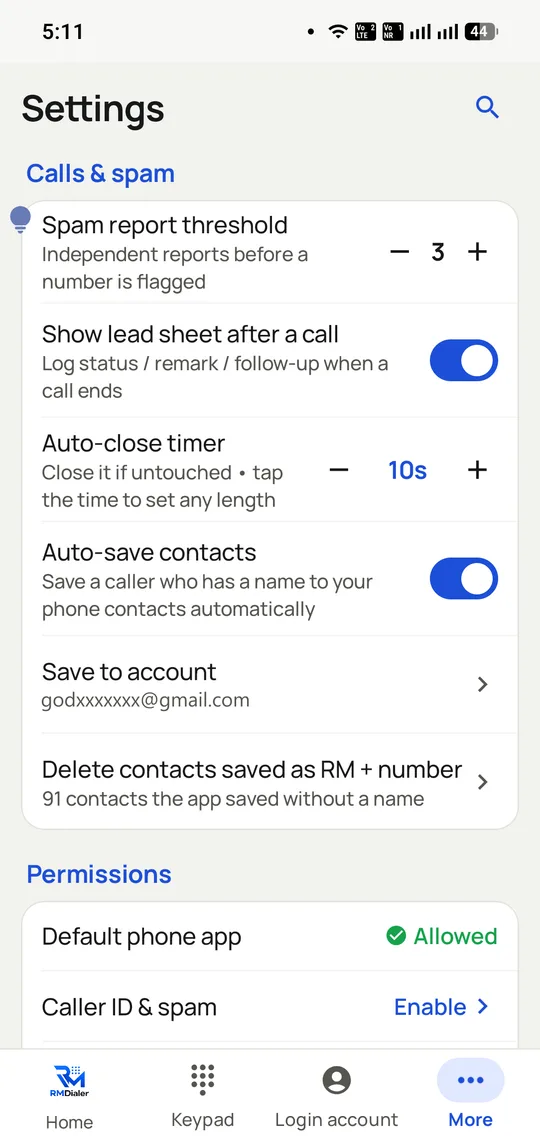
RMDialer identifies and flags spam callers, with a configurable threshold for how many reports it takes before a number is marked. The threshold matters because too low a setting turns a couple of annoyed people into a block on a legitimate number.
The responsibility runs the other way as well, and it is worth stating on a page about caller ID. The same mechanisms that flag a spam caller can flag your team. What earns a spam label is behaviour rather than technology: high volumes of very short calls, repeated calls to people who never engage, and complaints. Respecting DND registration for promotional calls in India, keeping lists clean and giving people a reason to want the call is what keeps your own numbers answered.
Because calls go out on ordinary SIMs rather than a pooled cloud number, your number carries your own behaviour rather than a previous renter’s. That mechanism is covered on the SIM-based auto dialer page.
What a business caller ID cannot tell you
A business caller ID app can only identify people you already have a record of. A genuinely unknown number shows as unknown, and can be turned into a lead in one tap, but nothing will name it for you.
It does not enrich contacts from outside sources, look up companies, or tell you a stranger’s name the way a crowdsourced directory attempts to.
Identification depends on number matching, so a customer calling from a second phone is a different record until someone merges them.
And it needs the records to exist. A business whose customer list lives in one person’s phonebook gets nothing from this until that list is imported, which is the starting point covered on the lead management page.
Crowdsourced caller ID vs business caller ID matched to your own records, 2026
Feature
Crowdsourced caller ID
Business caller ID (RMDialer)
Where the name comes from
What strangers labelled the number
Your own customer records
Identifies a total stranger
Often
No, shows as unknown
Knows your history with them
No
Stage, notes, products, every past call
Accuracy for your customers
Depends on the crowd
Correct by definition
Works on outgoing calls
Limited value
Yes, same context
Updates a record after the call
No
Two taps on the call screen
Spam flagging
Yes, its core feature
Yes, with a configurable threshold
Who it is for
Anyone screening unknown calls
A business calling its own customers
The two are complementary rather than competing, and many teams run both: a directory app to screen genuine strangers, and a business caller ID for everyone already in the customer list.
In the app
Caller id app for business, on a real account
Screenshots from a working account, with customer names and numbers masked.
Caller ID and spam behaviour is configurable, including how many reports mark a number and whether the lead sheet opens after every call.
Capabilities
Caller id app for business: what you get
Everything here is documented and shipping today, not on a roadmap.
Your records, not a directory
The name comes from your own customer data rather than a crowd-sourced database, so it is right, and it carries context a directory could never have.
The last note, at the right moment
What was agreed on the previous call appears as this one connects. It is the difference between "sorry, remind me?" and picking up where you left off.
Two taps to update
Outcome, stage, note and next follow-up date, set from the call screen. Logging that takes ten seconds gets done; logging that means opening a CRM does not.
Pipelines that match how you sell
Define your own lead statuses and custom fields, plus lead sources so you can tell which channel actually produced the deal.
Clients, payments and renewals
Beyond leads: what they bought, what they paid, and when the renewal is due, with reminders that fire on the date.
A lost-leads list worth revisiting
Lost leads are kept with their reason rather than deleted, which makes a quarterly win-back campaign a filter instead of an archaeology project.
How it works
Caller id app for business: how it is set up
1
Import your customers
CSV, Excel, Google Sheets or an existing CRM through the API.
2
Define statuses and fields
The stages your team actually uses, and the fields worth seeing on a call.
3
Answer a call
Name, status, notes and history appear as it connects.
4
Log in two taps
Outcome, stage and next follow-up, without leaving the screen.
Where it earns its keep
Caller id app for business: common uses
Repeat-customer businesses
Where knowing the last order changes the conversation.
Long sales cycles
Property and insurance, where the previous call was weeks ago.
Shared team numbers
Whoever answers has the same context the last person did.
Service and support
The complaint history is on screen before the apology.
Field sales
Context without opening a laptop in a car park.
Staff turnover
The relationship stays with the business, not the handset.
“A buyer who last spoke to me in March called and RMDialer showed the flat, the budget and my note before I answered. That caller ID with the lead CRM behind it has saved me from "sorry, who is this?" more times than I can count.”
Property consultant, Kochi
Verified RMDialer customer
“Our renewals team lives on the RMDialer call screen: name, policy, premium and due date come up as the phone rings. The caller ID app alone is worth the plan for us.”
Director, insurance brokerage, Delhi
Verified RMDialer customer
“Repeat customers expect us to remember them. With RMDialer the lead CRM puts the last complaint and the AMC date on screen during the call, and any of my three technicians can answer with full context.”
Owner, AC service company, Pune
Verified RMDialer customer
“We track lead sources in RMDialer and finally learned that referrals convert at three times our paid leads. The CRM is simple enough that counsellors actually update it, two taps on the call screen.”
Sales manager, edtech, Noida
Verified RMDialer customer
“Staff changed twice this year and we lost nothing, because every customer, note and follow-up sits in the RMDialer CRM, not in someone’s personal phonebook.”
To screen unknown spam numbers, a consumer directory app such as Truecaller does that job; a business caller ID only knows people already in your records.
On iPhone the companion app cannot take over the incoming call screen, so full caller context is an Android feature.
Caller id app for business FAQ
Straight answers about Caller id app for business.
How is this different from Truecaller?
A public caller ID app tells you what strangers have labelled a number. This matches the number against your own customer records, so it shows your name for them, their lead stage, what they bought and your last note. One identifies unknown numbers; the other briefs you on known ones.
Yes. Custom fields, your own lead statuses, lead sources and product or package records, so the call screen shows what your business actually sells on.
Both in one. RMDialer is a business caller ID app whose identification comes from its own built-in lead CRM: the name on the call screen is your lead record, and the same screen updates that record after the call. Neither half needs a second app.
How do I get customer names to show when they call?
What most Indian businesses use for this is RMDialer. Import your customers once, from CSV, Excel, Google Sheets or an existing CRM through the API, and every incoming and outgoing call is matched against those records. No per-contact saving into the phonebook is needed.
Does the caller ID work for numbers not in my records?
An unknown number rings as an unknown number, and one tap turns it into a lead with a source and status while the call is still on. The point is briefing you on known customers, not labelling strangers.
Can my whole team share the same customer records?
Yes. Everyone signs into the same RMDialer account with their own login and role, so whichever team member answers sees the same name, status and notes, and updates flow back to everyone.
Does it show payment and renewal details on the call screen?
Client records carry products, payments and renewal dates alongside lead fields, so a renewals call opens with the amount and due date already visible, and reminders fire on the date without anyone maintaining a separate sheet.
Yes. Lead sources are a first-class field, so three months in you can compare how leads from Facebook, IndiaMART, referrals or walk-ins actually converted, per source, instead of guessing which channel earns its budget.
Caller ID is free forever in the phone app and needs no account. The lead CRM behind it is part of the single RMDialer plan at ₹1908 per user per year (₹159 a month, or $29 outside India), together with list auto dialing, team reports, the desktop Web CRM and auto WhatsApp after calls. There is no separate CRM licence.
Yes. The Web CRM included in the plan opens the same leads, clients and follow-ups in a desktop browser, in two-way sync with the app, so an office person can update records while the field team calls.
When you log a call you set the next follow-up date in the same two taps. RMDialer surfaces the day’s due follow-ups as a list you can auto-dial straight through, which is how leads stop falling into the gap between intention and calendar.
Yes, both, plus CSV and the API for a live connection to whatever system generates your leads. Columns map to fields, including your custom ones, at import.
Does RMDialer work as a mobile CRM without the auto dialer?
Entirely. Plenty of customers use RMDialer as a mobile CRM for calling first, with caller ID, lead statuses and follow-ups, and only later turn on auto-dial sessions when a campaign list shows up. The features are one app, used in whatever order the work demands.