CRM with dialer from RMDialer: the dialer built in, not bolted on
A CRM with a dialer joins phone calling and customer records in one tool, so calling someone and logging the result happen together. Most CRMs add click-to-call and declare themselves a dialer. The caller still ends up in two apps, and whichever one is slower gets skipped. Here the dialer is the interface and the CRM is behind it.
Included in the platform licence. Not a paid add-on.
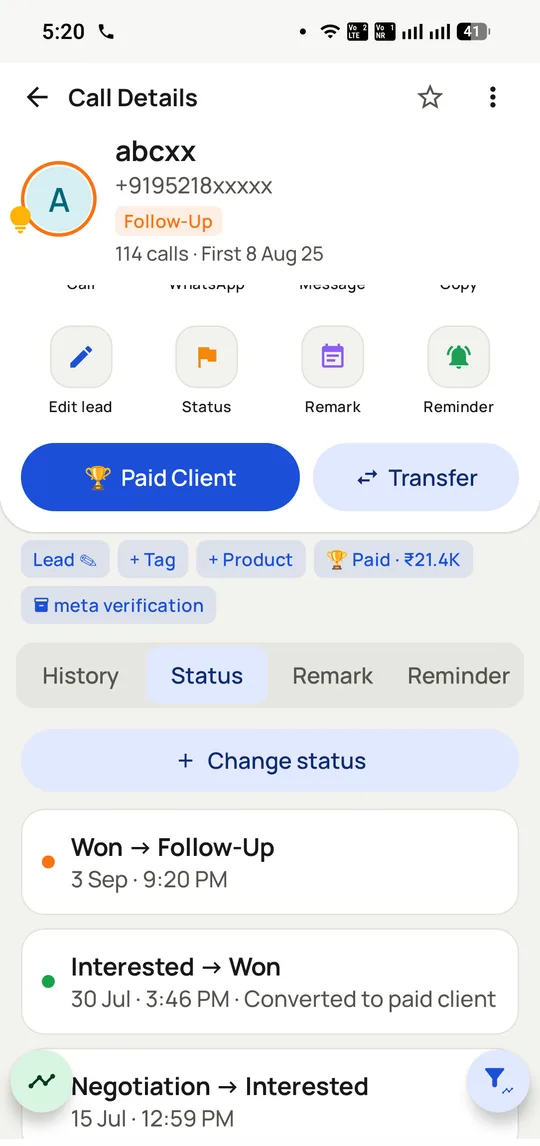
The record writes itself. Every stage change is dated and attributed, so the journey from first call to won is readable months later.
The short version
The dialer IS the interface; the CRM sits behind it.
No app switching, so logging actually happens.
Custom fields, lead stages, sources and a lost-leads list.
Client records, payments, catalogues and renewal reminders.
What is a CRM with a dialer?
A CRM with a dialer lets a user call straight from the customer record and save the result there, rather than hopping from a phone app to a database.
RMDialer inverts the usual click-to-call setup by replacing the Android dialer itself, so the record is the call screen and incoming calls get the same treatment.
No app switching, so call logging actually gets done.
Every stage change is dated and attributed to a person.
Client records, payments, catalogues and renewal reminders sit in the same CRM.
CRM with dialer benefits
Incoming calls handled too
Calls nobody started from the CRM still open the customer record.
Readable deal journey
Months later, the path from first call to won can be read stage by stage.
Renewal reminders
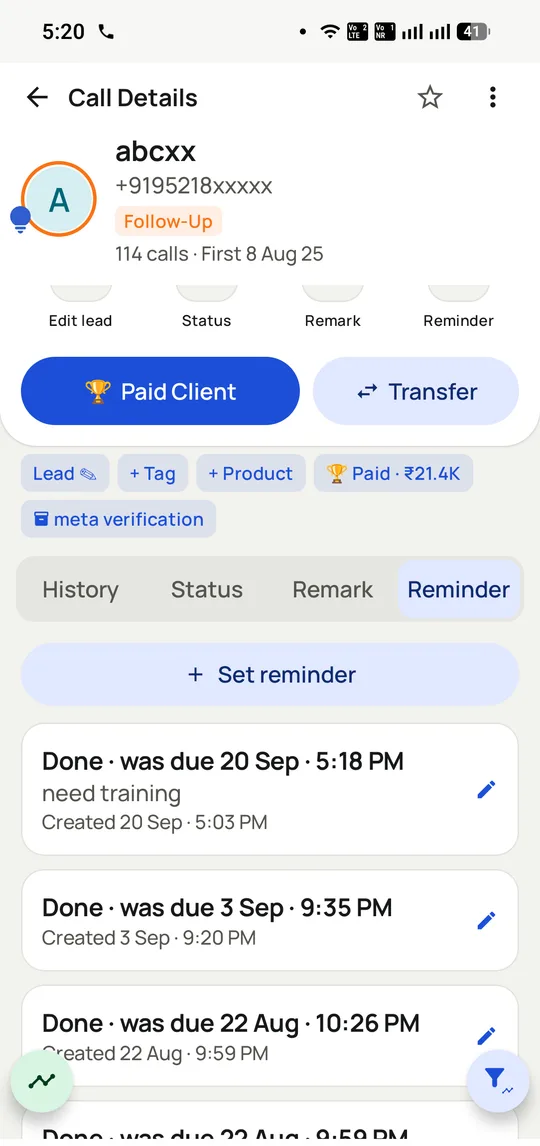
Client renewals surface on their date with the record attached.
Payments beside contacts
Payment entries and catalogues sit with the client instead of in another tool.
CRM with dialer in detail
RMDialer is a CRM with a dialer built in, for Android. A CRM with a dialer lets someone call from the customer record instead of switching between a phone app and a database, and most products deliver it as an integration: the CRM gains a click-to-call button that hands the call to the phone, then waits for the user to come back and say what happened. RMDialer inverts that. It replaces the Android phone dialer itself, so the customer record appears on the call screen rather than in another app, and the outcome, the next follow-up and the WhatsApp message are set from the same screen in two taps. Calls place through the phone’s own SIM, so incoming calls get the same treatment as outgoing ones and nothing depends on the caller switching back.
Trusted by 3,500+ businesses
4.8 / 5
Meta Tech Provider
D-U-N-S Registered
Some of the businesses using WappBlaster products every day
Where the dialer sits decides whether the CRM stays true
Almost every CRM now advertises a dialer, and the feature lists look identical. The difference that matters is not in the list. It is which application is on top when the call is happening.
In the common arrangement the CRM owns the screen and hands the call out to the phone. That works until the call connects, at which point the phone’s own call screen takes over and the CRM is behind it. The customer’s history is now in an app the caller cannot see, and recording the outcome means going back and finding the record again. Some do it. By Thursday, fewer do.
RMDialer takes the other position: it becomes the phone dialer, so there is no handing over. The record is on the call screen because the call screen is the CRM. The practical consequence is that incoming calls get the same treatment as outgoing ones, which a click-to-call integration structurally cannot do, since nothing initiated the call from the CRM.
This is also why the product is Android-first. Android allows an app to become the default dialer; iOS does not open that to third parties, which is why the iPhone app on the App Store is a calling companion rather than a second copy of the Android product: it carries the assigned leads, the keypad, outcome logging and the team reports, and hands the call itself to Apple’s Phone app.
Keeping the CRM you already run
Plenty of teams reading this already have a CRM they are not going to replace, because the deal desk, the quotes or the accounting integration live there. That is a reasonable position and RMDialer is not an argument against it.
The workable split is by function rather than by data. The existing CRM stays the system of record for the deal: quotes, contracts, revenue, approvals. RMDialer becomes the calling layer on top of it, and the two sync through the API so that calls, outcomes and follow-ups made on the phone appear against the same customer in the main system.
What that buys you is the thing the general CRM cannot do: the record on the call screen, two-tap logging and automatic WhatsApp, without asking your sales team to abandon a system the rest of the business depends on.
The alternative split, using RMDialer as the whole CRM, suits teams whose sales process is the calling process. The telecalling CRM page covers that case and where the two categories differ.
Model the two or three fields that change a decision
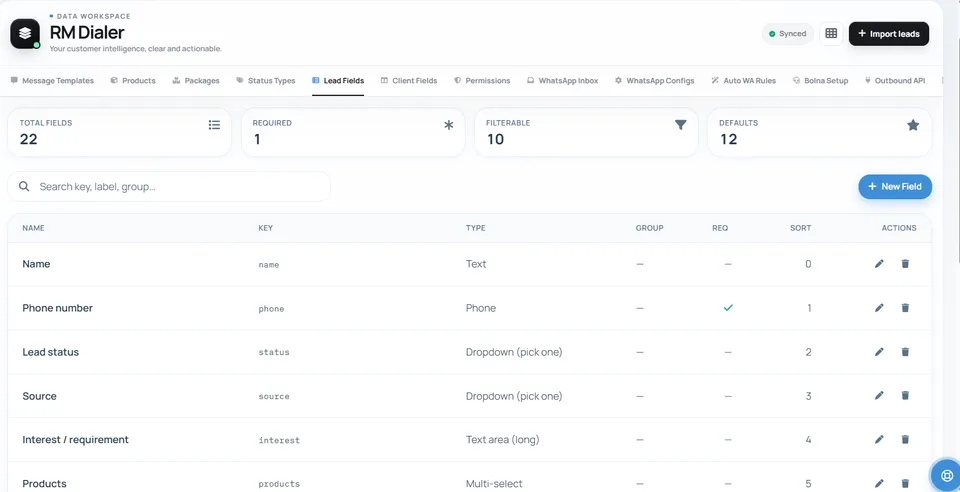
RMDialer ships 22 lead fields and lets you add more, which is more rope than most teams should take.
The instinct when configuring a CRM is to capture everything that might one day be useful. The result is a form with twenty fields, of which callers fill three, and reports that look authoritative while being mostly empty. An empty field is worse than a missing one, because it makes a gap invisible.
A better approach is to add only fields you would change a decision on. If knowing the customer’s city would change who calls them or what they are offered, capture city. If it would not, the field is costing a tap per lead and returning nothing. Only one field is mandatory by default, which is the right default.
The same restraint applies to products and packages. Attaching what a lead is interested in makes the pipeline value real and the win-back list useful; attaching a full catalogue to every lead makes neither.
Losses are a list, not an archive
Most CRMs treat a lost deal as an ending: mark it Lost, and it leaves the pipeline. For a calling business that is throwing away the second-best list you own.
A lead that said no in March said no to a price, a timing or a competitor, and at least two of those three change. RMDialer keeps lost leads with the reason attached and makes them filterable, so a win-back session is a filter rather than an excavation: everyone lost on price, six months ago, in one product.
The reason codes also aggregate into something a manager can act on. When one objection accounts for a third of losses, that is a pricing or positioning problem rather than a calling problem, and no amount of extra dialling will fix it.
Renewals work the same way from the other end: paying clients carry their plan value and expiry, so the renewal list builds itself. That side is covered on the business dialer page.
Click-to-call CRM integration vs a dialer-first CRM (RMDialer), 2026
Feature
CRM with click-to-call
Dialer-first CRM (RMDialer)
App on top during the call
The phone’s own call screen
The customer record
Apps a caller touches per call
Two
One
Incoming calls recognised
No, nothing initiated them
Yes, same treatment as outgoing
Outcome capture
Return to the CRM afterwards
On the call screen, two taps
Continuous auto-dialling
Rarely
Built in
Works when data drops
No
Dialling continues, sync queues
Quotes, invoices, approvals
Usually yes
No, sync through the API
Platform
Any
Android, plus an iPhone companion
The two are not exclusive. A common arrangement keeps an existing CRM as the system of record for deals and runs RMDialer as the calling layer, synced through the API.
In the app
CRM with dialer, on a real account
Screenshots from a working account, with customer names and numbers masked.
Callbacks stay on the record too, so a missed follow-up is visible rather than forgotten.
The schema is yours: 22 fields here, each with a type, and only one of them mandatory.
Capabilities
CRM with dialer: what you get
Everything here is documented and shipping today, not on a roadmap.
Click-to-call is not the same thing
The record lives on the call screen.
No switching between phone and CRM
Context visible before the call connects
Outcome logged where the call happened
Fields that match your business
Not a fixed schema you work around.
Custom fields on every contact
Your own lead statuses and pipeline
Lead sources so you can attribute deals
Beyond leads, into clients
What they bought and what they owe.
Payment tracking per client
Product and package catalogues
Renewal reminders that fire on the date
A lost-leads list worth keeping
Losses recorded with a reason.
Filter rather than archaeology at win-back time
Reasons show which objection recurs
Nothing silently deleted
Import and export freely
Your data stays yours.
CSV, Excel, Google Sheets or API
Encrypted cloud backup with selective restore
Survives a lost or replaced handset
WhatsApp inside the record
The conversation sits with the customer.
Auto follow-up when a call ends
Bulk campaigns on the official API
Replies logged against the contact
How it works
CRM with dialer: how it is set up
1
Import contacts
With custom fields intact, not flattened to name and number.
2
Define your pipeline
The stages your team names out loud.
3
Make it the dialer
So the record reaches the call.
4
Work from the call screen
Dial, log, follow up, next.
Where it earns its keep
CRM with dialer: common uses
Small sales teams
Too small for Salesforce, too busy for spreadsheets.
“I demoed five CRMs with dialers and RMDialer was the only one where the dialer felt native rather than bolted on. My calls log themselves; my old CRM just reminded me that they did not.”
Founder, HR software startup, Gurugram
Verified RMDialer customer
“We manage 300 retainer clients in the RMDialer CRM. The renewal reminders and the payment history on the call screen ended the March scramble.”
Partner, chartered accountancy firm, Thane
Verified RMDialer customer
“The CRM dialer keeps our dealer tiers and credit terms as fields, so whoever calls quotes the right price. RMDialer replaced a CRM costing four times as much per seat.”
Sales lead, machine tools trader, Rajkot
Verified RMDialer customer
“Counsellors update RMDialer because it happens during the call, not after. Our pipeline reviews finally discuss real numbers.”
Director, immigration consultancy, Hyderabad
Verified RMDialer customer
“One app on my phone runs the whole business now: RMDialer dials, remembers every customer, and sends the quotation on WhatsApp before I have parked the bike.”
If your sales process lives in a desktop CRM with quotes, invoices and approvals, keep it; RMDialer is built around the call, not around document workflows.
Teams working mostly on iPhones get the companion app, which covers calling and logging but cannot become the system dialer.
CRM with dialer FAQ
Straight answers about CRM with dialer.
What is a CRM with a dialer?
A CRM that can place calls directly from the customer record. The stronger version, and what RMDialer does, replaces the phone dialer itself so the record appears on the call screen rather than in a separate app.
Is a dialer with CRM different from a CRM with a dialer?
The products overlap heavily, but the word order tells you what the buyer is protecting. Someone searching for a CRM with a dialer usually has a database they care about and wants calling added without disturbing it; someone searching for a dialer with a CRM is buying calling first and wants somewhere for the record to land. RMDialer is built from the second direction, which is why it replaces the phone dialer rather than adding a call button to a database, and why the customer record appears on the call screen. If you already run Salesforce or Zoho and will not move, keep it and sync RMDialer as the calling layer through the API. If the calling is the process, RMDialer can be both.
No. Click-to-call starts a call from the CRM but leaves you in two apps. A dialer CRM puts the record on the call screen, which is what makes logging fast enough to actually happen.
Yes. Contacts import from CSV, Excel, Google Sheets or an API, and lead sources such as Zoho CRM can feed in. Many teams run RMDialer for calling and keep the system of record where it is.
Indian telecalling CRMs commonly run ₹599 to ₹1099 per user per month on annual billing. RMDialer is priced per user too, at ₹1908 per user per year or $29 outside India, with every feature included instead of split across tiers, and the Web CRM for desktop access built in rather than sold separately. The dialer half, with the call log and caller ID, is free forever.
Which is the best CRM with a dialer for small business?
For a small Indian team selling by phone, the CRM dialer to shortlist is RMDialer: the dialer is the interface rather than an add-on, the price is one flat ₹1908 ($29) per user per year, and WhatsApp follow-up runs on the official API. Larger inbound operations needing IVR queues are better served by cloud contact-centre platforms.
Yes. RMDialer is a CRM dialer app for Android: it replaces the phone dialer, puts the lead record on the call screen, dials through your own SIM and logs outcomes in two taps, with the CRM, reports and WhatsApp automation behind the same screen.
Does the CRM dialer support custom fields and pipelines?
Yes. Fields, lead statuses, sources, products and packages are all definable, so the call screen shows what your business sells on rather than a generic schema. Stage moves happen from the call screen itself.
Can two people work the same customer without clashing?
Yes. Leads have owners, transfers carry the history, and everyone sees the same record under their own login and role. The days of two colleagues quoting two prices to one customer end with a shared record.
It is the same account in a browser, included in the plan: leads, clients, payments and per-employee reports on a full screen, synced both ways with the app. Callers live in the app; managers and back-office live in the browser.
Yes. IndiaMART, TradeIndia, Facebook Lead Ads, Google Forms, Typeform, Zoho CRM and webhooks can push leads straight in, tagged by source, and an instant WhatsApp reply can fire on arrival.
Yes. Client records carry products, amounts paid and renewal dates, with reminders that fire on the date. For subscription and AMC businesses, the renewals list becomes a call list one tap from the reminder.
Two things are free. The phone dialer, call log, caller ID and call analytics never expire and need no account. On top of that, a 3-day trial opens every paid feature, from Google Play or rmdialer.com. Import a real list and run a real day on it; a CRM proves itself in use, not in a brochure.
Yes, and the per-user pricing means one person pays for one user, ₹159 a month, or $29 for the year outside India. A solo founder who only wants the dialer, call log and caller ID pays nothing at all, since that half never expires. Founders selling directly are one of the heaviest user groups precisely because it is one app instead of a stack.