Call analytics software by RMDialer: what to fix, from calls already made
Call analytics software measures what happens across many calls, from answer rates to lost reasons, so managers can see patterns rather than anecdotes. Somewhere in last month’s three thousand calls is the reason revenue was what it was: the list that never connected, the objection that kept recurring, the rep whose callbacks never happen. Analytics is just listening to it.
Included in the platform licence. Not a paid add-on.
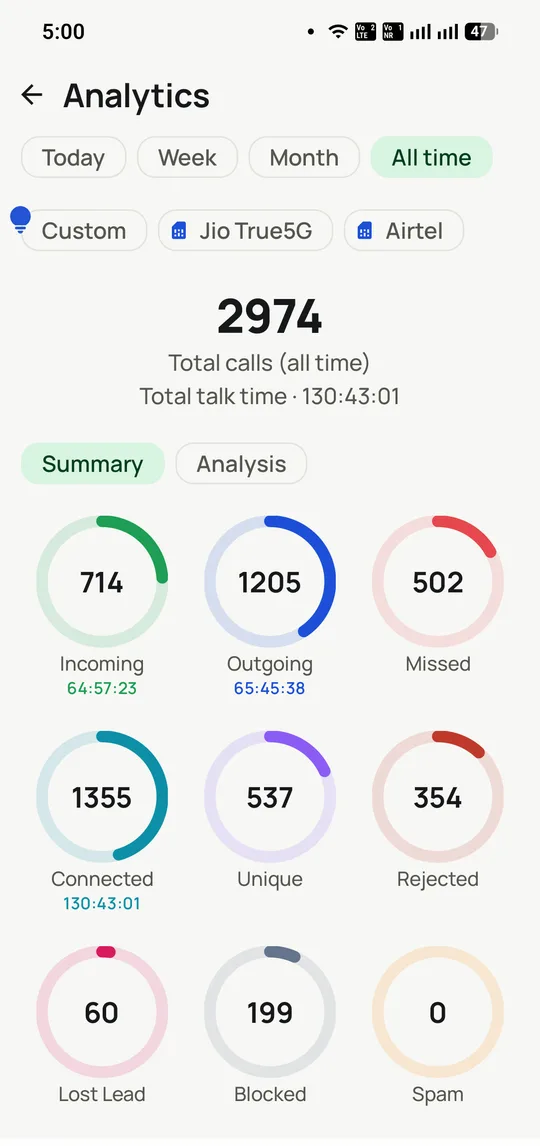
Every call lands in exactly one bucket and the buckets reconcile: 714 incoming plus 1,205 outgoing plus 502 missed plus 354 rejected plus 199 blocked is the 2,974 total.
The short version
Connect rates, outcome trends and per-rep performance.
Lost reasons aggregated into visible patterns.
Measures outcomes and follow-through, not just volume.
No exports or reconciliation: the dialer is the data source.
What is call analytics software?
Call analytics software turns call records into answers: connect rates, best hours, outcome trends, per-rep follow-through and recurring objections, drawn from data captured at each call.
RMDialer builds its analytics into the dialer, so duration, direction, SIM and outcome are recorded as the call happens and shown live in the app and on the desktop panel.
Numbers come from the call itself, not a CRM updated from memory.
Lost reasons roll up into patterns a manager can act on.
No exports or reconciliation between a call log and a spreadsheet.
Call analytics software benefits
Reliable connect rates
Managers see what share of dials reached a human, per list and per hour.
Lost-reason patterns
Recurring objections surface as a count rather than a hunch from one rep.
Follow-through tracking
Shows whether promised callbacks happened, not just how many calls went out.
Reconciled call buckets
Incoming, outgoing, missed, rejected and blocked add up to the total, so nothing is counted twice.
Call analytics software in detail
RMDialer is call analytics software for calling teams, built into the dialer rather than bolted onto it. Call analytics turns raw call records into answers: how many dials reach a human, which lists and hours connect, how outcomes move across the pipeline, whether follow-ups actually happen, and which objections recur. What decides whether any of that is trustworthy is where the numbers come from. Most call reporting is reconstructed after the fact, from a device log that knows durations but not outcomes, joined to a CRM someone updated from memory. Because RMDialer is the dialer, the CRM and the reporting layer at once, each call contributes its duration, its direction, its SIM and its outcome at the moment it happens, so nothing is exported, reconciled or remembered. The same figures appear live in the app and full-screen on the included desktop panel.
Trusted by 3,500+ businesses
4.8 / 5
Meta Tech Provider
D-U-N-S Registered
Some of the businesses using WappBlaster products every day
Why most call reporting cannot be trusted
Before any metric is worth acting on, it is worth asking where it came from. Call reporting usually comes from one of three places, and only one of them is reliable.
The weakest is the handset call log. It records that a number was dialled and for how long, which sounds sufficient until you need to know whether the call went well. A 90-second call could be a sale or a wrong number. The log cannot tell you, because nothing asked.
The second is a CRM someone updated afterwards. This has outcomes but not reality: entries get made at the end of the day, in batches, from memory, and the ones that were awkward get softened. It is not dishonesty so much as compression, and it systematically overstates how much follow-up happened.
The third is capture at the point of the call, which is what RMDialer does because it is the dialer. Duration and direction come from the call itself; the outcome comes from the sheet that appears when the call ends. Neither is reconstructed. That is the whole reason the numbers on this page are worth reading, and it is the question to ask any vendor before believing their dashboard.
Reading a connect rate without fooling yourself
Connect rate is the most quoted and most misread number in calling, because almost nobody agrees on the denominator.
The summary screen above is from a single handset: 2,974 calls in total, of which 714 were incoming, 1,205 outgoing, 502 missed, 354 rejected and 199 blocked. Connected calls number 1,355. Divide 1,355 by 2,974 and you get 46%. Divide it by outgoing calls alone and the picture changes completely. Neither is wrong; they answer different questions, and quoting one while meaning the other is how teams talk past each other for a quarter.
Two categories are routinely misfiled. A rejected call is not a missed call: someone saw the number and actively declined it, which says something about your caller ID or your timing rather than their availability. A blocked call never rang at all. Folding either into "missed" makes a reachability problem look like an availability problem.
The unique count is the other one worth watching. 537 distinct numbers across 2,974 calls means each number was dialled about five and a half times on average. Whether that is persistence or harassment depends entirely on your business, but you cannot form a view without the number.
Analytics, tracking and monitoring are three different jobs
These words are used interchangeably by vendors and they describe genuinely different things. Knowing which one you actually need saves buying the wrong product.
Call analytics is aggregate and retrospective. It answers questions about patterns: which hours connect, whether outcomes are improving, where the funnel loses people. You read it weekly and it changes strategy.
Call tracking is per-call and forensic. It answers questions about a specific call or a specific number: who rang this person, when, for how long, and what was agreed. You read it when something needs checking, and it settles disputes. That is covered on the call tracking page.
Call monitoring is live and supervisory. It answers what is happening right now: who is on the phone, who has not started, what today looks like against yesterday. You read it during a shift, and it changes what you say to someone at 11am. That is the call monitoring page.
RMDialer includes all three because they share one data source, but they are distinct habits and confusing them is why dashboards go unread.
Per-SIM measurement, and why it matters
An unusual capability of a SIM-based dialer is that analytics can be segmented by the number the call went out on, which cloud platforms cannot meaningfully offer because the number is pooled.
This turns out to matter for a specific and common problem: numbers get flagged. When one SIM’s connect rate drifts down over a few weeks while another on the same team holds steady, the difference is the number rather than the caller, and that is worth knowing before you conclude a person has stopped trying.
It also separates the personal from the professional on a dual-SIM handset. A caller using slot one for their own calls and slot two for work gets clean work figures, and nobody has to explain a Sunday evening spike.
They measure calling, not selling. Revenue attribution, marketing spend and channel mix are not here; pipeline value is, but it comes from what callers recorded rather than from an accounting system.
They do not analyse the content of conversations. There is no speech-to-text, sentiment scoring or keyword spotting. Recordings exist for a human to listen to, which for most teams is better than a sentiment score nobody trusts, but it is not automated conversation intelligence.
They cannot explain a number on their own. Analytics will tell you the Tuesday list connects at half the rate of the Thursday one. Why is a question for the person who built the lists.
And they are only as good as the outcome discipline underneath them. If callers stop logging, the volume figures survive and everything interesting degrades, which is the argument for two-tap logging made on the telecaller app page.
Where call reporting comes from: handset log, CRM entered later, or captured at the call, 2026
Feature
Handset call log
CRM updated afterwards
Captured at the call (RMDialer)
Call duration
Yes
If someone typed it
From the call itself
Outcome of the call
No
From memory, later
From the call screen, then
Which SIM placed it
Yes
No
Yes, and filterable
Rejected vs missed vs blocked
Partly
No
Separated
Follow-up actually completed
No
Self-reported
Recorded against the reminder
Survives an employee leaving
No, it is on their phone
Yes
Yes
Reconciliation needed
Manual
Constant
None, one source
Effort per call
None
Meaningful, so it lapses
Two taps
Figures quoted on this page come from the single-handset analytics screen shown above. The workspace-level figures on the sales dialer page are a different and larger dataset.
In the app
Call analytics software, on a real account
Screenshots from a working account, with customer names and numbers masked.
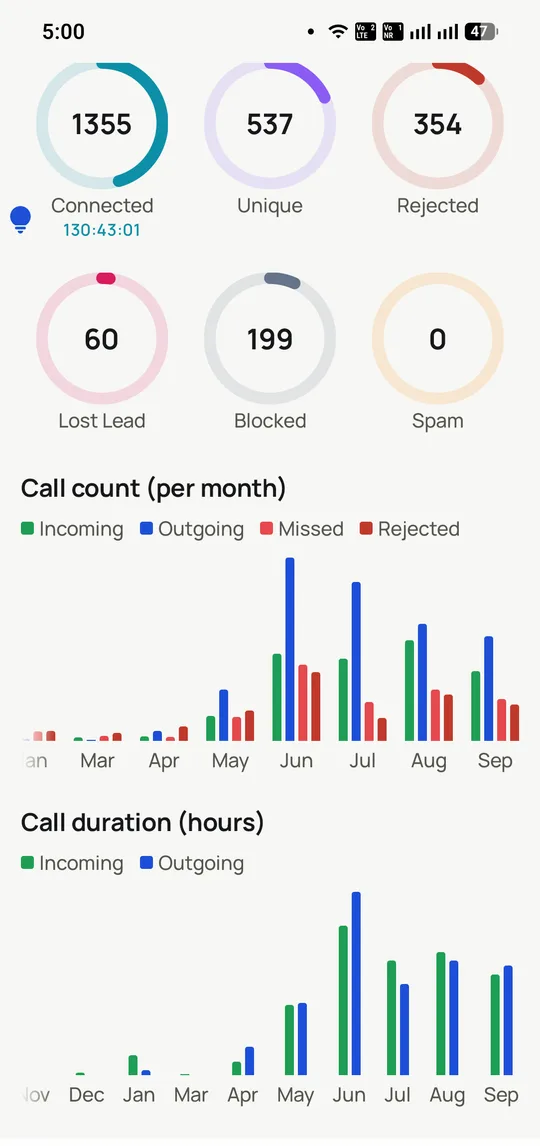
Volume and talk time by month, filterable per SIM, so a change in one number is not hidden inside the total.
Capabilities
Call analytics software: what you get
Everything here is documented and shipping today, not on a roadmap.
Connect-rate truth
By list, by time of day and by number, so a dying list or a flagged number shows up in the data first.
Outcome trends
Interested, callback, not interested and won, tracked over weeks: the health chart of the pipeline.
Per-rep analytics
Outcomes per rep against their own baseline, which is what separates coaching from blaming.
Lost-reason patterns
Every lost lead carries a reason; the aggregate tells you whether price, timing or product is the real enemy.
Follow-up completion
The metric almost nobody measures: how many promised callbacks actually happened, per rep.
Reports that leave the app
Exports for incentives, client billing and reviews, from the same data the live view runs on.
How it works
Call analytics software: how it is set up
1
Call normally
The analytics need nothing extra from the team.
2
Let outcomes accumulate
Two-tap logging is the entire data pipeline.
3
Read the patterns
Lists, times, reps and reasons, on the Web CRM.
4
Change one thing
The list, the pitch or the follow-up habit, then watch the trend answer.
“RMDialer call analytics showed our connect rate died after 6pm but conversions doubled between 11 and 1. We moved the calling hours and wrote nothing new: same team, eleven percent more policies.”
CEO, insurance broking firm, Ahmedabad
Verified RMDialer customer
“The lost-reason analytics settled a year-long argument. It was never price; it was response time. We fixed follow-up SLAs and the win rate moved within a quarter.”
Head of inside sales, IT services, Mysuru
Verified RMDialer customer
“I run three client campaigns on the RMDialer call reporting software and each client gets their own analytics pack from real call data. It is the most professional thing about my agency, their words.”
Owner, telecalling agency, Gorakhpur
Verified RMDialer customer
“Incentives used to be self-reported and contested. Now the calling performance analytics from RMDialer decide the table, and payout day stopped being argument day.”
“One chart in the RMDialer call analytics, connect rate by list source, showed our expensive purchased leads connecting at half the rate of exhibition leads. That single insight repaid the software many times over.”
If your calls run through a cloud PBX or desk phones, this cannot read them; it measures calls placed through RMDialer on Android.
Teams after transcript or sentiment scoring of the audio itself should look elsewhere, because these reports come from call records and the outcomes callers set.
Call analytics software FAQ
Straight answers about Call analytics software.
What is call analytics software?
Software that turns call logs into decision-ready answers: connect rates, outcome trends, per-rep performance and loss patterns. RMDialer builds call analytics directly on the calls its dialer places, so the data is complete without any collection effort.
On four layers: activity (dials, talk time), quality (connects, outcomes), follow-through (callbacks completed) and results (won, lost and why). The call analytics software that reports all four per rep and per period, without anyone filing anything, is RMDialer; managing on activity alone is how teams get busy without getting better.
What is call reporting software versus call analytics?
Reporting states what happened; analytics shows the pattern in it. RMDialer does both from one dataset: the daily per-employee report, and the trends across lists, times, reps and reasons that tell you what to change.
Connect rate tells you about the list and the number; outcome mix about the offer and pitch; follow-up completion about discipline; lost reasons about strategy. Dial counts, the metric everyone tracks, mostly tells you who types fastest, which is why RMDialer leads with outcomes.
Automatically or not at all: analytics built on manual logging inherit its gaps. Because RMDialer is the dialer, every call arrives in the analytics with its duration, direction and two-tap outcome attached, at 100 percent coverage.
Yes, if reasons are captured at the moment of loss, which RMDialer makes a two-tap habit. Aggregated, the reasons rank your real objections, and a pitch rewritten against the top one is the cheapest revenue fix available.
A sudden halving on one number suggests spam-flagging; a low rate on one list says the data vendor sold you a dud; an evening spike says your customers answer after work. Each pattern changes an operational decision RMDialer makes visible.
Fairly means same lists and outcome-based measures. RMDialer’s per-rep analytics on shared guided sessions do exactly that, and comparing each rep against their own previous month catches improvement that raw rankings hide.
Live in the app for the day, and full-screen on the included Web CRM for trends, per employee, per list and per period, with exports for whatever the spreadsheet ritual still requires.
Yes. Sessions and lists separate by client, so each campaign’s connects, outcomes and caller hours report separately, which turns month-end invoicing into an export.
List and connect problems show inside a day or two; rep and reason patterns need two to four weeks of outcomes. The discipline is changing one variable at a time and letting the trend answer.
Not at this scale. RMDialer pre-builds the views a calling team actually uses: connects, outcomes, follow-ups and reasons. The skill required is acting on them, not building them.
Yes. The automatic after-call messages are part of each lead’s record, so the analytics can show the full sequence, called, messaged, replied, converted, rather than the call alone.
Standalone analytics platforms price per seat per month. Your own call analytics are free forever in the RMDialer phone app. Team-wide analytics ship inside the ₹1908 per user per year plan, $29 outside India, alongside list auto dialing, the CRM, monitoring and the Web CRM, because the analytics are the same data the dialing creates.
Run the team on RMDialer for two weeks, from Google Play on Android or the App Store for the iPhone companion, with a free 3-day trial to start, then open the Web CRM trends. The first genuine surprise in the data typically pays for the year.