Telecaller app by RMDialer: the app a caller lives in, built caller-first
A telecaller app is mobile software for people who make phone calls all day, holding their lead list, dialler and call notes together. Most telecalling tools are bought by managers and endured by callers. This one starts from the seat where the work happens: fewer taps, no app switching, and nothing to fill in at seven in the evening.
Included in the platform licence. Not a paid add-on.
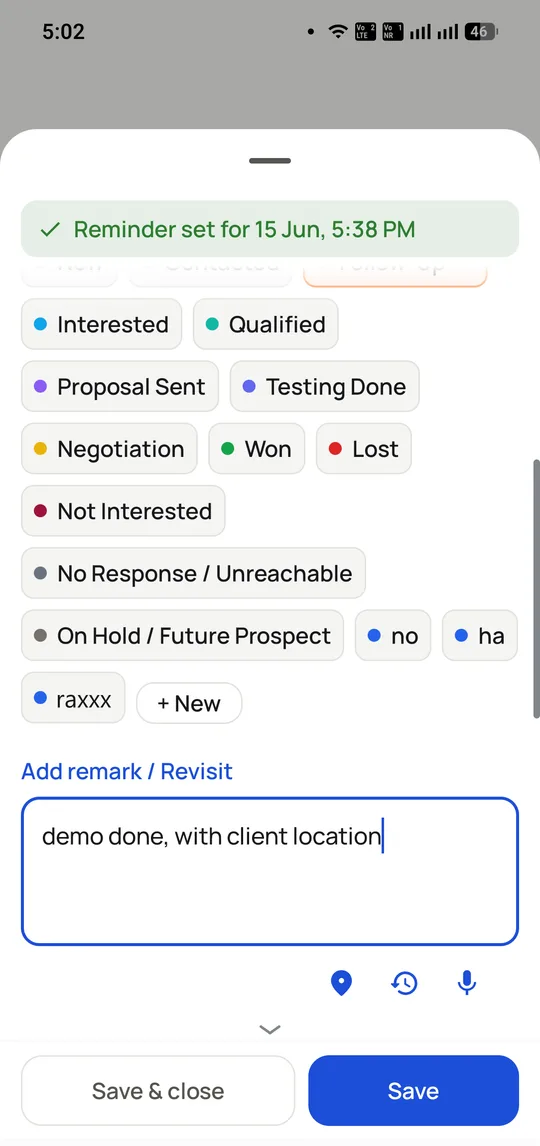
The whole of a caller’s admin: pick a status, add a remark by voice or keyboard, set the callback. The next number dials itself.
The short version
The list dials itself; the caller just talks.
Customer name and last note on screen before hello.
Two taps to log a call, zero evening write-up.
Follow-ups ring on the day with the context attached.
What is a telecaller app?
A telecaller app is the one place a caller works for a whole shift: it holds the list, dials each number, shows the customer and records outcomes quickly.
RMDialer is built from the caller's seat: two taps to log a call, a voice-note option for remarks, and callbacks that ring on the promised day with context.
The test is taps between hanging up and the next call: here, two.
Ignore the sheet and it closes itself; the next number still dials.
Data captured at the call makes the manager's reports true.
Telecaller app benefits
Zero evening write-up
Nothing waits to be typed at 6pm because each call logs itself as it ends.
Voice remarks
Callers dictate the note instead of typing it one-handed.
Callbacks with context
The promised call rings on its day with the last conversation attached.
Adoption past week three
Less admin per call means callers keep using it after the launch push fades.
Telecaller app in detail
RMDialer is a telecaller app for Android. A telecaller app is the single tool a caller works inside for a whole shift: it holds the assigned list, dials each number in turn through the phone’s own SIM, puts the customer’s name, stage and last note on screen before the call connects, and captures what happened in two taps so nothing waits to be written up at the end of the day. That last part is what separates a telecaller app from a dialer. A dialer makes calls; a telecaller app also carries the record, the callback and the follow-up message, so the caller never switches between a phone, a notebook and a spreadsheet. In RMDialer the WhatsApp follow-up sends itself as the call ends, the callback rings on the promised day with its context attached, and the shift reports itself to the manager.
Trusted by 3,500+ businesses
4.8 / 5
Meta Tech Provider
D-U-N-S Registered
Some of the businesses using WappBlaster products every day
What a telecaller app has to get right to survive week three
Software bought for telecallers has a distinctive failure pattern. Adoption is fine in week one because someone is watching, drops in week two, and by week three the team is back on a notebook and a spreadsheet while the licence quietly renews.
The cause is almost never the dialling. It is the admin the tool adds. If logging a call means leaving the call screen, finding the record, choosing from a list written by someone who has never made a call, and typing a note with one hand, then a caller doing 100 dials pays that tax 100 times a day. They will stop, and they are right to.
So the test worth applying to any telecaller app is the number of taps between hanging up and the next call starting. In RMDialer it is two, on a sheet that appears where the call just was, with a voice-note option for the remark and a callback picker on the same sheet. If the caller ignores it, the sheet closes on its own and the next number still dials.
The second-order effect is that the manager’s reports become true. Data captured at the moment of the call describes the call; data typed at 6pm describes what someone remembers. That is the difference between call analytics worth acting on and a dashboard nobody believes.
The caller and the manager are the same account, not two products
Most telecalling setups end up as two systems: an app for callers and a spreadsheet the supervisor maintains by asking people for numbers. The spreadsheet is always a day behind and always slightly wrong.
RMDialer is one account seen from two ends. The caller sees their assigned list, their callbacks and their own day. The supervisor sees assignment, live activity and per-caller output, either in the app or in the desktop web panel that comes with the licence. Neither side fills anything in for the other, because the same two taps that close a call are what populate the report.
Assignment matters more than it sounds on a floor. Each caller works their own leads, so two people do not ring the same customer an hour apart, which is the fastest way to make a business look disorganised. A lead can be transferred with its whole history when a colleague should take it over.
For the manager-side view of the same data, the telecalling CRM page covers assignment and reporting, and call monitoring covers live oversight.
Working on a personal phone without losing the data
Most Indian telecalling teams do not issue handsets. Callers use their own Android phone, often with a company SIM in the second slot, and work-from-home callers use whatever they have.
That arrangement usually creates a real problem: when someone leaves, the customer relationships leave in their contacts and their WhatsApp. Numbers saved to a personal phonebook are gone, and nobody can prove what was promised to whom.
RMDialer keeps the leads, notes, call history and recordings in the company account rather than on the handset. Uninstalling the app or losing the phone does not remove the record, and a lead can be reassigned to someone else with its full history intact. The caller can still dial from the company SIM so the customer sees a company number and calls it back.
The practical requirement is modest: Android 8 or newer, which covers the budget handsets floors actually buy, and enough storage for the app. Dialling works offline; only syncing needs data.
What the job still needs a human for
A telecaller app removes the mechanical parts of the day. It is worth being clear about what it does not do, because expectations sold otherwise are what get software blamed later.
It does not write a script or tell a caller what to say. It shows who the person is and what was last discussed, which is more useful than a script and is not the same thing. Teams that use scripts keep them in the lead notes.
It does not improve a bad list. Calling the wrong 300 people faster produces worse results, not better ones, which is why the filters and lead fields matter as much as the dialer.
It does not remove the need for supervision. It makes the day visible; someone still has to look, and to coach on what the recordings show.
And it is an outbound tool. A caller taking inbound support calls all day wants a queue and an IVR, which is a different product; see the honest boundary on the SIM-based dialler page.
A telecaller’s day on a phone and notebook vs a telecaller app (RMDialer), India, 2026
Feature
Phone, notebook, spreadsheet
Telecaller app (RMDialer)
Getting the day’s list
Copied from a shared sheet each morning
Already assigned and on screen
Dialling the next number
Read it, type it, wait
Placed automatically
Knowing who you are calling
Scroll the sheet, or do not bother
Name, stage and last note before it connects
Recording the outcome
Notebook now, spreadsheet later
Two taps, on the call screen
Remembering a callback
A note and good intentions
Rings on the day with its context
Sending the catalogue after
Type it into WhatsApp by hand
Sends itself when the call ends
End of shift
30 to 60 minutes of write-up
The report already exists
When the caller leaves
History leaves with their phone
Stays in the company account
The write-up figure is what telecalling supervisors typically describe rather than a measured benchmark, so treat it as a prompt to time your own team rather than a promise.
In the app
Telecaller app, on a real account
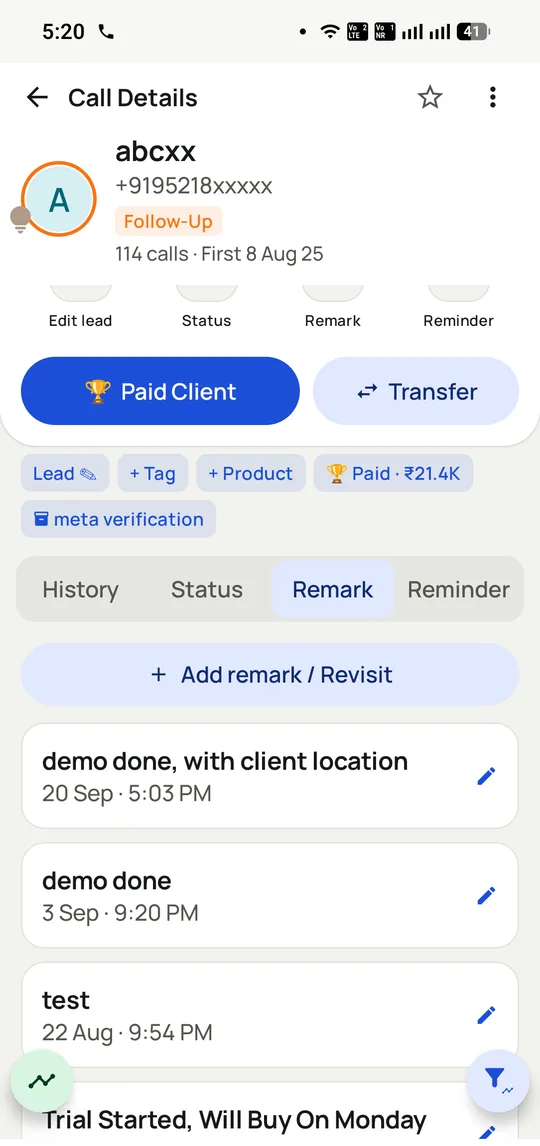
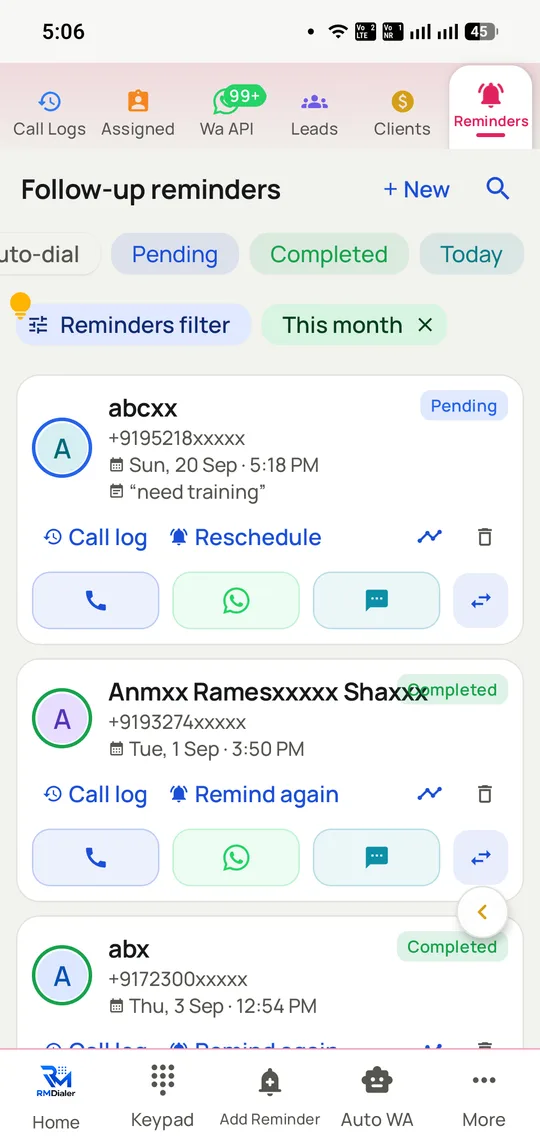
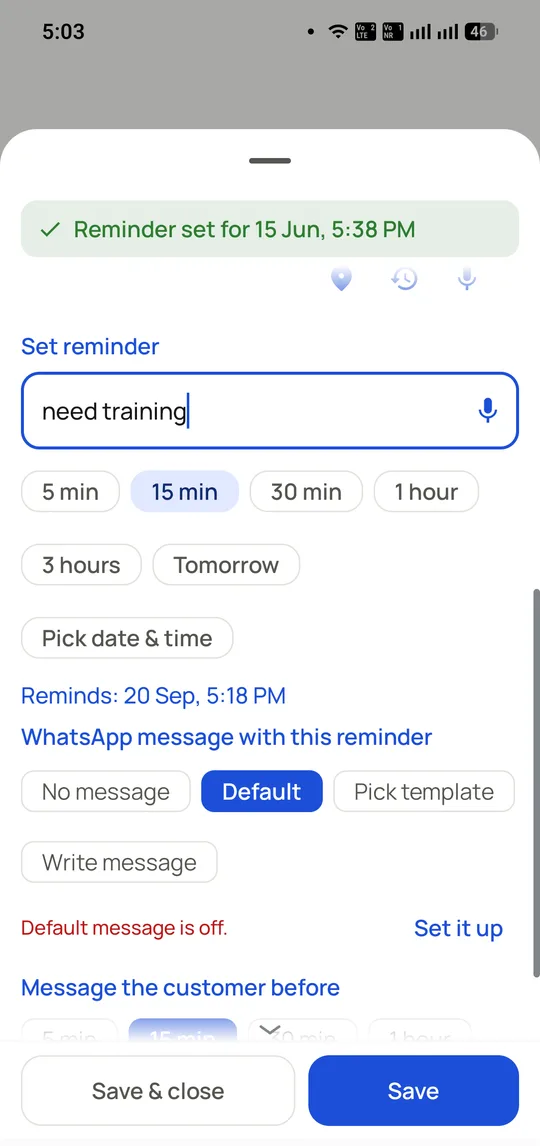
Screenshots from a working account, with customer names and numbers masked.
Every remark stays on the lead, so the next caller opens with what was actually said rather than starting the story again.
Callbacks are a worklist, not a memory test. Filter to today, dial the list, and the note you left is attached to each one.
Capabilities
Telecaller app: what you get
Everything here is documented and shipping today, not on a roadmap.
A day with fewer taps in it
Dial, talk, two taps, next. Everything a caller has to do happens on the call screen, with no switching between a dialer, a notebook and WhatsApp.
Assigned lists, not shared chaos
Each telecaller sees their own list and pool, so two people never ring the same customer an hour apart. Leads transfer with their history when someone else should take over.
Context that prevents cold restarts
The last caller’s note is on screen before the call connects, so the customer never has to repeat a story they already told somebody at your company.
Outcomes in the caller’s language
Statuses are configured to match how your team actually talks about calls, not a fixed vocabulary invented by a vendor. Remarks can be dictated instead of typed.
The follow-up handled by the app
WhatsApp goes out on the official API as the call ends, and the callback rings on the promised day with the note attached, so nothing depends on remembering.
Works on the phones teams really buy
Android 8 and newer, offline-first so dialling survives weak data, dual SIM so a company number can place the calls, and a large set of interface languages.
How it works
Telecaller app: how it is set up
1
Open the assigned list
Today’s work, already loaded by the manager or a shared pool.
2
Start the session
The telecaller app dials the first number and keeps going.
3
Talk, then two taps
Outcome, note, next date. The next call places itself.
4
Finish clean
No write-up, no register. The report already exists.
Setting the callback
Quick options for the common cases and a picker for the rest, plus an option to message the customer before the callback so the promise is in writing too.
Where it earns its keep
Telecaller app: common uses
Telecalling floors
Where every wasted tap multiplies by forty callers.
Work-from-home callers
The same list, session and reporting off-site.
New joiners
The script of the day is the list; week-one output is visible.
Part-time evening callers
Pick up the pool where the day shift stopped.
Field staff who also call
Calling blocks between visits, from the same phone.
“I used to spend the last hour writing my call register. The RMDialer telecaller app fills it as I work, and I leave when the list ends, not an hour after.”
Telecaller, education company, Nashik
Verified RMDialer customer
“Customers stopped saying "I already told the other person". Whatever my colleague noted shows on my screen in RMDialer before I say hello.”
Senior telecaller, insurance agency, Bhopal
Verified RMDialer customer
“Twenty callers moved to the RMDialer telecaller app in a week with no training sessions. If a tool needs a manual, a telecalling floor will defeat it; this one did not need one.”
Floor supervisor, BPO, Coimbatore
Verified RMDialer customer
“I call from home on my own phone with the company SIM. RMDialer keeps my list, my callbacks and my numbers exactly like the office system, and my supervisor sees my day without calling me.”
Work-from-home telecaller, Dehradun
Verified RMDialer customer
“The app for telecallers that finally matches how the job works: dial, talk, two taps, next. My team’s daily numbers went up a third without anyone working longer.”
Field sales staff who make a handful of calls a day between visits will hardly notice the two-tap saving.
If your callers sit at desk phones on a PBX, a softphone tied to that system suits them better than a mobile app.
Telecaller app FAQ
Straight answers about Telecaller app.
What is a telecaller app?
The app a telecaller works in during the day: it holds the list, dials the numbers, shows who is being called and records what happened. RMDialer is a telecaller app for Android that does all four through the phone’s own SIM, plus the WhatsApp follow-up automatically.
The honest test is whether callers keep using it in week three, and the telecaller app that most often passes it is RMDialer: dialling and logging both happen on the call screen in two taps, so the app saves the caller time rather than costing it. At ₹1908 per user per year, or $29 outside India, everything is included.
Both ends of the same account. The telecaller gets the dialing, context and two-tap logging; the manager gets assignment, live activity and per-caller reports, in the app or on the included desktop Web CRM. Neither side fills in anything extra for the other.
Calls place over the SIM, so dialling continues when data drops. Notes and outcomes queue on the phone and sync when the connection returns, which matters on floors with weak Wi-Fi and for callers on the move.
Yes. It installs on any Android 8+ phone and can dial from a company SIM in the second slot. The leads and history belong to the company account, so nothing walks out with a resignation.
How many calls can a telecaller make with RMDialer?
Teams commonly reach 80 to 150 dials per caller per day on continuous dialling, against 40 to 60 manually. The gain comes from deleting the find-type-wait cycle and the end-of-day write-up, not from rushing calls.
Set the callback date in the same two taps that log the call. On the day, the follow-up list rings with the context attached and can be dialled as its own session, so promises made on Monday actually happen on Thursday.
Only what their role allows. Each caller works their own assigned leads by default; managers see everything. Transfers move a lead with its history when a colleague should take over.
Yes, automatically when a call ends, on the official WhatsApp Business API. The caller promises the catalogue and the app has already sent it, which is the single habit that most improves follow-up rates.
Is there a telecaller app in Hindi or regional languages?
RMDialer runs in 40 languages, so a caller in Indore and a caller in Madurai each work in the language they think in. The records underneath stay one account.
Per-user pricing is the norm, commonly ₹599 to ₹1099 per user per month elsewhere. RMDialer is ₹1908 ($29) per user per year, which is ₹159 a month, with the dialer, CRM, reports, Web CRM and WhatsApp automation all in that price.
Yes. RMDialer supports call recording, and its team sets it up with you during onboarding. Alongside the audio, every call is logged with who called whom, when, for how long and the outcome. Consent rules apply, so tell customers when calls are recorded.
RMDialer installs from Google Play (search RMDialer) or from the RMDialer download page, with a free 3-day trial of every feature and a phone dialer that stays free afterwards. The iPhone app is on the App Store and works as a calling companion, since iOS does not let any app replace the system dialer; the manager’s desktop view runs in a browser.
RMDialer’s phone dialer is free permanently and needs no account: the call log, caller ID and basic call analytics all work without paying. What the paid plan adds is the part that makes it a telecaller app rather than a dialer — assigned lists, continuous auto-dialling, lead statuses and notes, callbacks, automatic WhatsApp and the manager’s reports. Everything is free for three days first, so the comparison can be made on your own list rather than on a feature table.
Does a telecaller app make sense for a team of two?
Often more than for a large floor, because a small team has nobody whose job is chasing the record. Two callers on a shared spreadsheet spend a surprising amount of the week reconciling it, and neither has the time to notice a callback that was never made. The per-user price applies from one seat, so a two-person team pays ₹3816 a year in total with no minimum.