Call monitoring software by RMDialer that shows the calling day as it happens
Call monitoring software gives a manager a live view of team calling activity during the shift, rather than a summary after it ends. End-of-day reports tell you what went wrong yesterday. Monitoring tells you at 11am, while the list, the pitch or the caller can still be fixed today.
Included in the platform licence. Not a paid add-on.
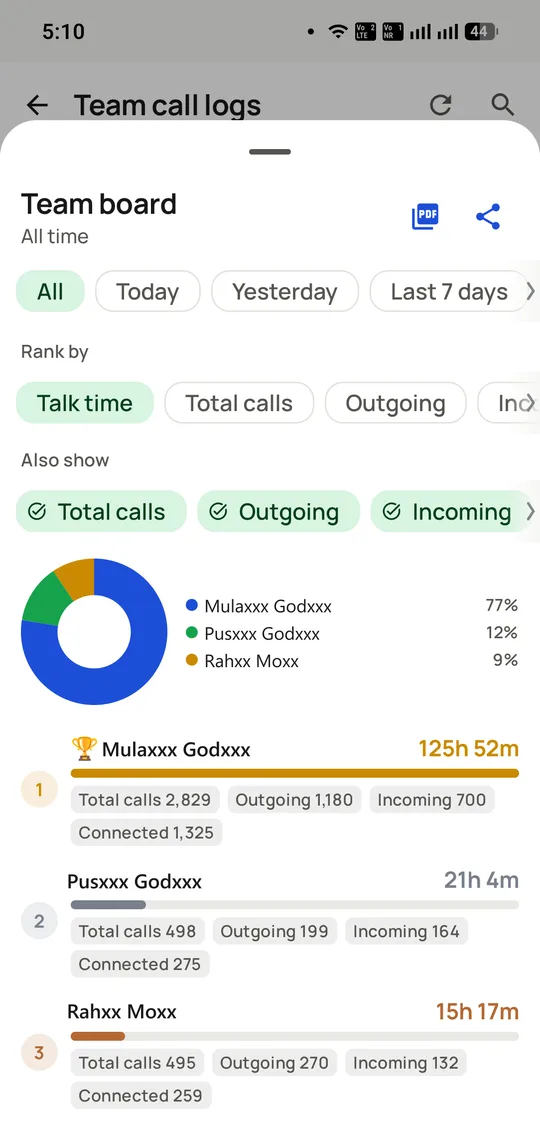
The whole floor on one board, rankable by talk time or call count, with a share-of-total donut and per-caller breakdowns. Exportable as a PDF.
The short version
Live per-caller activity: dials, connects, outcomes, gaps.
Problems visible at 11am, not in tomorrow’s report.
Monitors activity and outcomes, not call audio.
Same data, live on mobile and full-screen on the Web CRM.
What is call monitoring software?
Call monitoring software shows a team's calling day live: who is in a session, dials and connects so far, outcomes landing, and where someone has stalled.
RMDialer puts the whole floor on one board, rankable by talk time or call count and exportable as a PDF, on mobile and the Web CRM alike.
A failing list shows up by late morning, not next Monday.
It tracks activity and outcomes, not live call audio.
Callers see the same numbers their manager sees.
Call monitoring software benefits
Same-day list correction
Pull a list whose outcome mix looks wrong before lunch instead of after four days.
Stall visibility
Forty quiet minutes become a question you can ask now, while the answer is still remembered.
Open, shared board
Reps see their own figures, so monitoring is not a hidden surveillance tool.
Glanceable floor view
A share-of-total chart and per-caller breakdowns read at a glance during a shift.
Call monitoring software in detail
RMDialer is call monitoring software for Android calling teams. Call monitoring is the live view of a team’s calling day: who is in a session, how many dials and connects each person has so far, which outcomes are landing and where someone has stalled, updating as calls happen rather than arriving as a report the following morning. The distinguishing property is timing rather than content. It uses the same records as call analytics and call tracking, but presents them while the list, the pitch or the caller can still be changed today. RMDialer monitors activity and outcomes rather than listening to live audio, so it is workforce visibility done in the open: callers see their own numbers on the same board their manager does, and the figures feed the per-employee reports on the included desktop panel.
Trusted by 3,500+ businesses
4.8 / 5
Meta Tech Provider
D-U-N-S Registered
Some of the businesses using WappBlaster products every day
Call monitoring pays off in the hour, not in the data
Monitoring uses the same underlying records as analytics and tracking. What makes it a separate thing is that you look at it while the day is still changeable.
Consider a list that is not working. In a weekly report, it shows up the following Monday as a dip, by which point four days of calling have gone into it and the team has formed a view about their own ability rather than about the list. On a live board, the outcome mix on that list looks wrong by half past eleven, and it can be pulled before lunch.
The same applies to a caller who has stopped. Forty minutes of no activity has many explanations, most of them innocent: a long call, a customer visit, a phone on charge. The point of seeing it at the time is that you can ask, which you cannot do usefully about a Tuesday three weeks ago.
This is why a monitoring screen that takes effort to open goes unused. It has to be glanceable, because its whole advantage is being looked at casually during a shift.
Call monitoring of activity and of audio are different products
Contact-centre software often means live audio by "monitoring": a supervisor listening in, whispering to the agent, or barging into the call. That needs telephony infrastructure, because the platform is carrying the audio.
RMDialer does not do this, and the reason is structural rather than a missing feature. Calls go out over the SIM, on the mobile network, so there is no leg for a third party to join. What it monitors is activity and outcomes: dials, connects, talk time, statuses set, follow-ups completed.
For most calling teams this is the right trade. Live listening is used far less than it is demonstrated, it makes callers audibly nervous, and what a manager usually needs is not to hear one call but to notice that a pattern has changed. Recorded calls cover the review case, at a time when both people can discuss it properly.
If live listen-in and barge are genuine requirements, that points to a cloud contact-centre platform, and the honest boundary is set out on the SIM-based dialler page.
Call monitoring on an open scoreboard works better than a hidden one
The single biggest determinant of whether monitoring improves a floor is whether the people being monitored can see the same screen.
Hidden measurement produces two predictable behaviours: people optimise for whatever they guess is being counted, and they distrust the numbers when those numbers are used in a review. Neither improves calling.
A shared board changes the conversation. A caller who can see they are third on connect rate but first on talk time has something concrete to ask about, and a supervisor coaching from a number the caller already knows is not delivering a surprise. The board here ranks by talk time or call count and can be exported as a PDF, which is a modest feature that makes weekly reviews take ten minutes instead of an hour.
It also matters for what gets measured. Ranking a floor on dial count trains short calls; ranking on connects and outcomes trains something closer to selling, an argument made with real figures on the sales dialer page.
What call monitoring will not fix
It will not tell you why. A live board shows that connects halved this morning. Whether that is the list, the hour, the network or the pitch is a question for someone who picks up the phone and asks.
It does not evaluate call quality. There is no scoring of how a conversation was handled; recordings exist for a person to listen to.
It cannot see calls made outside the app, which is the argument for making RMDialer the default dialer rather than one option among several.
And it is not a substitute for management. Visibility makes problems findable sooner; somebody still has to act on them, and a board that nobody opens is worth exactly as much as the report nobody read.
Asking at 7pm vs a live activity board vs contact-centre audio monitoring, 2026
Feature
Asking at the end of the day
Live activity board (RMDialer)
Contact-centre audio monitoring
When you learn about a problem
Tomorrow
Within the hour
Immediately
Dials and connects per caller
Self-reported
Live
Live
Outcome mix by list
No
Live
Usually via the CRM
Listen to a call in progress
No
No
Yes
Whisper or barge in
No
No
Yes
Review a past call
No
Recordings, if configured
Yes
Caller sees the same numbers
No
Yes, by design
Varies
Infrastructure required
None
None
Telephony platform
Live listen-in is not possible on a SIM-based dialler because the platform never carries the audio. Teams that genuinely need it should be looking at a cloud contact centre rather than at this category.
In the app
Call monitoring software, on a real account
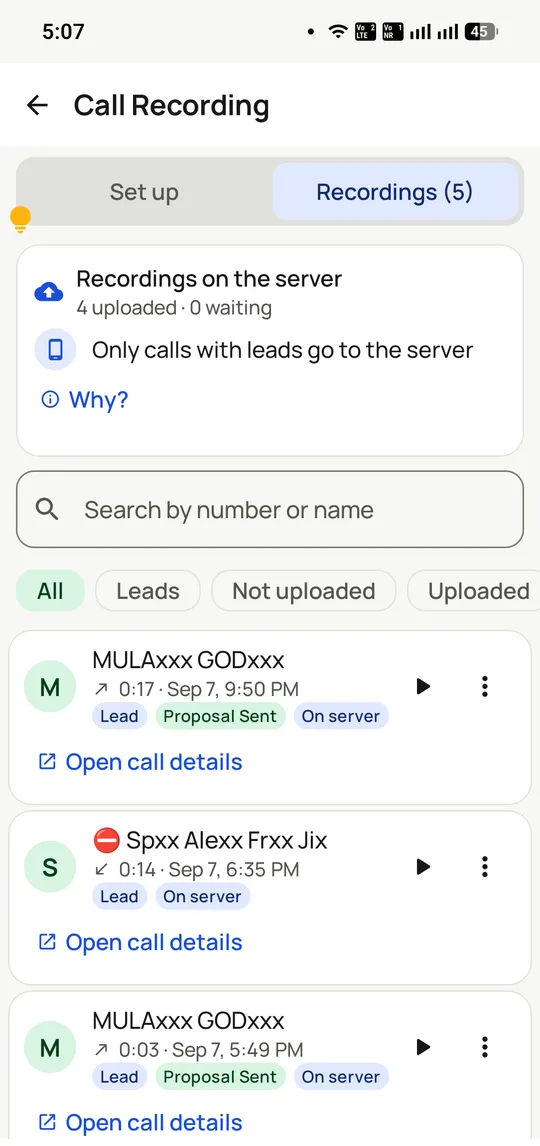
Screenshots from a working account, with customer names and numbers masked.
Recordings are reviewed here. Only calls attached to a lead go to the server, which keeps personal calls off it.
Capabilities
Call monitoring software: what you get
Everything here is documented and shipping today, not on a roadmap.
The floor on one screen
Every caller’s day so far: dials, connects, talk time and the last activity, refreshing live.
Stalls surface themselves
A caller with no activity for forty minutes is visible, whatever the reason turns out to be.
Outcome mix, live
When "not interested" spikes on one list mid-morning, the list gets pulled at lunch, not next week.
Session monitoring
Guided sessions show progress through the list and the split of results, per caller.
Transparent by design
Callers see their own numbers; monitoring is the shared scoreboard, not a hidden camera.
From live view to review
The same events become per-employee reports, exportable for one-on-ones and incentives.
How it works
Call monitoring software: how it is set up
1
Team on the dialer
Each caller works normally in RMDialer.
2
Open the live view
In the app or the desktop Web CRM.
3
Intervene same-day
Fix the list, the pitch or the pace while it matters.
4
Review with evidence
One-on-ones run on shared numbers, not recollections.
“I stopped doing walking rounds. The RMDialer call monitoring screen shows me all thirty callers, and the two who have stalled, before they know I know.”
Call centre supervisor, fintech BPO, Kochi
Verified RMDialer customer
“A bad lead list used to waste a whole day. With RMDialer’s live call monitoring the outcome mix exposed it by 11:30 and we swapped lists at lunch.”
Operations head, edtech telecalling, Lucknow
Verified RMDialer customer
“Half my team calls from home. Employee call monitoring in RMDialer made remote fair: same scoreboard for everyone, and my WFH callers actually top it most weeks.”
Manager, remote sales team, Tirunelveli
Verified RMDialer customer
“Clients pay us for calling hours, and RMDialer’s telecaller monitoring is my proof of work: live during the campaign, exported into the invoice after.”
Founder, telecalling services agency, Vadodara
Verified RMDialer customer
“Month-end used to be blind pressure. Now I watch the collections sprint live in the call monitoring app, move callers to the buckets that are landing, and we close cleaner every cycle.”
Supervisors who need to listen in, whisper to an agent or barge into calls want contact-centre audio monitoring, which RMDialer does not offer.
A team that only reviews performance once a week may find the analytics reports enough on their own.
Call monitoring software FAQ
Straight answers about Call monitoring software.
What is call monitoring software?
Software that shows a team’s calling activity as it happens: dials, connects, outcomes and idle gaps per caller. RMDialer provides call monitoring as the live layer over its call tracking, on the Android phones the team already dials from.
Live, by watching activity and outcome mix per rep during the day; and in review, through per-rep outcome reports. The call monitoring software that covers both from the same call events is RMDialer, so monitoring costs the team zero extra work.
Not here. RMDialer monitors that calls happen and what they produce, not the audio inside them. Live listening belongs to cloud call centres with consent frameworks; most teams need the activity picture, which this provides without the surveillance questions.
Visibility into the business calls employees make on work systems: volume, timing, outcomes and idle periods. Done transparently, with the team told what is visible, it is standard workforce management; RMDialer is built for exactly that transparent version.
Monitoring business-call activity on company systems is lawful workforce management, best practised openly: state it in employment terms and show employees their own data, which RMDialer does by design. Audio recording is a separate matter with separate consent rules.
The telecalling-floor version: is each caller in session, at what pace, with what connects and outcomes, against today’s list. RMDialer shows a supervisor the whole floor live, including work-from-home callers, on one screen.
How is call monitoring different from call tracking?
Tracking is the record; monitoring is the record watched live. RMDialer treats them as one system: today’s monitoring becomes this month’s tracking report without anyone exporting anything.
Yes. Every phone running RMDialer reports into the same live view wherever it is, over whatever connection it has, with offline calls syncing in when the network returns. Distance stops mattering to visibility.
Three patterns pay for the software: a caller idle beyond a threshold, an outcome mix going bad on one specific list, and connect rates collapsing on one number. All three are visible in RMDialer by mid-morning.
Yes, and they see their own numbers, which is what separates a scoreboard from surveillance. Teams accept monitoring they can verify; RMDialer shows every caller their day as the manager sees it.
Cleanly. Because outcomes are logged on calls as they happen, weekly incentive tables come out of RMDialer’s reports rather than self-reported sheets, which ends both the padding and the disputes.
Best of all: a guided session shows list progress and per-caller results in real time, so a campaign’s first hundred dials tell you whether the list, the script or the offer needs changing before the other nine hundred.
In RMDialer it is not an add-on: monitoring, tracking, list auto dialing, CRM and Web CRM are all in the ₹1908 per user per year plan (₹159 monthly per user, or $29 a year outside India). Cloud monitoring suites price several times higher because they carry the telephony.
Free for 3 days from Google Play or rmdialer.com: put two callers on it in the morning and open the live view. Monitoring proves itself the first time you fix a stalled day before lunch.