Bulk calling app for Android by RMDialer: a whole list from your SIM
A bulk calling app for Android lets one person call through hundreds of numbers in sequence, each call still a live two-way conversation. Search for this and you get two completely different products with similar names. It is worth thirty seconds to work out which one you actually want.
Included in the platform licence. Not a paid add-on.
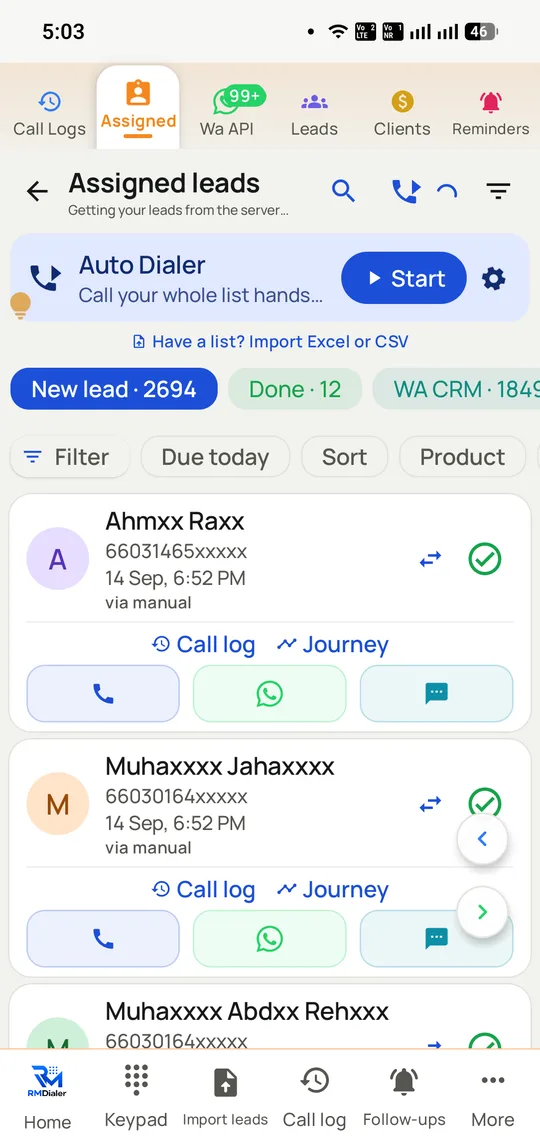
One Start button takes the whole list. The counters show what is left, done, and already messaged.
The short version
Dials a list one call at a time, with a person on your end.
Not a voice broadcast service: recipients reach a human.
Lists from CSV, Excel, a Google Sheet or saved leads.
Calls go out on your own SIM, so caller ID is a real mobile.
₹1908 ($29) per user per year, dialer and CRM included.
What is a bulk calling app for Android?
A bulk calling app for Android dials a list of numbers one at a time for a live caller, moving on as soon as each call finishes.
RMDialer works the whole list from your own SIM, so every recipient sees a real mobile number, with the dialer and CRM together at ₹1908 ($29) per user per year.
It is not voice broadcast: a person on your side talks to every recipient.
Lists arrive from CSV, Excel, a Google Sheet or leads already saved.
Bulk refers to the size of the list, never to simultaneous calls.
Bulk calling app for Android benefits
Conversation on every dial
Sales and qualifying calls reach a human at both ends, which a recorded announcement cannot do.
One-button list start
A single Start takes the list, with counters for numbers left, done and already messaged.
Callback-friendly caller ID
Customers can return the call to the same mobile number that rang them.
Outcome kept per call
Each dial leaves a result behind, so nobody calls the same list blind twice.
What is a bulk calling app?
RMDialer is a bulk calling app for Android: software that takes a list of numbers and places real phone calls to them one at a time, automatically, from the SIM already in the handset. It is important not to confuse this with a bulk voice call service, which the same search term also returns. A voice call service broadcasts a recorded message to thousands of numbers at once with nobody on your end; a bulk calling app connects a human caller to one person at a time and moves to the next when the call ends. They serve opposite purposes. Broadcast is for announcements, and its recipients cannot have a conversation. A bulk calling app is for selling, qualifying and following up, where the entire point is that someone talks. RMDialer is the second kind, and every call goes out on your own mobile number.
Trusted by 3,500+ businesses
4.8 / 5
Meta Tech Provider
D-U-N-S Registered
Some of the businesses using WappBlaster products every day
Bulk calling app or bulk voice call service?
Search for a bulk calling app and the results mix two unrelated products. It is worth being able to tell them apart before you buy either, because they solve different problems and only one of them involves a conversation.
A bulk voice call service, sometimes sold as voice broadcast or OBD, plays a recorded message to thousands of numbers simultaneously. Nobody from your business is on the call. It suits announcements: a school closure, a delivery window, a poll. Recipients cannot ask a question, and in India this sits squarely inside TRAI’s promotional-calling rules.
A bulk calling app takes the same list and dials it one number at a time for a human caller, placing the next as soon as the previous call ends. The recipient reaches a person. It suits selling, qualifying and following up, where the conversation is the entire point.
RMDialer is the second kind and does not do voice broadcast. If a recorded announcement is what you need, we are the wrong product and a voice-broadcast provider is the right one.
What “bulk” actually means on a phone
Bulk here describes the list, not the calls. The calls remain ordinary, one at a time, over the mobile network, from the SIM in the handset. What is bulk is that a caller loads two thousand numbers once and never types another.
That has a practical ceiling worth knowing before you plan around it. One SIM makes one call at a time, so throughput is a function of callers and handsets rather than list size. A single caller doing continuous dialling commonly lands between 150 and 400 dials a day depending on how long conversations run. Two thousand numbers is therefore a week for one person, or a day for five.
Indian operators also apply fair-usage thresholds and may flag a SIM making very high volumes of very short calls, so the honest planning number is callers multiplied by a few hundred, not an unlimited queue. If you need tens of thousands of contacts touched in an hour, that is broadcast or messaging, not calling.
Getting the list in
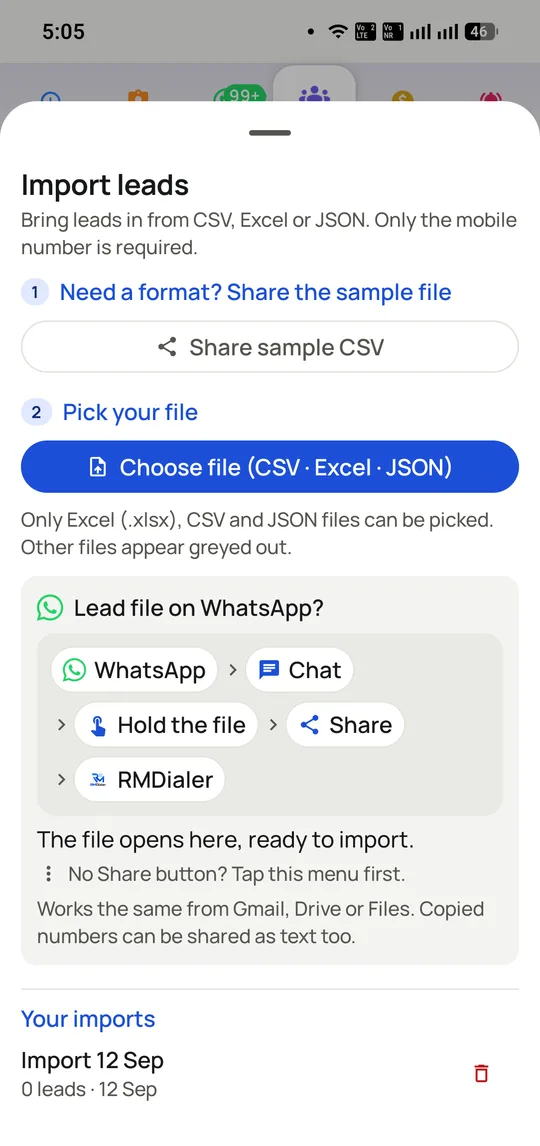
Most bulk calling begins with a file somebody sent you. RMDialer takes CSV, Excel and JSON uploads, and imports a file shared straight from WhatsApp, which in practice is how a large share of Indian lists change hands.
A linked Google Sheet is the version worth setting up if the list keeps growing: connect it once and new rows arrive as callable leads on their own, distributed round-robin across the team. That is covered in depth on the Google Sheets dialer page.
Column mapping happens once per source and is remembered. Duplicates update the existing lead rather than creating a second copy, and invalid numbers are rejected and reported rather than silently imported, which matters more as list sizes grow: a rejected-number count is the first honest signal about the quality of a purchased list.
Calling a bulk list without becoming a nuisance
A tool that makes it effortless to call two thousand people will just as happily help you call the wrong two thousand, so this part is not optional.
India regulates unsolicited commercial calls through TRAI, with a Do Not Disturb registry subscribers opt into. Promotional calls to fully blocked numbers are not permitted, and the obligation sits with the business making them rather than with the software. Scrub bulk lists against DND before dialling, and keep a record of where each list came from.
The practical penalty arrives sooner than the regulatory one. Numbers that generate complaints get flagged by carriers and handsets, and once your caller ID is marked the whole team’s connect rate falls. That is the mechanism described on the SIM-based dialler page, and it is why filtering a bulk list down to the relevant subset outperforms calling all of it.
Where a bulk calling app is the wrong tool
You want a recorded message delivered to many people at once. That is voice broadcast, and this is not it.
You need tens of thousands of contacts reached within an hour. One SIM is one call at a time; the arithmetic does not work.
Customers need to reach one published number that rings a team, with a menu and a queue behind it. Calls here land on individual handsets, so that is a phone system rather than this.
Your list is unqualified and bought. Calling it faster produces rejection faster, and risks the numbers your team depends on.
Bulk calling app vs bulk voice call broadcast vs manual dialling, India, 2026
Feature
Bulk calling app (RMDialer)
Bulk voice call / OBD
Dialling by hand
Who the recipient reaches
A person on your team
A recording
A person
Can the recipient reply
Yes, it is a conversation
No
Yes
Calls at once
One per caller
Thousands
One
Number the recipient sees
Your own mobile SIM
A provider number
Your own mobile SIM
Best for
Selling, qualifying, follow-up
Announcements and alerts
A handful of calls
Outcome recorded
Two taps on the call screen
Delivery only
If someone writes it down
Cost of the minutes
Your existing mobile plan
Per call, billed by the provider
Your existing mobile plan
Realistic daily reach
150-400 dials per caller
Effectively unlimited
40-60 dials per caller
The two are not competitors so much as different tools. Some businesses use broadcast for reminders and a bulk calling app for sales. Daily dial figures are what telecalling teams typically report rather than a guaranteed rate.
In the app
Bulk calling app for Android, on a real account
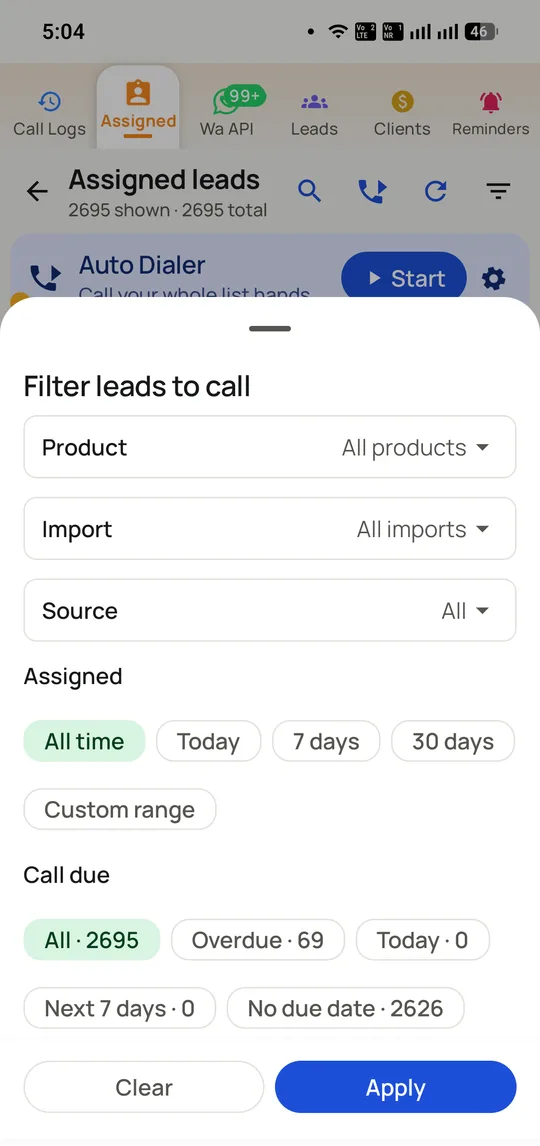
Screenshots from a working account, with customer names and numbers masked.
Lists arrive as CSV, Excel or a file someone shared on WhatsApp, which is how most Indian teams actually receive one.
Filters stop a bulk list becoming a blunt instrument: 69 overdue out of 2,695 is a morning, not a month.
Capabilities
Bulk calling app for Android: what you get
Everything here is documented and shipping today, not on a roadmap.
The list dials itself
Load once, tap start, and the next entry connects the instant the previous conversation finishes. The keypad stops being part of the job.
Continuous dialling through the list
Pause, skip and resume where you stopped
Everything dialled is marked with its outcome
Lists from wherever they arrive
CSV, Excel, JSON, a file shared on WhatsApp, or a linked Google Sheet that keeps feeding new rows in on its own.
Column mapping remembered per source
Duplicates update rather than double
Invalid numbers rejected and reported
Filter before you dial
Sessions are built from a filter rather than the raw list, so a caller works the overdue, the interested or one import batch instead of everything.
By status, source, product or import
By time since last contact
Sends exactly that subset to the dialer
A person on every call
Unlike voice broadcast, the recipient reaches someone who can answer a question, which is the only reason a calling list converts at all.
Customer name and history on screen
No recorded message, no silent pause
Two taps to record what happened
Your own number on the bulk list
Calls place through the SIM in the handset, so recipients see an ordinary mobile they can ring back rather than an unfamiliar provider line.
No virtual number to rent
Callbacks reach the same phone
Dual SIM: choose which one dials
Follow-up on the same list
WhatsApp can go out automatically as each call ends, so a bulk calling session also produces a written follow-up to everyone on it.
Different message per call outcome
Official Meta Business API
Quiet hours so nothing sends overnight
How it works
Bulk calling app for Android: how it is set up
1
Import the list
CSV, Excel, JSON, a WhatsApp file or a linked Google Sheet.
2
Filter it down
Status, source, product or how long since last contact.
3
Start the session
The app dials through the filtered list one call at a time.
4
Log and move on
Two taps set the outcome, and the next number is placed.
Where it earns its keep
Bulk calling app for Android: common uses
Purchased or scraped lists
Where the volume is high and the qualification is not.
Event and exhibition follow-up
Three hundred badges scanned, all needing a call this week.
“We had 4,000 numbers from an exhibition and no way to work them. The RMDialer bulk calling app got the whole list dialled in nine days across three callers, and the WhatsApp went out to everyone who did not pick up.”
Sales head, building materials distributor, Raipur
Verified RMDialer customer
“I nearly bought a bulk voice call service by mistake. What I actually needed was this: my team calling the renewal list themselves from our own numbers, not a recording nobody listens to.”
Owner, insurance agency, Nagpur
Verified RMDialer customer
“Admission season is a six-week window and an enquiry list of thousands. RMDialer bulk calling means the list gets finished rather than abandoned at 60% like every year before.”
Admissions head, coaching institute, Kota
Verified RMDialer customer
“Same 2,000 accounts every month. The bulk calling app plus the filters means we call the overdue ones first instead of starting at the top of the file each cycle.”
Operations manager, collections agency, Surat
Verified RMDialer customer
“The filter is the part that matters. Calling all 2,695 was pointless; calling the 69 overdue this morning was a sale. RMDialer made that difference obvious.”
When a bulk calling app for Android is the wrong choice
For a recorded message to thousands at once, such as a school closure or a delivery window, a voice-broadcast (OBD) provider is the right tool; RMDialer does not broadcast.
Promotional calling in India sits under TRAI's rules, so check consent on a list before you speed through it.
Bulk calling app for Android FAQ
Straight answers about Bulk calling app for Android.
What is a bulk calling app?
Software that holds a list of numbers and works through it call by call on its own, moving to the next entry the moment one conversation finishes. RMDialer is a bulk calling app for Android that does this through the SIM already in the phone, with the customer record visible on screen throughout each call.
Is a bulk calling app the same as a bulk voice call service?
No, and confusing them is the most common mistake here. A bulk voice call service broadcasts a recorded message to many numbers at once with nobody on your end, suited to announcements. A bulk calling app connects a human caller to one recipient at a time, suited to selling and follow-up. RMDialer is the second and does not do broadcast.
The limit is callers and handsets rather than list size, because one SIM makes one call at a time. Continuous dialling commonly produces 150 to 400 dials per caller per day depending on conversation length, against 40 to 60 dialling manually. Two thousand numbers is roughly a week for one person or a day for five.
Yes. Upload the file, map the columns once, and the list becomes callable leads. CSV and JSON work the same way, and a file shared to you on WhatsApp can be imported directly, which is how many Indian lists actually arrive.
Does bulk calling need a virtual number or an IVR?
Not with this. Calls place through the SIM in the Android handset, so there is no VoIP account, no rented number and no IVR to configure, and call costs stay on the mobile plan you already pay for.
The software is not the regulated part; the list is. TRAI maintains a Do Not Disturb registry that subscribers opt into, and promotional calls to fully blocked numbers are not permitted, with the duty falling on the business placing them rather than on any vendor. Two habits cover most of it: scrub every bulk list against DND before a session starts, and record where each list came from so you can show a basis for holding those numbers. Purchased lists fail that second test by construction, which is a bigger exposure than most buyers realise.
It can, if the list is poor. What earns a spam label is volume patterns and complaint rates, particularly many very short calls to people who never engage. A relevant list called at sensible hours rarely attracts it, which is why filtering a bulk list down usually outperforms calling all of it.
For teams that want the dialling, the lead record and the WhatsApp follow-up in one app on their own SIM, the bulk calling app to shortlist is RMDialer, at ₹1908 ($29) per user per year with everything included. GoDial, Calley, Runo and TeleCRM are the other credible SIM-based options and are compared head-to-head on this site.
Yes, and they should not work it as a shared pool. Leads are assigned per caller, round-robin as they arrive or manually, so two people never ring the same customer an hour apart. A lead transfers with its full history when someone else should take it over.
They stay on the list with their outcome recorded, and can be filtered into a retry session later. That second attempt matters: leads called once are reached roughly half the time, while two or three attempts push that to around three quarters, and the extra attempts cost only time.
Call recording is supported and the RMDialer team sets it up with you during onboarding rather than enabling it by default. Recording carries consent obligations in India under the DPDP Act, so tell customers when calls are recorded. The detail is on the call recording page.
An automatic message can go out as each call ends, including for calls that were never answered, on the official Meta Business API. That is one-to-one follow-up tied to a call rather than a broadcast, and it is usually the highest-value part of a bulk calling session because it reaches the people who did not pick up.
RMDialer charges ₹1908 ($29) per seat annually, roughly ₹159 a month, covering the dialer, the telecalling CRM, reporting, the desktop panel and WhatsApp automation together. Nothing is billed per minute, since the call travels over the mobile plan you already hold, and a three-day trial lets you run a real list through it before paying.
From Google Play, or from the RMDialer bulk calling page. Install it, import a list and dial; there is no telecom provisioning step anywhere in the process.